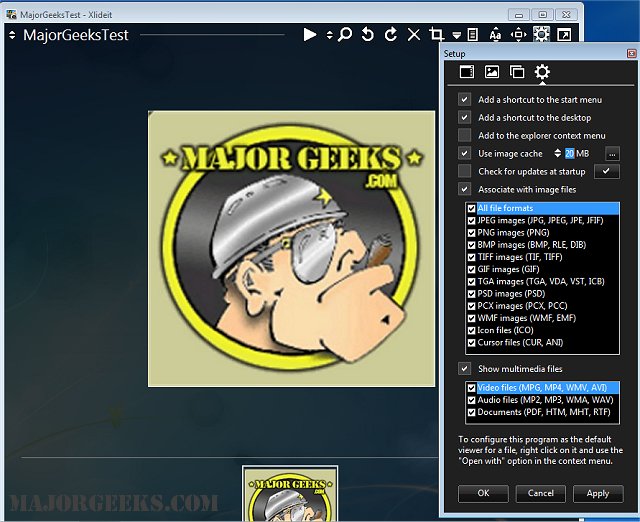
Xlideit Image Viewer has released version 1.0.260712, enhancing its reputation as a lightweight tool designed for basic image processing. The application features a user-friendly interface with a thumbnail bar located at the bottom of the window, displaying all images in the selected folder. The current image name and a toolbar are positioned at the top, allowing users to perform essential actions such as starting a slideshow, adjusting zoom levels, rotating, deleting, cropping, and resizing images. Users can sort the image list and access program settings conveniently.
Navigating through images is intuitive; users can move their mouse to the left or right edges of the window to display arrows for selecting the next or previous image. Hovering over various buttons provides tooltips, while thumbnails reveal additional information about each image. The viewer defaults to full-screen mode for an immersive experience, but pressing F11 toggles between full-screen and windowed modes. Shortcut keys enhance usability, such as using Enter to toggle toolbars, Space to initiate a slideshow, and Escape to exit the program. To set Xlideit as the default image viewer, users can right-click an image file and select it from the "Open with" context menu.
Overall, Xlideit Image Viewer combines simplicity and functionality, making it an appealing choice for users seeking an efficient way to view and process images. Future updates could include enhanced editing features, support for additional file formats, or advanced sorting and filtering options to enrich user experience further
Navigating through images is intuitive; users can move their mouse to the left or right edges of the window to display arrows for selecting the next or previous image. Hovering over various buttons provides tooltips, while thumbnails reveal additional information about each image. The viewer defaults to full-screen mode for an immersive experience, but pressing F11 toggles between full-screen and windowed modes. Shortcut keys enhance usability, such as using Enter to toggle toolbars, Space to initiate a slideshow, and Escape to exit the program. To set Xlideit as the default image viewer, users can right-click an image file and select it from the "Open with" context menu.
Overall, Xlideit Image Viewer combines simplicity and functionality, making it an appealing choice for users seeking an efficient way to view and process images. Future updates could include enhanced editing features, support for additional file formats, or advanced sorting and filtering options to enrich user experience further
Xlideit Image Viewer 1.0.260712 released
Xlideit Image Viewer is a lightweight image viewer that provides you with basic image processing capabilities.