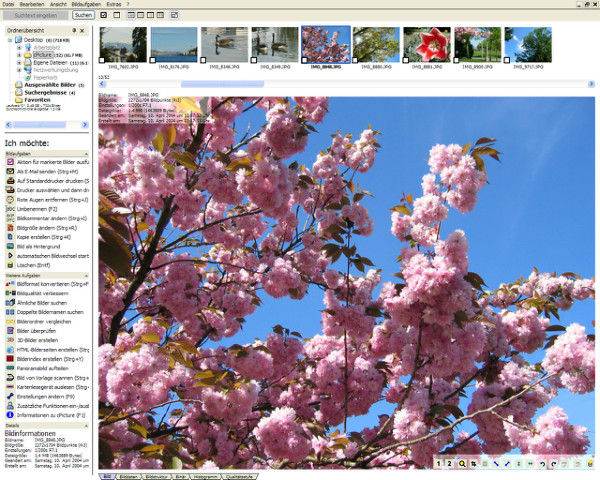
cPicture LE 4.14 has been released as a comprehensive software solution designed to enhance your digital photography workflow. This user-friendly application does not require a database or installation, making it accessible for users who prefer a straightforward setup. It operates independently of other picture or RAW libraries, ensuring that it does not conflict with any existing software.
cPicture is renowned for its capability to perform lossless cropping of JPEG images. It also features universal index prints for easy review, quick searching, the ability to add comments, and simple browsing through your photo collection. Users can even enjoy watching movies in a 16:9 aspect ratio directly within the application. To begin using cPicture, simply copy the latest version of the application onto your device.
In addition to its primary features, cPicture LE 4.14 can be particularly useful for those looking to streamline their photo management processes. It provides an efficient alternative for users who may be frustrated with other photo management software that might require complex installations or databases.
For users seeking additional insights into photo management on Windows, there are various guides available, such as restoring the Windows Photo Viewer, managing folders in the Photos app, and customizing context menu options.
As digital photography continues to evolve, tools like cPicture LE 4.14 remain essential for photographers looking to enhance their workflow with ease and efficiency
cPicture is renowned for its capability to perform lossless cropping of JPEG images. It also features universal index prints for easy review, quick searching, the ability to add comments, and simple browsing through your photo collection. Users can even enjoy watching movies in a 16:9 aspect ratio directly within the application. To begin using cPicture, simply copy the latest version of the application onto your device.
In addition to its primary features, cPicture LE 4.14 can be particularly useful for those looking to streamline their photo management processes. It provides an efficient alternative for users who may be frustrated with other photo management software that might require complex installations or databases.
For users seeking additional insights into photo management on Windows, there are various guides available, such as restoring the Windows Photo Viewer, managing folders in the Photos app, and customizing context menu options.
As digital photography continues to evolve, tools like cPicture LE 4.14 remain essential for photographers looking to enhance their workflow with ease and efficiency
cPicture LE 4.14 released
cPicture is a modern all-in-one software suite to support your digital picture workflow. Very easy and without a database or installation.