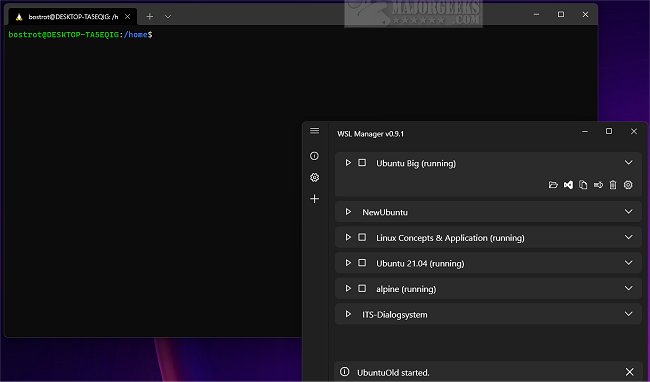
WSL Distro Manager has released version 2.4.1, a tool designed to streamline the management of Windows Subsystem for Linux (WSL) distributions through a user-friendly graphical interface. This application enables users to easily back up, restore, configure settings, install, uninstall, update, and launch distributions with just a single click.
In addition to these core functionalities, WSL Distro Manager introduces several features aimed at enhancing the overall WSL experience. Users can share distributions across multiple machines and create custom actions for executing repetitive tasks efficiently. This makes it suitable for both beginners and advanced users looking to optimize their WSL usage.
Key features of WSL Distro Manager include:
- Management of multiple WSL instances
- The ability to download and run Docker images as WSL instances without needing Docker
- Quick Actions, which allow users to execute predefined scripts for rapid configuration changes
- Support for downloading and using Turnkey or other LXC containers (in experimental stages), with successful testing on platforms like Turnkey WordPress
- The option to utilize personal repositories for root filesystems or LXC containers
As WSL continues to gain popularity among developers and users seeking to integrate Linux capabilities into their Windows environment, tools like WSL Distro Manager are essential for simplifying and enhancing the user experience.
To extend this discussion, future updates to WSL Distro Manager could focus on improving compatibility with a wider range of Linux distributions, expanding the library of available Docker images, and enhancing the user interface for even greater usability. Additionally, providing support for community-driven features and plugins could foster a more dynamic and customizable WSL management experience. This would not only cater to individual preferences but also encourage collaborative improvements within the WSL user community
In addition to these core functionalities, WSL Distro Manager introduces several features aimed at enhancing the overall WSL experience. Users can share distributions across multiple machines and create custom actions for executing repetitive tasks efficiently. This makes it suitable for both beginners and advanced users looking to optimize their WSL usage.
Key features of WSL Distro Manager include:
- Management of multiple WSL instances
- The ability to download and run Docker images as WSL instances without needing Docker
- Quick Actions, which allow users to execute predefined scripts for rapid configuration changes
- Support for downloading and using Turnkey or other LXC containers (in experimental stages), with successful testing on platforms like Turnkey WordPress
- The option to utilize personal repositories for root filesystems or LXC containers
As WSL continues to gain popularity among developers and users seeking to integrate Linux capabilities into their Windows environment, tools like WSL Distro Manager are essential for simplifying and enhancing the user experience.
To extend this discussion, future updates to WSL Distro Manager could focus on improving compatibility with a wider range of Linux distributions, expanding the library of available Docker images, and enhancing the user interface for even greater usability. Additionally, providing support for community-driven features and plugins could foster a more dynamic and customizable WSL management experience. This would not only cater to individual preferences but also encourage collaborative improvements within the WSL user community
WSL Distro Manager 2.4.1 released
WSL Distro Manager allows Windows Subsystem for Linux distribution management via a user-friendly graphical interface.