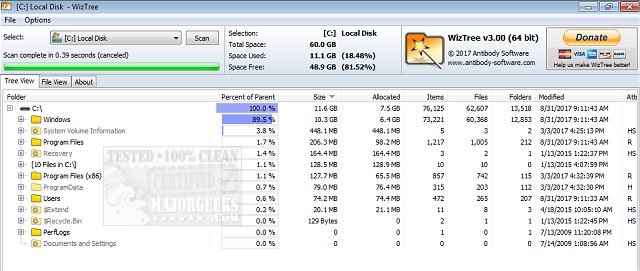
WizTree 4.33 has been released as a powerful disk space analyzer designed to efficiently scan hard drives and identify files and folders consuming significant disk space. This free, lightweight software offers a fast and user-friendly solution for managing cluttered hard drives, making it easier for users to keep track of their storage.
What makes WizTree stand out is its remarkable speed. Unlike traditional disk management tools that analyze files sequentially, WizTree leverages the Master File Table (MFT) on NTFS drives to provide instantaneous insights into disk usage. It also supports various file systems, such as FAT and FAT32, and can analyze network drives and external storage devices.
WizTree features a visually appealing treemap view that graphically represents storage usage, helping users quickly spot large files or folders. Key functionalities include:
- Disk Space Management: Quickly find large files and folders.
- Treemap Visualization: A color-coded, zoomable view of data.
- Top 1000 Files: A leaderboard that highlights the largest files on your drive.
- Duplicate Finder: Identify and remove duplicate files.
- CSV Export: Export scan results for tracking and sharing.
- Flexible Sorting & Filtering: Custom searches for files based on various criteria.
- Batch Deletion: Remove unwanted files directly from the interface.
- Non-NTFS Support: Clean up external drives and network storage.
WizTree is beneficial for a wide audience, from casual users to IT professionals. Its recent updates have improved duplicate file detection, high DPI display support, filtering options, and introduced drag-and-drop functionality for added convenience.
Performance-wise, WizTree is recognized as one of the fastest tools in the market, making it a time-saving choice for those looking to optimize their disk space. While it's free for personal use, businesses can acquire supporter codes or enterprise licenses for commercial use.
In summary, WizTree is an essential tool for anyone looking to streamline their digital storage management. With its intuitive interface, quick scanning capabilities, and powerful features, users can efficiently tackle disk clutter and optimize their hard drive space. Downloading WizTree can transform your approach to digital organization, saving you time and effort in the long run.
Further Considerations: Users looking for additional disk cleaning tools might explore options like CCleaner, Wise Disk Cleaner, or PrivaZer for complementary functionalities. For an automated approach, leveraging Windows Storage Sense can also help manage junk files effectively in Windows 10
What makes WizTree stand out is its remarkable speed. Unlike traditional disk management tools that analyze files sequentially, WizTree leverages the Master File Table (MFT) on NTFS drives to provide instantaneous insights into disk usage. It also supports various file systems, such as FAT and FAT32, and can analyze network drives and external storage devices.
WizTree features a visually appealing treemap view that graphically represents storage usage, helping users quickly spot large files or folders. Key functionalities include:
- Disk Space Management: Quickly find large files and folders.
- Treemap Visualization: A color-coded, zoomable view of data.
- Top 1000 Files: A leaderboard that highlights the largest files on your drive.
- Duplicate Finder: Identify and remove duplicate files.
- CSV Export: Export scan results for tracking and sharing.
- Flexible Sorting & Filtering: Custom searches for files based on various criteria.
- Batch Deletion: Remove unwanted files directly from the interface.
- Non-NTFS Support: Clean up external drives and network storage.
WizTree is beneficial for a wide audience, from casual users to IT professionals. Its recent updates have improved duplicate file detection, high DPI display support, filtering options, and introduced drag-and-drop functionality for added convenience.
Performance-wise, WizTree is recognized as one of the fastest tools in the market, making it a time-saving choice for those looking to optimize their disk space. While it's free for personal use, businesses can acquire supporter codes or enterprise licenses for commercial use.
In summary, WizTree is an essential tool for anyone looking to streamline their digital storage management. With its intuitive interface, quick scanning capabilities, and powerful features, users can efficiently tackle disk clutter and optimize their hard drive space. Downloading WizTree can transform your approach to digital organization, saving you time and effort in the long run.
Further Considerations: Users looking for additional disk cleaning tools might explore options like CCleaner, Wise Disk Cleaner, or PrivaZer for complementary functionalities. For an automated approach, leveraging Windows Storage Sense can also help manage junk files effectively in Windows 10
WizTree 4.33 released
WizTree is a disk space analyzer for quickly scanning your entire hard drive and showing you which files and folders are using the most disk space.