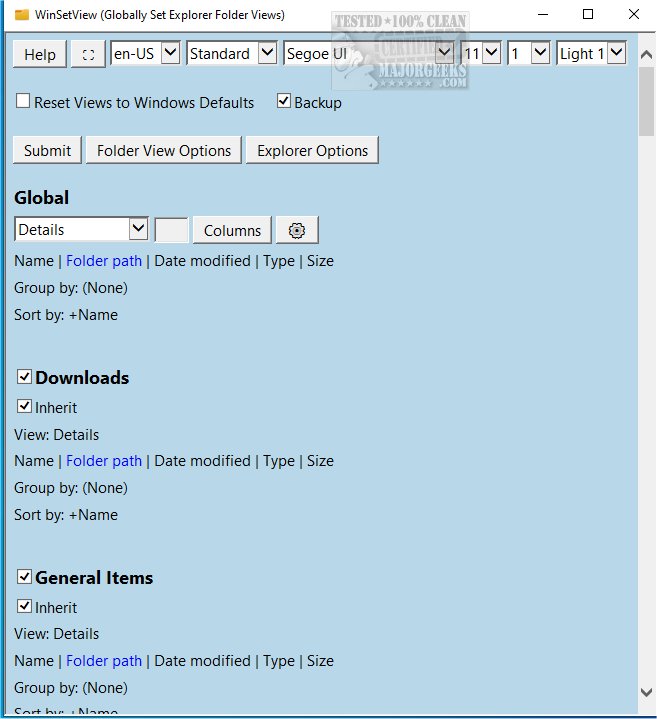
WinSetView version 3.1.9 has been released, offering users the ability to set Windows Explorer folder views on a global scale. This tool lets you customize the Details View by selecting specific column headings, which will be applied to all folders in the system. The process of using WinSetView is intuitive, but it is recommended to close all open applications beforehand to ensure that changes to open/save dialog views are updated properly.
The software operates within the HKEY_CURRENT_USER section of the Windows registry, meaning it only affects the user's settings without making changes to the overall machine configuration. No elevated privileges are necessary to use WinSetView. Each time you run the tool, it creates a unique backup of the modified registry values, allowing users to easily restore previous settings if needed. Additionally, users have the option to reset all folder views back to the default Windows settings.
To use WinSetView, simply double-click the WinSetView.exe file to open the graphical user interface (GUI). After making your selections, clicking the submit button will trigger the application to pass your choices to WinSetView.ps1 via an INI file, apply the changes, and restart Windows Explorer.
For users seeking to enhance their file management experience, WinSetView is a powerful tool that streamlines folder organization and improves accessibility. It complements various Explorer features, such as showing hidden files, managing file name extensions, and optimizing keyboard shortcuts for efficiency.
Overall, WinSetView 3.1.9 not only simplifies the process of customizing folder views but also ensures a backup mechanism and easy restoration options, making it a valuable addition for Windows users looking to tailor their file management environment
The software operates within the HKEY_CURRENT_USER section of the Windows registry, meaning it only affects the user's settings without making changes to the overall machine configuration. No elevated privileges are necessary to use WinSetView. Each time you run the tool, it creates a unique backup of the modified registry values, allowing users to easily restore previous settings if needed. Additionally, users have the option to reset all folder views back to the default Windows settings.
To use WinSetView, simply double-click the WinSetView.exe file to open the graphical user interface (GUI). After making your selections, clicking the submit button will trigger the application to pass your choices to WinSetView.ps1 via an INI file, apply the changes, and restart Windows Explorer.
For users seeking to enhance their file management experience, WinSetView is a powerful tool that streamlines folder organization and improves accessibility. It complements various Explorer features, such as showing hidden files, managing file name extensions, and optimizing keyboard shortcuts for efficiency.
Overall, WinSetView 3.1.9 not only simplifies the process of customizing folder views but also ensures a backup mechanism and easy restoration options, making it a valuable addition for Windows users looking to tailor their file management environment
WinSetView 3.1.9 released
WinSetView allows you to set Windows Explorer folder views globally.