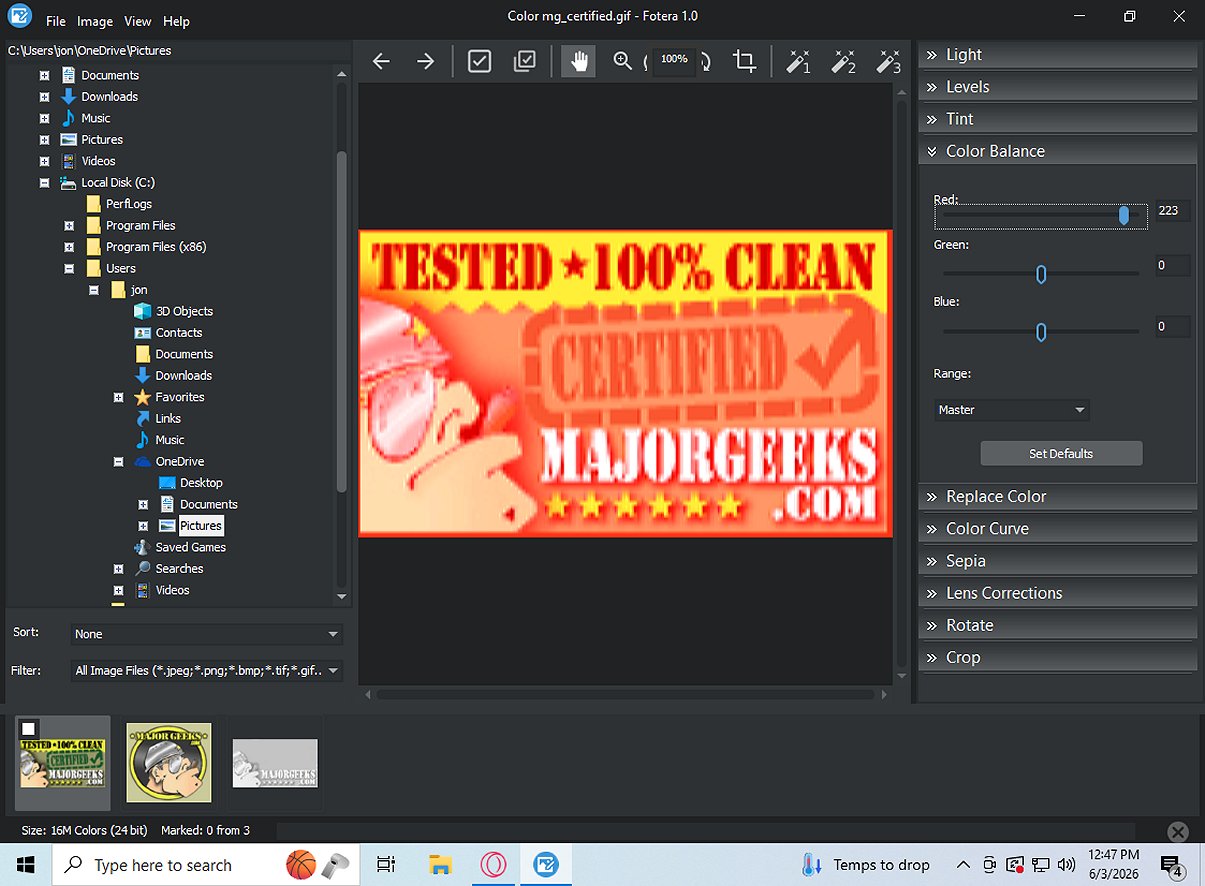
Fotera 2.2 is a freeware photo-editing software designed for users who need a fast, efficient, and non-destructive editing solution. Its primary function is to allow users to modify images while preserving the original files. Any changes made, such as adjustments to exposure, contrast, and color settings, are saved as separate data linked to the original image, ensuring that the source photos remain untouched.
Key Features of Fotera:
1. Non-Destructive Editing: Fotera’s editing process is completely non-destructive, allowing users to explore creative options without risking the quality of their original images. Users can revert to the original photo at any time or choose to export their edits when satisfied.
2. Folder-Based Workflow: The software features an intuitive folder-based workflow that simplifies the editing process. Users can easily navigate through their images, utilize thumbnail previews, and efficiently manage their workflow with photo sorting and filtering options.
3. RAW Photo Support: Fotera stands out with its capability to edit RAW images from various camera formats. This includes advanced settings for RAW engine selection, color space management, and adjustments tailored for specific camera settings and white balance.
4. Image Correction Tools: Users have access to a variety of image correction tools. These tools allow for transformations like cropping, rotating, and correcting lens distortions, enhancing the overall quality of photos.
5. Creative Editing Features: Fotera includes creative options such as sepia effects and auto enhancement presets, enabling quick adjustments to achieve the desired aesthetic.
6. Batch Export Functionality: For those who work with multiple images, Fotera offers robust batch export capabilities. Users can export selected photos to a specific folder while applying all non-destructive edits, preserving the integrity of the original images.
Conclusion:
Fotera 2.2 is an excellent choice for anyone looking for high-quality, free photo editing software on Windows. With its non-destructive editing capabilities, intuitive workflow, and extensive support for RAW formats, Fotera allows photographers and hobbyists alike to edit their images efficiently and creatively. This software ensures that original masterpieces remain pristine while offering a wealth of tools for enhancing image quality and aesthetics.
Additional Notes:
As technology continues to evolve, Fotera might expand its features in future updates, potentially incorporating more advanced editing tools and compatibility with additional file formats. Users can look forward to updates that maintain the software's user-friendliness while enhancing its capabilities for both amateur and professional photographers
Key Features of Fotera:
1. Non-Destructive Editing: Fotera’s editing process is completely non-destructive, allowing users to explore creative options without risking the quality of their original images. Users can revert to the original photo at any time or choose to export their edits when satisfied.
2. Folder-Based Workflow: The software features an intuitive folder-based workflow that simplifies the editing process. Users can easily navigate through their images, utilize thumbnail previews, and efficiently manage their workflow with photo sorting and filtering options.
3. RAW Photo Support: Fotera stands out with its capability to edit RAW images from various camera formats. This includes advanced settings for RAW engine selection, color space management, and adjustments tailored for specific camera settings and white balance.
4. Image Correction Tools: Users have access to a variety of image correction tools. These tools allow for transformations like cropping, rotating, and correcting lens distortions, enhancing the overall quality of photos.
5. Creative Editing Features: Fotera includes creative options such as sepia effects and auto enhancement presets, enabling quick adjustments to achieve the desired aesthetic.
6. Batch Export Functionality: For those who work with multiple images, Fotera offers robust batch export capabilities. Users can export selected photos to a specific folder while applying all non-destructive edits, preserving the integrity of the original images.
Conclusion:
Fotera 2.2 is an excellent choice for anyone looking for high-quality, free photo editing software on Windows. With its non-destructive editing capabilities, intuitive workflow, and extensive support for RAW formats, Fotera allows photographers and hobbyists alike to edit their images efficiently and creatively. This software ensures that original masterpieces remain pristine while offering a wealth of tools for enhancing image quality and aesthetics.
Additional Notes:
As technology continues to evolve, Fotera might expand its features in future updates, potentially incorporating more advanced editing tools and compatibility with additional file formats. Users can look forward to updates that maintain the software's user-friendliness while enhancing its capabilities for both amateur and professional photographers
Fotera 2.2 released
Fotera is freeware photo-editing software tailored for individuals seeking quick, efficient, and non-destructive image editing. It ensures that every modification is saved separately from the original image, preserving the integrity of your source photos.