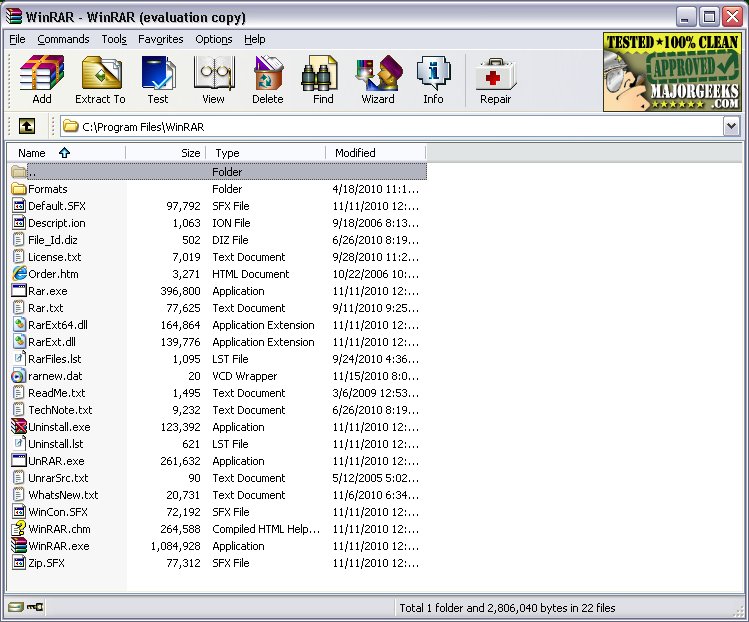
WinRAR continues to be a dominant force in file compression and management, celebrated for its reliability and versatility. The software, which has existed for decades, supports a wide array of formats including RAR, ZIP, 7Z, TAR, and more. Its user-friendly interface remains largely unchanged, providing quick access to essential features such as creating and extracting archives, file splitting, password encryption, and virus scanning.
Key Features:
- Extraction Capabilities: Supports numerous file formats including RAR, ZIP, CAB, and more.
- Compression: Allows users to compress files into RAR or ZIP archives to save space or simplify sharing.
- File Splitting: Users can divide large files into smaller, manageable parts for easier storage or transfer.
- Encryption: AES-256 encryption secures sensitive files effectively.
- Repair Functionality: Built-in recovery records help repair damaged archives.
Recent Updates: The latest versions of WinRAR focus on enhancing file format support, fixing bugs, and improving performance, making the tool increasingly useful even for users who primarily use RAR and ZIP formats.
Trial Version: WinRAR's trial does not expire, allowing users to evaluate the software without restrictions, though purchasing a license is encouraged to support the developers.
Pros and Cons:
- Pros:
- Fast and reliable performance
- Extensive format support
- Built-in encryption and repair features
- Ability to create self-extracting archives
- Compatibility with all Windows versions, including the latest Windows 11
- Cons:
- Traditional interface may feel outdated to some users
- Not truly freeware, but can be used indefinitely
- Limited support for newer compression formats like Zstandard without plugins
Practical Applications: WinRAR is particularly useful for compressing large files, such as game mods or sensitive documents, enabling easy sharing and secure storage.
Conclusion: While WinRAR may not boast flashy features, it remains a reliable and essential tool for file management on Windows. For users seeking dependable compression and encryption solutions, WinRAR stands alongside alternatives like 7-Zip, with both being popular choices among users.
Future Considerations: As software continues to evolve, WinRAR will need to adapt by potentially updating its user interface and expanding support for newer compression formats to maintain its competitive edge in the file management landscape. Users should stay tuned for future updates that enhance functionality while keeping the user experience at the forefront
Key Features:
- Extraction Capabilities: Supports numerous file formats including RAR, ZIP, CAB, and more.
- Compression: Allows users to compress files into RAR or ZIP archives to save space or simplify sharing.
- File Splitting: Users can divide large files into smaller, manageable parts for easier storage or transfer.
- Encryption: AES-256 encryption secures sensitive files effectively.
- Repair Functionality: Built-in recovery records help repair damaged archives.
Recent Updates: The latest versions of WinRAR focus on enhancing file format support, fixing bugs, and improving performance, making the tool increasingly useful even for users who primarily use RAR and ZIP formats.
Trial Version: WinRAR's trial does not expire, allowing users to evaluate the software without restrictions, though purchasing a license is encouraged to support the developers.
Pros and Cons:
- Pros:
- Fast and reliable performance
- Extensive format support
- Built-in encryption and repair features
- Ability to create self-extracting archives
- Compatibility with all Windows versions, including the latest Windows 11
- Cons:
- Traditional interface may feel outdated to some users
- Not truly freeware, but can be used indefinitely
- Limited support for newer compression formats like Zstandard without plugins
Practical Applications: WinRAR is particularly useful for compressing large files, such as game mods or sensitive documents, enabling easy sharing and secure storage.
Conclusion: While WinRAR may not boast flashy features, it remains a reliable and essential tool for file management on Windows. For users seeking dependable compression and encryption solutions, WinRAR stands alongside alternatives like 7-Zip, with both being popular choices among users.
Future Considerations: As software continues to evolve, WinRAR will need to adapt by potentially updating its user interface and expanding support for newer compression formats to maintain its competitive edge in the file management landscape. Users should stay tuned for future updates that enhance functionality while keeping the user experience at the forefront
WinRAR 7.30 Beta 1 / 7.23 released
WinRAR is an excellent program for opening, creating, extracting, or adding files to your ZIP and RAR files.