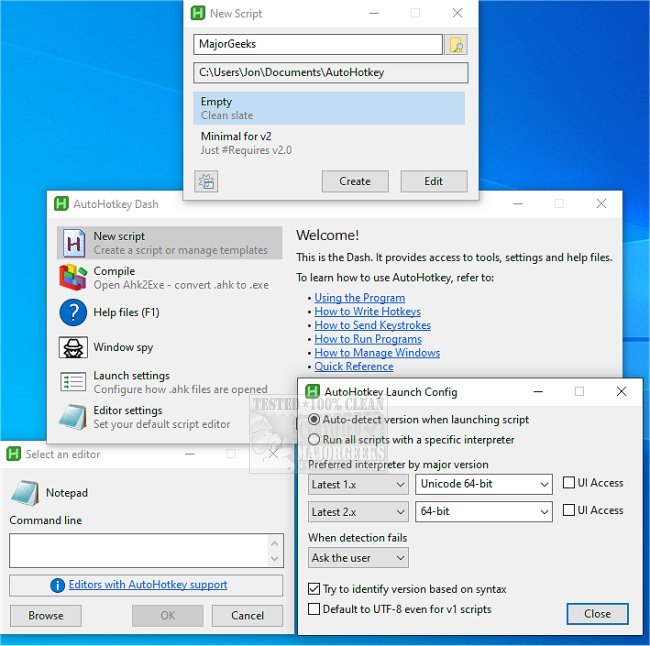
AutoHotkey has released updates for both version 2.0.31 and 1.1.37.02, continuing to provide a powerful and flexible scripting tool for Windows users interested in desktop automation. As a free application, AutoHotkey allows users to create custom keyboard shortcuts, macros, text replacements, and small automation scripts, making it ideal for those who find themselves performing repetitive tasks like clicking, typing, or navigating through Windows.
At its core, AutoHotkey enables users to automate actions by assigning them to specific keys or mouse buttons. This functionality can be leveraged for a variety of tasks, including launching applications, remapping keys, and automating data entry, which can significantly enhance productivity, especially for users who engage in repetitive workflows.
For example, with a simple script, users can bind the Windows key combination to open a frequently visited website or replace a seldom-used key with a more functional one, such as turning Caps Lock into Escape. While the initial setup may require some scripting knowledge, simple commands can transform mundane tasks into streamlined processes.
AutoHotkey also supports advanced features such as text expansion, allowing users to input long responses with short abbreviations, and creating basic windows or menus within scripts for ease of use. However, users should be cautious when using automation in online gaming due to the potential for violations of anti-cheat policies.
To get started with AutoHotkey, users need to install the software, create a script file, input their desired commands, and run the script. A visible icon appears in the system tray while the script is active, providing easy access to reload, pause, or exit if necessary.
Despite its powerful capabilities, AutoHotkey has a learning curve, particularly when transitioning between different versions of the software. Users must be mindful of syntax changes and potential errors that can arise from small mistakes in scripting.
In conclusion, AutoHotkey is an invaluable tool for Windows users who frequently perform repetitive tasks and are willing to invest some time into learning how to script. By automating these processes, users can free up time and reduce strain from their daily computer interactions.
Extension Ideas:
- Community and Support: Users can access a variety of forums and communities online where they can share scripts, troubleshoot issues, and learn from others' experiences. This can greatly enhance the learning process and provide inspiration for new automation ideas.
- Integration with Other Tools: AutoHotkey can be integrated with other productivity tools, enhancing its functionality. For instance, combining it with task management software can automate reminders or create shortcuts for frequently accessed tasks.
- Use Cases Beyond Personal Computing: Beyond personal use, AutoHotkey can be particularly beneficial in professional environments, such as streamlining data entry in customer service roles or automating report generation for regular tasks in administrative jobs.
- Educational Resources: Providing tutorials, videos, and documentation can help users overcome the initial learning curve, making it easier for newcomers to adopt AutoHotkey as part of their daily routine
At its core, AutoHotkey enables users to automate actions by assigning them to specific keys or mouse buttons. This functionality can be leveraged for a variety of tasks, including launching applications, remapping keys, and automating data entry, which can significantly enhance productivity, especially for users who engage in repetitive workflows.
For example, with a simple script, users can bind the Windows key combination to open a frequently visited website or replace a seldom-used key with a more functional one, such as turning Caps Lock into Escape. While the initial setup may require some scripting knowledge, simple commands can transform mundane tasks into streamlined processes.
AutoHotkey also supports advanced features such as text expansion, allowing users to input long responses with short abbreviations, and creating basic windows or menus within scripts for ease of use. However, users should be cautious when using automation in online gaming due to the potential for violations of anti-cheat policies.
To get started with AutoHotkey, users need to install the software, create a script file, input their desired commands, and run the script. A visible icon appears in the system tray while the script is active, providing easy access to reload, pause, or exit if necessary.
Despite its powerful capabilities, AutoHotkey has a learning curve, particularly when transitioning between different versions of the software. Users must be mindful of syntax changes and potential errors that can arise from small mistakes in scripting.
In conclusion, AutoHotkey is an invaluable tool for Windows users who frequently perform repetitive tasks and are willing to invest some time into learning how to script. By automating these processes, users can free up time and reduce strain from their daily computer interactions.
Extension Ideas:
- Community and Support: Users can access a variety of forums and communities online where they can share scripts, troubleshoot issues, and learn from others' experiences. This can greatly enhance the learning process and provide inspiration for new automation ideas.
- Integration with Other Tools: AutoHotkey can be integrated with other productivity tools, enhancing its functionality. For instance, combining it with task management software can automate reminders or create shortcuts for frequently accessed tasks.
- Use Cases Beyond Personal Computing: Beyond personal use, AutoHotkey can be particularly beneficial in professional environments, such as streamlining data entry in customer service roles or automating report generation for regular tasks in administrative jobs.
- Educational Resources: Providing tutorials, videos, and documentation can help users overcome the initial learning curve, making it easier for newcomers to adopt AutoHotkey as part of their daily routine
AutoHotkey 2.0.31 / 1.1.37.02 released
AutoHotkey provides you with a fast, scriptable freeware desktop automation tool with hotkeys.