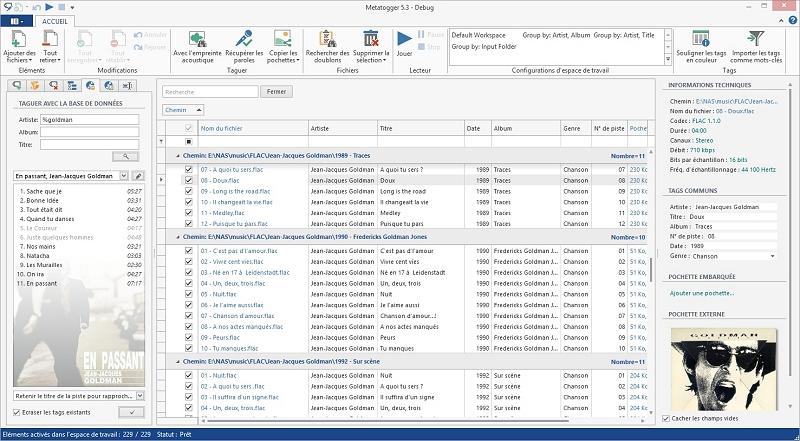
MetatOGGer has released version 7.7.4.0, a powerful software tool designed for managing audio files in various formats, including Ogg Vorbis, FLAC, Speex, and MP3. This application allows users to rename, tag, and classify their audio files with ease. Users can enhance functionality by adding support for additional audio formats through plug-ins.
One of MetatOGGer’s standout features is its ability to perform tasks either manually or automatically by retrieving information from an extensive local database containing hundreds of thousands of discs sourced from MusicBrainz. This makes it particularly effective for users with large collections of music.
Notably, MetatOGGer is the first tagging tool to utilize a dynamic and vector user interface based on Windows Presentation Foundation (WPF), providing a user-friendly experience that balances simplicity with robust capabilities compared to other tagging software.
Key features include:
- Manual or script-based editing of tags using C#.
- Automatic tagging from filenames or file paths.
- Renaming files based on their associated tags.
- Organizing files through copying, moving, or symbolic linking, especially with Windows Vista.
- Retrieving tags from a comprehensive local database of over 300,000 discs.
- Downloading album covers from the internet.
- Identifying audio files through acoustic fingerprinting.
- Quickly cleaning up unwanted or erroneous tags.
MetatOGGer stands out not only for its functionality but also for its user interface, making it a preferred choice for audio file management among enthusiasts and professionals alike.
In addition to its existing features, future updates could potentially include more advanced machine learning algorithms for better tag prediction, integration with streaming services for real-time data fetching, and enhanced community support for user-generated plug-ins. The development team might also consider adding features for batch processing to further streamline the organizational process for extensive audio libraries
One of MetatOGGer’s standout features is its ability to perform tasks either manually or automatically by retrieving information from an extensive local database containing hundreds of thousands of discs sourced from MusicBrainz. This makes it particularly effective for users with large collections of music.
Notably, MetatOGGer is the first tagging tool to utilize a dynamic and vector user interface based on Windows Presentation Foundation (WPF), providing a user-friendly experience that balances simplicity with robust capabilities compared to other tagging software.
Key features include:
- Manual or script-based editing of tags using C#.
- Automatic tagging from filenames or file paths.
- Renaming files based on their associated tags.
- Organizing files through copying, moving, or symbolic linking, especially with Windows Vista.
- Retrieving tags from a comprehensive local database of over 300,000 discs.
- Downloading album covers from the internet.
- Identifying audio files through acoustic fingerprinting.
- Quickly cleaning up unwanted or erroneous tags.
MetatOGGer stands out not only for its functionality but also for its user interface, making it a preferred choice for audio file management among enthusiasts and professionals alike.
In addition to its existing features, future updates could potentially include more advanced machine learning algorithms for better tag prediction, integration with streaming services for real-time data fetching, and enhanced community support for user-generated plug-ins. The development team might also consider adding features for batch processing to further streamline the organizational process for extensive audio libraries
MetatOGGer 7.7.4.0 released
MetatOGGer makes it possible to rename, tag, and easily classify your Ogg Vorbis, FLAC, Speex, and MP3 files.