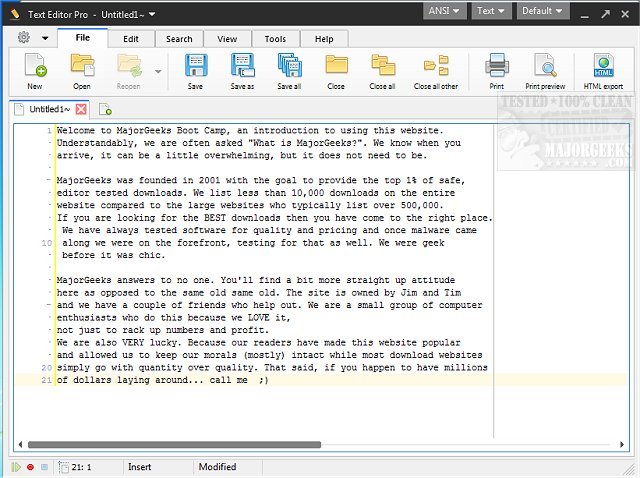
Text Editor Pro, formerly known as EditBone, has recently launched version 37.4.0, enhancing its reputation as a robust text editing tool designed for programmers and writers alike. With support for syntax highlighting across multiple programming languages—including HTML, Python, and Ruby—Text Editor Pro stands out for its versatility and user-friendly interface.
Key Features and Customization Options
The latest version boasts over 100 customizable options, allowing users to tailor their editing experience to fit individual preferences. With a selection of more than 100 ready-made skins, users can personalize the software’s appearance. Additionally, it incorporates a Unicode character map, a numerical unit conversion tool, and SQL formatting capabilities, making it suitable for a wide range of coding tasks.
Dual-Panel Interface and File Management
Text Editor Pro features a flexible dual-panel interface that can be adjusted to single, double, or triple columns, facilitating efficient multitasking on multiple projects. The Directory function enhances file management by allowing users to navigate their directories seamlessly while coding. This feature, combined with the advanced Text Compare functionality, enables users to open two documents side by side and quickly identify any differences, simplifying the review process.
Efficiency with Macro Feature
One of the standout features is the Macro functionality, which significantly streamlines the coding process by allowing users to record repetitive tasks. By simply clicking "Record" and performing actions, users can save time on mundane tasks. The recorded macros can be replayed effortlessly using the Shift+Ctrl+P hotkey, thus enhancing productivity and efficiency.
Conclusion: A Professional-Grade Solution
In conclusion, Text Editor Pro is a powerful, multi-functional text editing tool that goes beyond basic editing. With advanced features like numerical unit conversion, sophisticated formatting options for various coding languages (including JSON, SQL, and XML), and advanced code folding functionalities, it is an essential tool for both novice and experienced users. The combination of its extensive capabilities and user-friendly design positions Text Editor Pro as a leading choice for anyone looking to elevate their text editing experience.
Future Enhancements
Looking ahead, the development team behind Text Editor Pro may consider further enhancements such as integrating collaborative features for team coding, improving cloud functionality for seamless access across devices, and expanding language support to cater to a broader audience. This foresight could solidify Text Editor Pro’s standing as a top-tier text editing solution in an increasingly competitive market
Key Features and Customization Options
The latest version boasts over 100 customizable options, allowing users to tailor their editing experience to fit individual preferences. With a selection of more than 100 ready-made skins, users can personalize the software’s appearance. Additionally, it incorporates a Unicode character map, a numerical unit conversion tool, and SQL formatting capabilities, making it suitable for a wide range of coding tasks.
Dual-Panel Interface and File Management
Text Editor Pro features a flexible dual-panel interface that can be adjusted to single, double, or triple columns, facilitating efficient multitasking on multiple projects. The Directory function enhances file management by allowing users to navigate their directories seamlessly while coding. This feature, combined with the advanced Text Compare functionality, enables users to open two documents side by side and quickly identify any differences, simplifying the review process.
Efficiency with Macro Feature
One of the standout features is the Macro functionality, which significantly streamlines the coding process by allowing users to record repetitive tasks. By simply clicking "Record" and performing actions, users can save time on mundane tasks. The recorded macros can be replayed effortlessly using the Shift+Ctrl+P hotkey, thus enhancing productivity and efficiency.
Conclusion: A Professional-Grade Solution
In conclusion, Text Editor Pro is a powerful, multi-functional text editing tool that goes beyond basic editing. With advanced features like numerical unit conversion, sophisticated formatting options for various coding languages (including JSON, SQL, and XML), and advanced code folding functionalities, it is an essential tool for both novice and experienced users. The combination of its extensive capabilities and user-friendly design positions Text Editor Pro as a leading choice for anyone looking to elevate their text editing experience.
Future Enhancements
Looking ahead, the development team behind Text Editor Pro may consider further enhancements such as integrating collaborative features for team coding, improving cloud functionality for seamless access across devices, and expanding language support to cater to a broader audience. This foresight could solidify Text Editor Pro’s standing as a top-tier text editing solution in an increasingly competitive market
Text Editor Pro 37.4.0 released
Text Editor Pro (formerly EditBone) is a powerful text editing tool with syntax highlighting multiple languages and scripts.