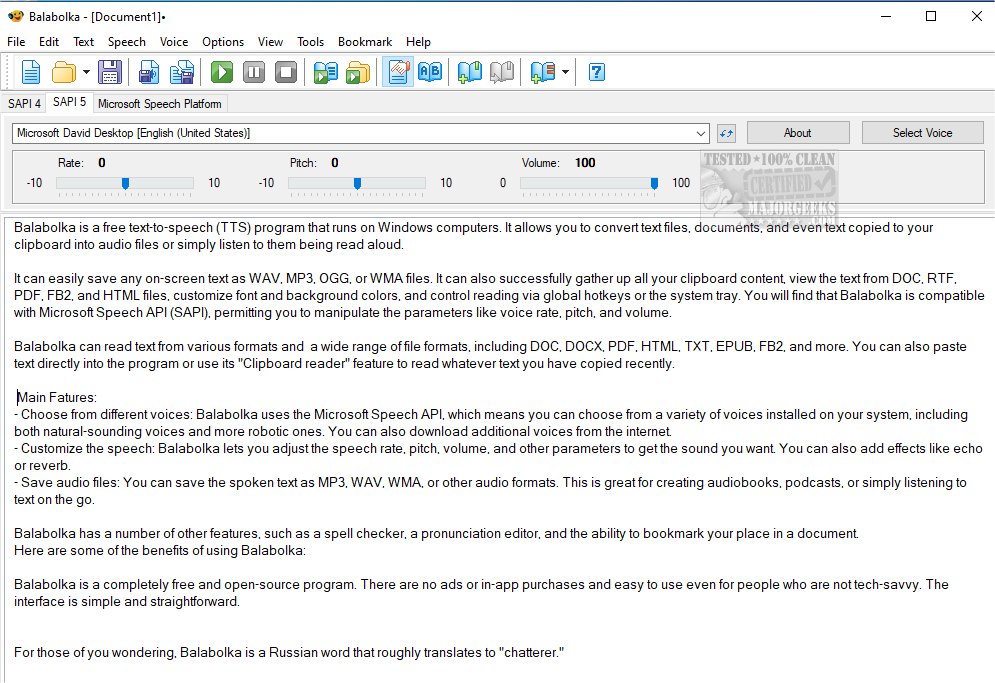
Balabolka 2.15.0.922 has been released, enhancing the capabilities of this versatile text-to-speech (TTS) freeware application for Windows. Balabolka allows users to convert various text files, including documents and copied text, into audio formats such as WAV, MP3, OGG, or WMA. It supports multiple file formats, including DOC, RTF, PDF, FB2, and HTML, and offers features such as clipboard reading and customizable visual settings for fonts and background colors.
One of Balabolka's standout features is its compatibility with the Microsoft Speech API (SAPI), enabling users to select from a range of voices installed on their computer, which can be further customized in terms of speech rate, pitch, and volume. Additional effects like echo or reverb can also be added, making it a powerful tool for creating diverse audio content, including audiobooks and podcasts.
Other noteworthy features include a spell checker, a pronunciation editor, and the ability to bookmark text within documents. Balabolka is completely free, open-source, and user-friendly, making it accessible even for those with limited technical skills. The name "Balabolka" translates from Russian to "chatterer," aptly reflecting the program's functionality.
In summary, Balabolka offers a comprehensive solution for anyone looking to convert text to speech, with a range of customizable options and support for various text formats. Its user-friendly interface and absence of ads or in-app purchases further enhance its appeal, making it an excellent choice for both casual users and professionals alike.
Furthermore, as technology continues to advance, future updates to Balabolka may include even more voice options, improved text recognition capabilities, and integration with other applications, making it a continually evolving resource for text-to-speech needs
One of Balabolka's standout features is its compatibility with the Microsoft Speech API (SAPI), enabling users to select from a range of voices installed on their computer, which can be further customized in terms of speech rate, pitch, and volume. Additional effects like echo or reverb can also be added, making it a powerful tool for creating diverse audio content, including audiobooks and podcasts.
Other noteworthy features include a spell checker, a pronunciation editor, and the ability to bookmark text within documents. Balabolka is completely free, open-source, and user-friendly, making it accessible even for those with limited technical skills. The name "Balabolka" translates from Russian to "chatterer," aptly reflecting the program's functionality.
In summary, Balabolka offers a comprehensive solution for anyone looking to convert text to speech, with a range of customizable options and support for various text formats. Its user-friendly interface and absence of ads or in-app purchases further enhance its appeal, making it an excellent choice for both casual users and professionals alike.
Furthermore, as technology continues to advance, future updates to Balabolka may include even more voice options, improved text recognition capabilities, and integration with other applications, making it a continually evolving resource for text-to-speech needs
Balabolka 2.15.0.922 released
Balabolka is a mildly customizable freeware text-to-speech application capable of utilizing all the installed computer voices on your PC.