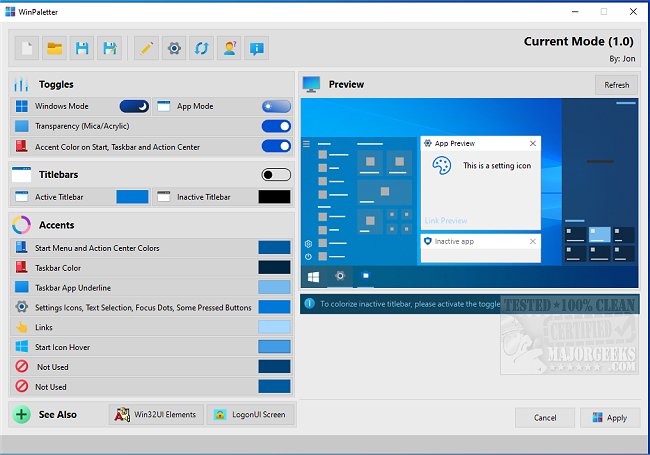
WinPaletter version 1.1.0.0 has been released, providing users with an intuitive tool to customize the color accents of Windows 10 and 11. This application allows for extensive personalization of the desktop environment, enabling users to alter various elements such as title bars and accent colors easily. The modern interface presents options clearly, allowing users to preview changes before applying them, ensuring harmonious color schemes.
Accent colors are stored in the Windows registry, with some arranged as arrays and others individually keyed. WinPaletter simplifies the process of changing these colors, making it accessible for users of all skill levels. Additionally, users can save their customizations as theme files, allowing for multiple themes suited to different occasions or tasks. The software also caters to users with vision impairments by enhancing color contrast.
Overall, WinPaletter is a valuable tool for anyone looking to enhance the aesthetic of their Windows environment. Its user-friendly design and comprehensive features make it suitable for a broad audience.
In future updates, it could be beneficial for the developers to incorporate more advanced customization options, such as dynamic themes that change based on time of day or user activity. Additionally, integrating a community feature where users can share their themes could foster a creative environment and inspire new designs
Accent colors are stored in the Windows registry, with some arranged as arrays and others individually keyed. WinPaletter simplifies the process of changing these colors, making it accessible for users of all skill levels. Additionally, users can save their customizations as theme files, allowing for multiple themes suited to different occasions or tasks. The software also caters to users with vision impairments by enhancing color contrast.
Overall, WinPaletter is a valuable tool for anyone looking to enhance the aesthetic of their Windows environment. Its user-friendly design and comprehensive features make it suitable for a broad audience.
In future updates, it could be beneficial for the developers to incorporate more advanced customization options, such as dynamic themes that change based on time of day or user activity. Additionally, integrating a community feature where users can share their themes could foster a creative environment and inspire new designs
WinPaletter 1.1.0.0 released
WinPaletter enables you to colorize Windows 10 and 11 accents without restrictions from an easy-to-use interface.