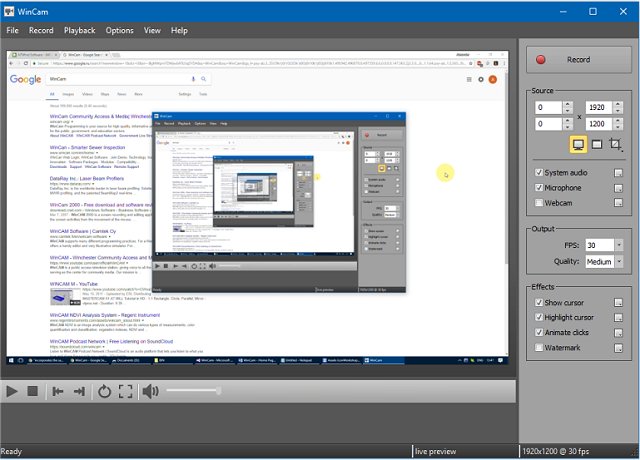
WinCam 4.3 has been released, enhancing the capabilities of this intuitive screen recording software. It allows users to capture video from applications, the entire screen, or specific sections, boasting an impressive recording rate of up to 60 frames per second. This ensures that even the smallest details are captured with clarity. The software utilizes hardware acceleration for real-time video rendering and encoding, simplifying the recording process for users.
Designed for ease of use, WinCam is packed with features that cater to various recording needs, such as creating video tutorials, saving Skype calls, and capturing real-time media. Users can effortlessly select their desired video source and effects, then initiate recording with a simple click of the Record button. Additionally, WinCam provides basic video editing tools; users can easily adjust the start and end points of their recordings by interacting with the timeline or using toolbar buttons.
In addition to its core features, WinCam 4.3 also offers advanced options for users looking to enhance their recordings further. Future updates could include improved editing functionalities, support for more video formats, and enhanced sharing options for social media and other platforms. By continuing to innovate, WinCam can solidify its position as a go-to tool for both casual users and professional content creators.
For more tips on optimizing your Windows experience, check out related articles on taking screenshots, restoring the Windows Photo Viewer, and editing videos with the Microsoft Photo App
Designed for ease of use, WinCam is packed with features that cater to various recording needs, such as creating video tutorials, saving Skype calls, and capturing real-time media. Users can effortlessly select their desired video source and effects, then initiate recording with a simple click of the Record button. Additionally, WinCam provides basic video editing tools; users can easily adjust the start and end points of their recordings by interacting with the timeline or using toolbar buttons.
In addition to its core features, WinCam 4.3 also offers advanced options for users looking to enhance their recordings further. Future updates could include improved editing functionalities, support for more video formats, and enhanced sharing options for social media and other platforms. By continuing to innovate, WinCam can solidify its position as a go-to tool for both casual users and professional content creators.
For more tips on optimizing your Windows experience, check out related articles on taking screenshots, restoring the Windows Photo Viewer, and editing videos with the Microsoft Photo App
WinCam 4.3 released
WinCam is designed to be a simple but powerful screen recorder.