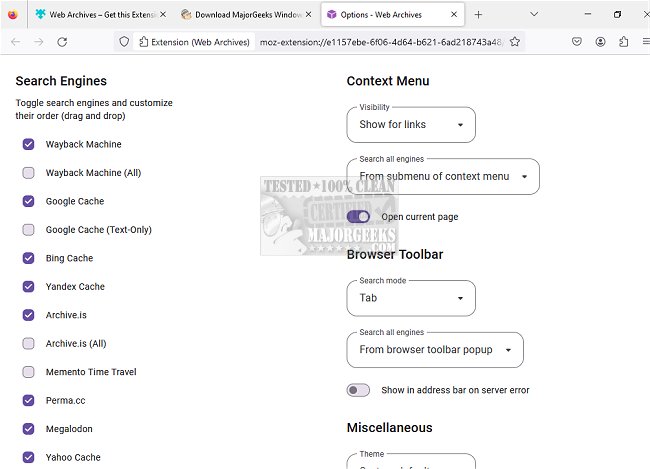
The Web Archives extension, now updated to version 7.3.3, is available for major web browsers including Chrome, Firefox, Edge, Opera, and Safari. This tool enables users to easily access archived versions of websites across various search engines, such as the Wayback Machine, Google, and Bing.
With just a few clicks, users can retrieve cached versions of the pages they are visiting. The extension supports multiple popular archival services, providing a convenient way to find the latest saved versions of web pages. If a webpage fails to load or is no longer accessible, users can benefit from the Web Archives extension by searching for older cached versions.
The functionality of Web Archives allows for simultaneous searching across multiple engines, which can open several new tabs for each search. Alternatively, users can click on the Web Archives icon to select a specific search engine. The extension captures the URL of the currently active tab and sends it to the chosen archival service, or users can manually enter a URL they wish to search for.
Web Archives offers two primary search modes:
- Tab: Searches for the webpage currently open in the active tab, which is the default setting.
- URL: Allows users to input a custom page URL for searching.
This tool is particularly useful for researchers, students, and anyone needing access to historical web content, offering a seamless way to navigate the complexities of web archiving. As web content becomes increasingly transient, extensions like Web Archives play a crucial role in preserving digital information for future reference
With just a few clicks, users can retrieve cached versions of the pages they are visiting. The extension supports multiple popular archival services, providing a convenient way to find the latest saved versions of web pages. If a webpage fails to load or is no longer accessible, users can benefit from the Web Archives extension by searching for older cached versions.
The functionality of Web Archives allows for simultaneous searching across multiple engines, which can open several new tabs for each search. Alternatively, users can click on the Web Archives icon to select a specific search engine. The extension captures the URL of the currently active tab and sends it to the chosen archival service, or users can manually enter a URL they wish to search for.
Web Archives offers two primary search modes:
- Tab: Searches for the webpage currently open in the active tab, which is the default setting.
- URL: Allows users to input a custom page URL for searching.
This tool is particularly useful for researchers, students, and anyone needing access to historical web content, offering a seamless way to navigate the complexities of web archiving. As web content becomes increasingly transient, extensions like Web Archives play a crucial role in preserving digital information for future reference
Web Archives for Chrome, Firefox, Edge, Opera, and Safari 7.3.3 released
Web Archives for Chrome, Firefox, Edge, Opera, and Safari allows access to cached versions of websites on multiple popular search engines, including the Wayback Machine, Google, and Bing.
Web Archives for Chrome, Firefox, Edge, Opera, and Safari 7.3.3 released @ MajorGeeks