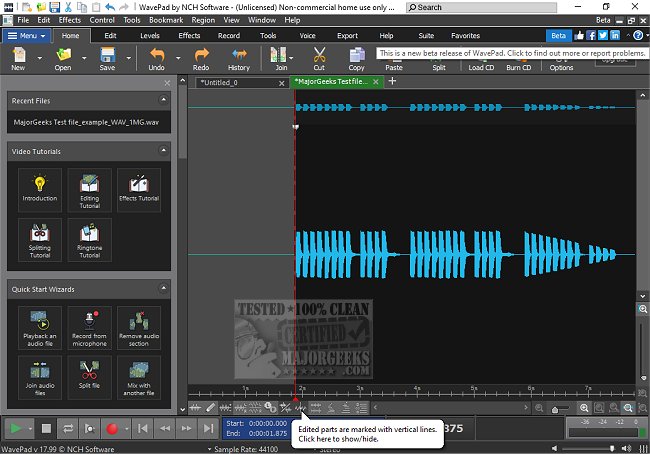
WavePad 24.56 has recently been released, enhancing its reputation as an advanced audio editing software suitable for both professionals and enthusiasts. Developed by NCH Software, WavePad provides a comprehensive toolkit for audio editing, making it ideal for a variety of applications, including music production and podcasting.
Key Features and Capabilities:
WavePad is designed to facilitate everything from basic audio trimming to intricate sound restoration. It offers tools to remove background noise, add reverb effects, and process large batches of files quickly. The software supports numerous audio file formats such as MP3, WAV, FLAC, and AAC, ensuring versatility for users. Its extensive editing tools include cut, copy, paste, and advanced functions like pitch shifting and auto-trim. Additionally, WavePad allows users to apply various effects, including amplification, normalization, and echo, while also supporting VST plugins for further customization.
Audio Restoration and Video Editing:
Advanced features include spectral analysis, voice changing, and speech synthesis, enabling detailed manipulation of audio. The software also comes equipped with audio restoration capabilities to clean recordings effectively, including noise reduction and hum elimination. For users working with video, WavePad provides the functionality to extract and edit audio tracks, complete with visualization options.
Platform Availability and Accessibility:
WavePad is accessible across multiple platforms, including Windows, macOS, iOS, Android, and Kindle, allowing for audio editing on the go. While the free version does come with some limitations, the Masters Edition offers additional professional-grade features, making it a worthy investment for serious audio projects.
Pros and Cons:
Among its advantages, WavePad boasts an intuitive interface, extensive file format support, and advanced editing capabilities. However, its free version lacks some advanced features, and the interface may feel somewhat outdated compared to newer software.
Conclusion:
Overall, WavePad stands out as a reliable and feature-rich audio editor that caters to a diverse range of users, from casual hobbyists to audio professionals. It provides a good balance of usability and functionality, making it a strong choice for anyone in need of a comprehensive audio editing solution.
Future Enhancements:
Looking ahead, WavePad could benefit from continuous updates that enhance its user interface and add even more advanced features, ensuring it remains competitive in the evolving landscape of audio editing software. Additionally, integrating more collaborative features could appeal to users working in teams, further solidifying its position as a go-to audio editing tool
Key Features and Capabilities:
WavePad is designed to facilitate everything from basic audio trimming to intricate sound restoration. It offers tools to remove background noise, add reverb effects, and process large batches of files quickly. The software supports numerous audio file formats such as MP3, WAV, FLAC, and AAC, ensuring versatility for users. Its extensive editing tools include cut, copy, paste, and advanced functions like pitch shifting and auto-trim. Additionally, WavePad allows users to apply various effects, including amplification, normalization, and echo, while also supporting VST plugins for further customization.
Audio Restoration and Video Editing:
Advanced features include spectral analysis, voice changing, and speech synthesis, enabling detailed manipulation of audio. The software also comes equipped with audio restoration capabilities to clean recordings effectively, including noise reduction and hum elimination. For users working with video, WavePad provides the functionality to extract and edit audio tracks, complete with visualization options.
Platform Availability and Accessibility:
WavePad is accessible across multiple platforms, including Windows, macOS, iOS, Android, and Kindle, allowing for audio editing on the go. While the free version does come with some limitations, the Masters Edition offers additional professional-grade features, making it a worthy investment for serious audio projects.
Pros and Cons:
Among its advantages, WavePad boasts an intuitive interface, extensive file format support, and advanced editing capabilities. However, its free version lacks some advanced features, and the interface may feel somewhat outdated compared to newer software.
Conclusion:
Overall, WavePad stands out as a reliable and feature-rich audio editor that caters to a diverse range of users, from casual hobbyists to audio professionals. It provides a good balance of usability and functionality, making it a strong choice for anyone in need of a comprehensive audio editing solution.
Future Enhancements:
Looking ahead, WavePad could benefit from continuous updates that enhance its user interface and add even more advanced features, ensuring it remains competitive in the evolving landscape of audio editing software. Additionally, integrating more collaborative features could appeal to users working in teams, further solidifying its position as a go-to audio editing tool
Wavepad 24.56 released
WavePad is an advanced audio editing software that offers a wide range of features for professionals and enthusiasts alike.