Executor has released version 2.4.0, enhancing its functionality as a customizable alternative to the Windows Run feature. This multi-purpose launcher is designed to streamline the process of finding and launching applications, particularly for users with extensive Start menu lists that can be cumbersome to navigate. By providing a quicker and more efficient method to access programs, Executor helps optimize daily workflows.
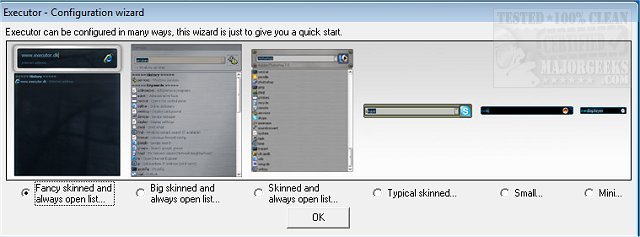
The application can be personalized through various skins, layouts, and operational modes, allowing users to tailor it to their preferences. It features keyword-based suggestions, enabling rapid searches and filtering of results as users type. A simple double-click can launch applications or perform actions such as opening folders or copying paths. When not in use, Executor minimizes to the system tray for easy access.
Key features of Executor include:
- The ability to assign properties to keywords, including shortcuts and drag-and-drop functionality for adding files or folders.
- Auto-completion for keywords, file system paths, and history.
- URL detection for direct entry of web addresses.
- Support for keyword parameters.
- Dynamic addition of relevant Start menu and control panel items.
- User-defined file extension scanning.
- Integration with popular services like Gmail and Twitter.
- Customizable layout options including colors, fonts, and transparency.
- Hotkey assignment for keywords and launching the application.
In addition to these features, Executor's flexibility and customization options make it a valuable tool for enhancing productivity. Users can further explore its capabilities through forums, tutorials, and tips available on the author’s website.
Overall, Executor 2.4.0 is a powerful launcher that promotes efficiency and a personalized user experience, making it an asset for anyone looking to streamline their computing tasks. The continuous development and update of such applications suggest a growing trend towards personalized computing tools that cater to individual work habits and preferences
The application can be personalized through various skins, layouts, and operational modes, allowing users to tailor it to their preferences. It features keyword-based suggestions, enabling rapid searches and filtering of results as users type. A simple double-click can launch applications or perform actions such as opening folders or copying paths. When not in use, Executor minimizes to the system tray for easy access.
Key features of Executor include:
- The ability to assign properties to keywords, including shortcuts and drag-and-drop functionality for adding files or folders.
- Auto-completion for keywords, file system paths, and history.
- URL detection for direct entry of web addresses.
- Support for keyword parameters.
- Dynamic addition of relevant Start menu and control panel items.
- User-defined file extension scanning.
- Integration with popular services like Gmail and Twitter.
- Customizable layout options including colors, fonts, and transparency.
- Hotkey assignment for keywords and launching the application.
In addition to these features, Executor's flexibility and customization options make it a valuable tool for enhancing productivity. Users can further explore its capabilities through forums, tutorials, and tips available on the author’s website.
Overall, Executor 2.4.0 is a powerful launcher that promotes efficiency and a personalized user experience, making it an asset for anyone looking to streamline their computing tasks. The continuous development and update of such applications suggest a growing trend towards personalized computing tools that cater to individual work habits and preferences
Executor 2.4.0 released
Executor provides a fully customizable alternative to Windows Run that gives you a personalized multi-purpose launcher and more.