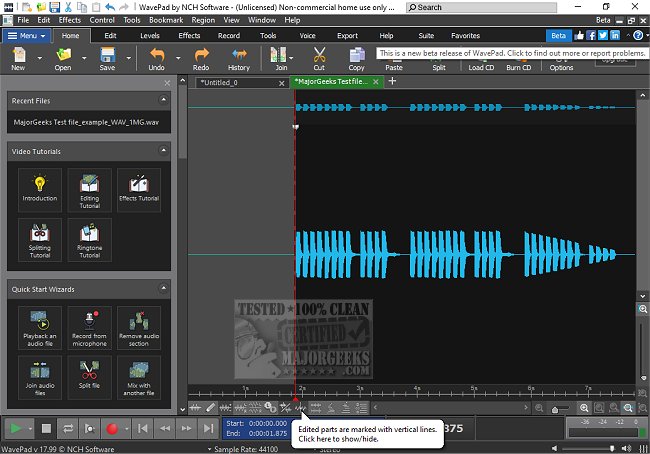
WavePad 24.33 Beta has been released, showcasing its capabilities as a comprehensive audio editing software tailored for both professionals and hobbyists. Developed by NCH Software, WavePad is designed to simplify audio editing, whether for music production, podcasting, or general audio adjustments. Its user-friendly interface combined with powerful tools makes it suitable for users of all skill levels.
Key Features of WavePad:
WavePad provides an extensive array of features including essential editing tools such as cut, copy, paste, delete, and pitch shifting. The software also includes effects like amplification, normalization, and reverb, alongside support for VST plugins, which broaden its customization potential. It accommodates a wide variety of audio formats including MP3, WAV, FLAC, and more, and offers batch processing capabilities for efficient handling of multiple files—ideal for podcasters and musicians. Advanced functionalities such as spectral analysis, voice changing, and audio restoration tools further enhance its utility. Additionally, WavePad allows users to extract or edit audio from video files and includes a library of royalty-free sounds.
Pros and Cons:
Pros:
- Intuitive interface with robust tools
- Wide format support
- Advanced features like batch processing and spectral analysis
- Availability across multiple platforms (Windows, macOS, iOS, Android, Kindle)
Cons:
- The free version has limitations compared to the Master's Edition
- Some users may find the interface somewhat outdated
- Certain tools require an upgrade for full access
Conclusion:
WavePad stands out as a versatile audio editor that caters to a broad audience, from casual users cleaning up their recordings to seasoned professionals engaged in high-quality audio projects. While the free version does have some constraints, upgrading to the Master's Edition unlocks many advanced features that justify the investment. For those seeking a dependable and feature-rich audio editing solution without a steep learning curve, WavePad is an excellent choice.
In addition to its core functionalities, users can explore further enhancements and tips related to audio editing, such as enabling surround sound on various operating systems or troubleshooting sound issues in Windows. WavePad not only serves as an editing tool but also as a resource for improving overall audio quality in various projects
Key Features of WavePad:
WavePad provides an extensive array of features including essential editing tools such as cut, copy, paste, delete, and pitch shifting. The software also includes effects like amplification, normalization, and reverb, alongside support for VST plugins, which broaden its customization potential. It accommodates a wide variety of audio formats including MP3, WAV, FLAC, and more, and offers batch processing capabilities for efficient handling of multiple files—ideal for podcasters and musicians. Advanced functionalities such as spectral analysis, voice changing, and audio restoration tools further enhance its utility. Additionally, WavePad allows users to extract or edit audio from video files and includes a library of royalty-free sounds.
Pros and Cons:
Pros:
- Intuitive interface with robust tools
- Wide format support
- Advanced features like batch processing and spectral analysis
- Availability across multiple platforms (Windows, macOS, iOS, Android, Kindle)
Cons:
- The free version has limitations compared to the Master's Edition
- Some users may find the interface somewhat outdated
- Certain tools require an upgrade for full access
Conclusion:
WavePad stands out as a versatile audio editor that caters to a broad audience, from casual users cleaning up their recordings to seasoned professionals engaged in high-quality audio projects. While the free version does have some constraints, upgrading to the Master's Edition unlocks many advanced features that justify the investment. For those seeking a dependable and feature-rich audio editing solution without a steep learning curve, WavePad is an excellent choice.
In addition to its core functionalities, users can explore further enhancements and tips related to audio editing, such as enabling surround sound on various operating systems or troubleshooting sound issues in Windows. WavePad not only serves as an editing tool but also as a resource for improving overall audio quality in various projects
Wavepad 24.33 Beta released
WavePad is an advanced audio editing software that offers a wide range of features for professionals and enthusiasts alike.