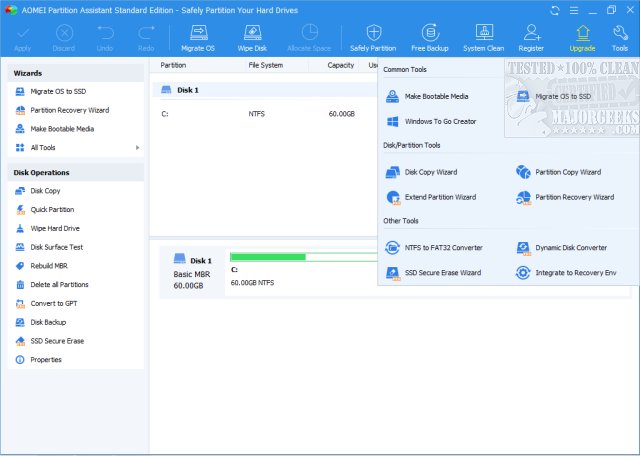
Aomei Partition Assistant has just released version 10.11.0, a powerful disk partition management tool that offers a range of features including a Partition Manager and a one-click Extend Partition Wizard. This software is designed to simplify the often frustrating process of managing disk partitions, making it a valuable asset for anyone who has dealt with running out of disk space or complex partitioning tasks.
Aomei Partition Assistant stands out from Windows' built-in partition manager, which can be cumbersome and limited. This software allows users to efficiently resize, merge, clone, and convert partitions without risking data loss. Key features include the ability to resize and move partitions, convert between MBR (Master Boot Record) and GPT (GUID Partition Table) formats without data loss, and migrate the operating system to a faster SSD. Additionally, users can create bootable media to recover systems that refuse to boot and utilize a Windows To Go feature to run their OS from a USB drive on any computer.
The software caters to a diverse audience. Gamers can optimize their storage for game libraries, IT professionals can manage operating systems across multiple machines, and home users benefit from its intuitive interface, making complex tasks accessible without technical expertise.
In summary, Aomei Partition Assistant is an essential tool for anyone looking to take control of their hard drive. Its advanced capabilities, combined with an easy-to-use interface, provide a seamless experience for users needing to manage their disk space effectively. Whether you're upgrading your storage or tackling partition issues, Aomei Partition Assistant offers a comprehensive solution that outperforms built-in options. Consider it your go-to software for hassle-free disk management.
Looking ahead, future updates could further enhance the tool's capabilities by including more automation features, cloud integration for backups, or even compatibility with newer file systems, ensuring that users continue to have the most advanced and user-friendly experience possible
Aomei Partition Assistant stands out from Windows' built-in partition manager, which can be cumbersome and limited. This software allows users to efficiently resize, merge, clone, and convert partitions without risking data loss. Key features include the ability to resize and move partitions, convert between MBR (Master Boot Record) and GPT (GUID Partition Table) formats without data loss, and migrate the operating system to a faster SSD. Additionally, users can create bootable media to recover systems that refuse to boot and utilize a Windows To Go feature to run their OS from a USB drive on any computer.
The software caters to a diverse audience. Gamers can optimize their storage for game libraries, IT professionals can manage operating systems across multiple machines, and home users benefit from its intuitive interface, making complex tasks accessible without technical expertise.
In summary, Aomei Partition Assistant is an essential tool for anyone looking to take control of their hard drive. Its advanced capabilities, combined with an easy-to-use interface, provide a seamless experience for users needing to manage their disk space effectively. Whether you're upgrading your storage or tackling partition issues, Aomei Partition Assistant offers a comprehensive solution that outperforms built-in options. Consider it your go-to software for hassle-free disk management.
Looking ahead, future updates could further enhance the tool's capabilities by including more automation features, cloud integration for backups, or even compatibility with newer file systems, ensuring that users continue to have the most advanced and user-friendly experience possible
Aomei Partition Assistant 10.11.0 released
Aomei Partition Assistant Standard is a comprehensive disk partition solution, including a Partition Manager and a one-click Extend Partition Wizard.