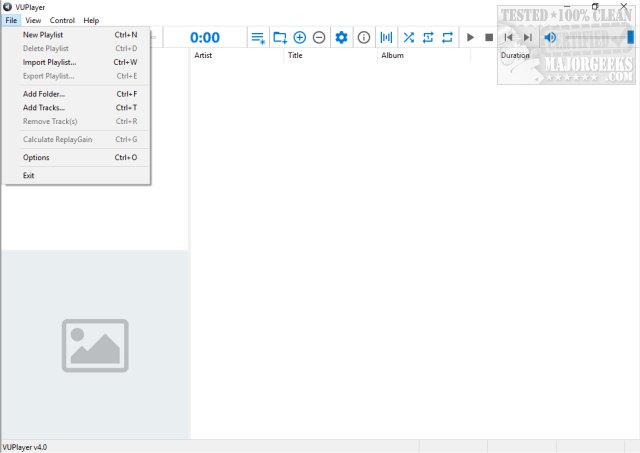
VUPlayer version 4.24 has been released, showcasing its capabilities as a lightweight Open Source audio player. This application offers a variety of playlist options and customizable appearance settings, making it a versatile choice for users. The user interface features a clean design with a white background, black fonts, and blue icons for easy navigation.
The software organizes its functions across four tabs: File, View, Control, and Help, with common actions accessible via icons at the top of the interface. Users can easily add, remove, or modify playlists, and the application supports the import and export of playlists in M3U or PLS formats. By default, VUPlayer plays songs in sequential order, although some users have reported occasional skips, which could be related to testing conducted in a VMware environment rather than the application itself.
VUPlayer's toolbar includes essential features such as Seek Control, Progress Counter, button controls, and Volume Control. Remarkably, while playing music, the app utilizes around 22MB of memory and often consumes less than 1% of CPU resources, making it an efficient choice for users who require a lightweight application. With a file size under 5MB, VUPlayer is designed for efficiency and ease of use. Additionally, portable versions can be accessed from the homepage, adding to its convenience.
Overall, while VUPlayer faces competition as an audio player, its minimal resource usage, user-friendly interface, and feature set position it as a notable option for those seeking an efficient audio player. With continued updates and improvements, it may further establish itself in the market. For users experiencing sound issues, related resources on enhancing audio performance in Windows are also available
The software organizes its functions across four tabs: File, View, Control, and Help, with common actions accessible via icons at the top of the interface. Users can easily add, remove, or modify playlists, and the application supports the import and export of playlists in M3U or PLS formats. By default, VUPlayer plays songs in sequential order, although some users have reported occasional skips, which could be related to testing conducted in a VMware environment rather than the application itself.
VUPlayer's toolbar includes essential features such as Seek Control, Progress Counter, button controls, and Volume Control. Remarkably, while playing music, the app utilizes around 22MB of memory and often consumes less than 1% of CPU resources, making it an efficient choice for users who require a lightweight application. With a file size under 5MB, VUPlayer is designed for efficiency and ease of use. Additionally, portable versions can be accessed from the homepage, adding to its convenience.
Overall, while VUPlayer faces competition as an audio player, its minimal resource usage, user-friendly interface, and feature set position it as a notable option for those seeking an efficient audio player. With continued updates and improvements, it may further establish itself in the market. For users experiencing sound issues, related resources on enhancing audio performance in Windows are also available
VUPlayer 4.24 released
VUPlayer is a lightweight Open Source audio player with numerous playlists and appearance settings.