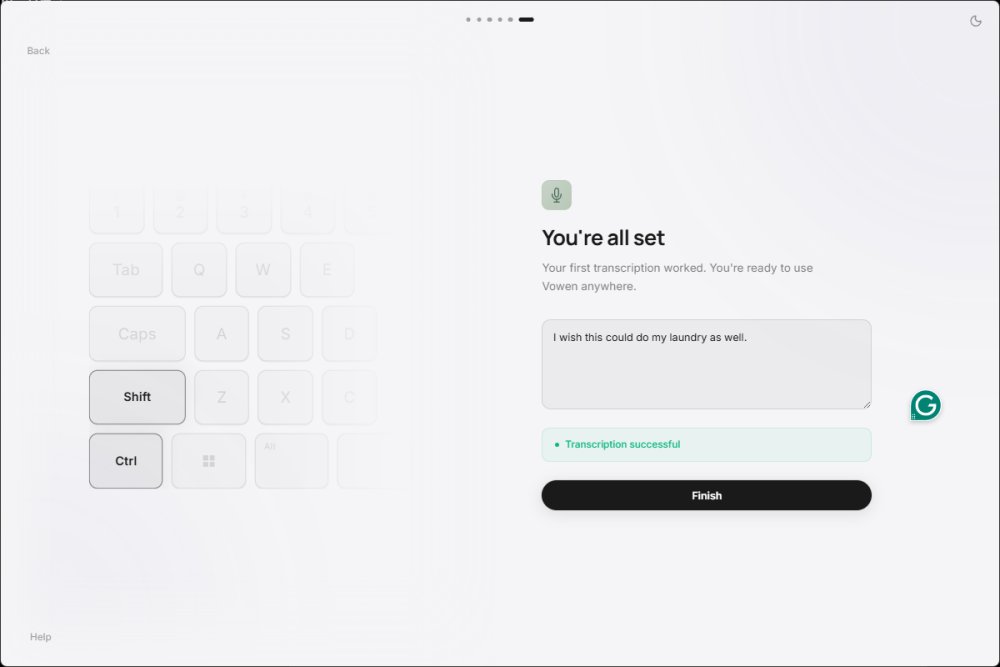
Vowen is a free, privacy-centric voice productivity application designed for both Windows and macOS platforms. It specializes in converting speech to text through offline AI transcription, making it especially beneficial for writers, coders, and professionals engaged in virtual meetings. One of Vowen's standout features is its commitment to user privacy, as it processes dictation locally rather than sending recordings to the cloud—unless the user opts to do so.
Key Features and Functionality
Vowen functions as a system-wide dictation tool, allowing users to dictate text into practically any application by holding a designated shortcut (Control+Shift) and speaking. This capability proves invaluable for tasks such as composing emails, taking notes during meetings, and drafting documentation. A hands-free mode (Control+H) further enhances usability, particularly when users' hands are occupied. Additionally, Vowen can capture and organize meeting notes by recording discussions, although users are encouraged to test this feature for optimal results.
The core functionality of Vowen relies on offline AI transcription utilizing local Whisper-based speech recognition, which is particularly appealing for users concerned about privacy. This allows for secure handling of sensitive information such as internal business materials or personal notes.
For those looking to expand their capabilities, Vowen supports integration with external AI services like OpenAI, Claude, or Gemini, provided users have the necessary API keys. This allows advanced features such as summarization and code assistance. However, the setup for these integrations may feel more suited to tech-savvy users rather than casual ones.
Vowen also includes voice command functionality, enabling users to execute tasks such as launching applications or managing workflows through spoken commands, enhancing productivity further.
User Experience and Accessibility
Using Vowen is straightforward: users install the app, select their microphone, and define their desired dictation shortcut. After this initial setup, they can begin dictating text into any field. While installation may trigger an "unknown author" warning common with new applications, it is important for users to remain vigilant about security.
The interface is user-friendly, although some advanced features may require a learning curve. Beginners may initially find the setup for AI integrations and automation commands a bit overwhelming, but with a bit of exploration, most users should quickly become comfortable with the app's capabilities.
Conclusion and Recommendations
Vowen stands out as a valuable tool for users seeking fast, offline speech-to-text capabilities while prioritizing privacy. Its system-wide dictation, optional email registration, and advanced AI integrations offer a comprehensive solution for those who write, code, or engage in meetings frequently.
While some aspects may not be as intuitive for casual users—particularly the setup of API keys and automation workflows—the overall functionality is robust and beneficial. Vowen's ability to provide local AI models is a significant advantage, though users should be mindful of storage space requirements.
In summary, Vowen is an excellent choice for anyone looking to enhance their productivity through voice dictation, especially for those who prefer not to rely on cloud services. Given its effectiveness, the app has proven to be particularly helpful for users experiencing issues such as carpal tunnel syndrome, allowing for a smoother workflow with minimal typing. Overall, Vowen is a highly recommended addition for anyone seeking to streamline their writing and dictation processes
Key Features and Functionality
Vowen functions as a system-wide dictation tool, allowing users to dictate text into practically any application by holding a designated shortcut (Control+Shift) and speaking. This capability proves invaluable for tasks such as composing emails, taking notes during meetings, and drafting documentation. A hands-free mode (Control+H) further enhances usability, particularly when users' hands are occupied. Additionally, Vowen can capture and organize meeting notes by recording discussions, although users are encouraged to test this feature for optimal results.
The core functionality of Vowen relies on offline AI transcription utilizing local Whisper-based speech recognition, which is particularly appealing for users concerned about privacy. This allows for secure handling of sensitive information such as internal business materials or personal notes.
For those looking to expand their capabilities, Vowen supports integration with external AI services like OpenAI, Claude, or Gemini, provided users have the necessary API keys. This allows advanced features such as summarization and code assistance. However, the setup for these integrations may feel more suited to tech-savvy users rather than casual ones.
Vowen also includes voice command functionality, enabling users to execute tasks such as launching applications or managing workflows through spoken commands, enhancing productivity further.
User Experience and Accessibility
Using Vowen is straightforward: users install the app, select their microphone, and define their desired dictation shortcut. After this initial setup, they can begin dictating text into any field. While installation may trigger an "unknown author" warning common with new applications, it is important for users to remain vigilant about security.
The interface is user-friendly, although some advanced features may require a learning curve. Beginners may initially find the setup for AI integrations and automation commands a bit overwhelming, but with a bit of exploration, most users should quickly become comfortable with the app's capabilities.
Conclusion and Recommendations
Vowen stands out as a valuable tool for users seeking fast, offline speech-to-text capabilities while prioritizing privacy. Its system-wide dictation, optional email registration, and advanced AI integrations offer a comprehensive solution for those who write, code, or engage in meetings frequently.
While some aspects may not be as intuitive for casual users—particularly the setup of API keys and automation workflows—the overall functionality is robust and beneficial. Vowen's ability to provide local AI models is a significant advantage, though users should be mindful of storage space requirements.
In summary, Vowen is an excellent choice for anyone looking to enhance their productivity through voice dictation, especially for those who prefer not to rely on cloud services. Given its effectiveness, the app has proven to be particularly helpful for users experiencing issues such as carpal tunnel syndrome, allowing for a smoother workflow with minimal typing. Overall, Vowen is a highly recommended addition for anyone seeking to streamline their writing and dictation processes
Vowen 0.4.10 released
Vowen is a free, privacy-focused voice productivity app for Windows and macOS that turns speech into text using offline AI transcription.