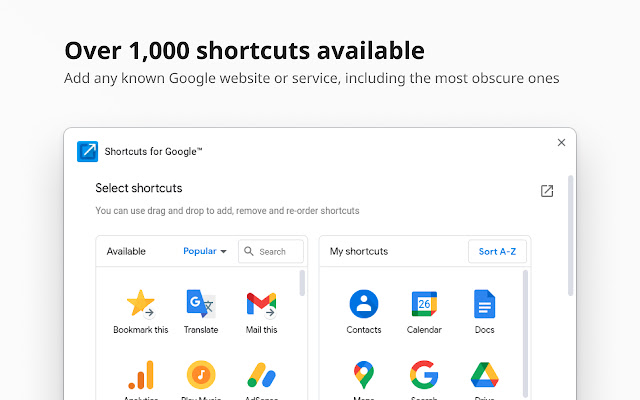
The latest release of Shortcuts for Google, version 31.6.0, enhances the Chrome extension that provides users with access to over 1,000 Google shortcuts. This extension allows users to display these shortcuts as buttons in a compact popup next to their browser's address bar, making it easier to navigate various Google services such as Gmail, Google Drive, Google Keep, Google Maps, and Google Calendar with just two clicks.
Key features of Shortcuts for Google include:
- Access to a continuously updated library of over 1,000 Google shortcuts.
- Support for three different icon sizes: 16px, 32px, and 64px.
- The ability to add custom URL buttons, allowing users to link to sites like Facebook.
- Options to rename services for better personalization.
- Integration features for quick actions like "Gmail this!", "Map this!", and "Bookmark this!".
This extension not only improves the efficiency of accessing Google services but also offers customization options to enhance user experience.
To further extend the functionality of Shortcuts for Google, future updates could consider adding features such as:
- User-defined categories for organizing shortcuts based on preference or frequency of use.
- A search bar within the popup for quickly finding shortcuts.
- Browser synchronization so that users can access their custom shortcuts across different devices.
- Integration with other productivity tools or platforms to broaden its functionality beyond just Google services.
- Regularly featured shortcuts based on trending or seasonal events to keep the content fresh and relevant.
Overall, Shortcuts for Google aims to streamline the user experience on Chrome by providing quick access to essential Google services while allowing for personalization and expansion in future updates
Key features of Shortcuts for Google include:
- Access to a continuously updated library of over 1,000 Google shortcuts.
- Support for three different icon sizes: 16px, 32px, and 64px.
- The ability to add custom URL buttons, allowing users to link to sites like Facebook.
- Options to rename services for better personalization.
- Integration features for quick actions like "Gmail this!", "Map this!", and "Bookmark this!".
This extension not only improves the efficiency of accessing Google services but also offers customization options to enhance user experience.
To further extend the functionality of Shortcuts for Google, future updates could consider adding features such as:
- User-defined categories for organizing shortcuts based on preference or frequency of use.
- A search bar within the popup for quickly finding shortcuts.
- Browser synchronization so that users can access their custom shortcuts across different devices.
- Integration with other productivity tools or platforms to broaden its functionality beyond just Google services.
- Regularly featured shortcuts based on trending or seasonal events to keep the content fresh and relevant.
Overall, Shortcuts for Google aims to streamline the user experience on Chrome by providing quick access to essential Google services while allowing for personalization and expansion in future updates
Shortcuts for Google 31.6.0 released
Shortcuts for Google is a Chrome extension that allows you to choose from 1000+ Google shortcuts to show up as buttons in a space-saving popup.