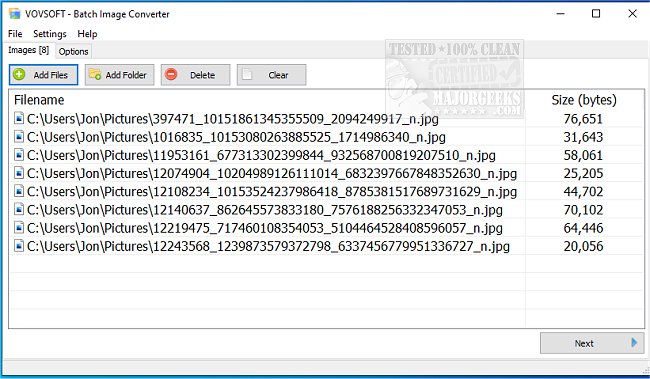
VOVSOFT has announced the release of Batch Image Converter 2.4, a user-friendly application designed for quick batch conversions between various graphic formats. This software streamlines the process, allowing users to convert both single and multiple images effortlessly through its intuitive interface. Users can easily add files or entire folders to batch process them, and they have the flexibility to choose the destination for the converted files.
To utilize the application, users simply select their desired output image format from options including PNG, WEBP, JPEG, TIFF, BMP, GIF, ICO, and WMP, and proceed to convert the original images. A notable feature is the installer’s option to create a shortcut in the SendTo directory, enabling users to convert selected files directly from the context menu with a right-click. Additionally, the application offers a convert to greyscale option, catering to specific user needs.
VOVSOFT Batch Image Converter stands out as an effective tool for efficient image conversions, providing enough functionality to appeal to both tech-savvy individuals and those who may be less familiar with technology.
In an effort to enhance user experience, future updates could include more advanced features such as image editing capabilities, support for additional formats, and enhanced batch processing options. Moreover, integrating cloud storage compatibility would allow users to convert images stored online, further increasing the app's versatility. As digital image management continues to evolve, tools like VOVSOFT Batch Image Converter will remain essential for users seeking efficient solutions for their graphic conversion needs
To utilize the application, users simply select their desired output image format from options including PNG, WEBP, JPEG, TIFF, BMP, GIF, ICO, and WMP, and proceed to convert the original images. A notable feature is the installer’s option to create a shortcut in the SendTo directory, enabling users to convert selected files directly from the context menu with a right-click. Additionally, the application offers a convert to greyscale option, catering to specific user needs.
VOVSOFT Batch Image Converter stands out as an effective tool for efficient image conversions, providing enough functionality to appeal to both tech-savvy individuals and those who may be less familiar with technology.
In an effort to enhance user experience, future updates could include more advanced features such as image editing capabilities, support for additional formats, and enhanced batch processing options. Moreover, integrating cloud storage compatibility would allow users to convert images stored online, further increasing the app's versatility. As digital image management continues to evolve, tools like VOVSOFT Batch Image Converter will remain essential for users seeking efficient solutions for their graphic conversion needs
VOVSOFT Batch Image Converter 2.4 released
VOVSOFT Batch Image Converter allows speedy batch conversions between graphic formats.