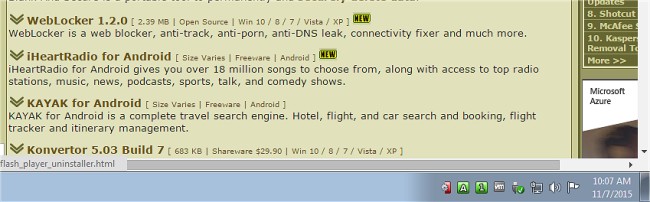
TrayStatus 5.2 has been released, introducing a handy utility that enhances your computer experience by providing visual indicators for key functionalities directly in your system tray. This tool is particularly beneficial for users with notebooks or keyboards that lack dedicated indicator lights for caps lock, number lock, or scroll lock. Additionally, it caters to those without a hard drive activity light.
With TrayStatus, you can easily monitor essential statuses such as Num Lock, Caps Lock, Scroll Lock, and the activity of your hard drive, which includes read and write speeds displayed through a tooltip. The utility also tracks the status of modifier keys, including Alt, Ctrl, Shift, and Windows keys, making it a comprehensive solution for keyboard status monitoring.
This software not only improves your workflow by keeping you informed about your keyboard's state but also has potential productivity benefits. For instance, being aware of your Caps Lock status can help prevent typing errors, while knowing your hard drive activity can assist in managing system performance.
In summary, TrayStatus is an essential tool for anyone looking to enhance their keyboard usability and productivity, especially for those who may be using devices without built-in indicators. As technology continues to evolve, utilities like TrayStatus will remain vital in providing users with the information they need at a glance
With TrayStatus, you can easily monitor essential statuses such as Num Lock, Caps Lock, Scroll Lock, and the activity of your hard drive, which includes read and write speeds displayed through a tooltip. The utility also tracks the status of modifier keys, including Alt, Ctrl, Shift, and Windows keys, making it a comprehensive solution for keyboard status monitoring.
This software not only improves your workflow by keeping you informed about your keyboard's state but also has potential productivity benefits. For instance, being aware of your Caps Lock status can help prevent typing errors, while knowing your hard drive activity can assist in managing system performance.
In summary, TrayStatus is an essential tool for anyone looking to enhance their keyboard usability and productivity, especially for those who may be using devices without built-in indicators. As technology continues to evolve, utilities like TrayStatus will remain vital in providing users with the information they need at a glance
TrayStatus 5.2 released
TrayStatus is a small utility designed to provide indicator lights for caps lock, number lock, scroll lock and hard drive activity status right in your systray.