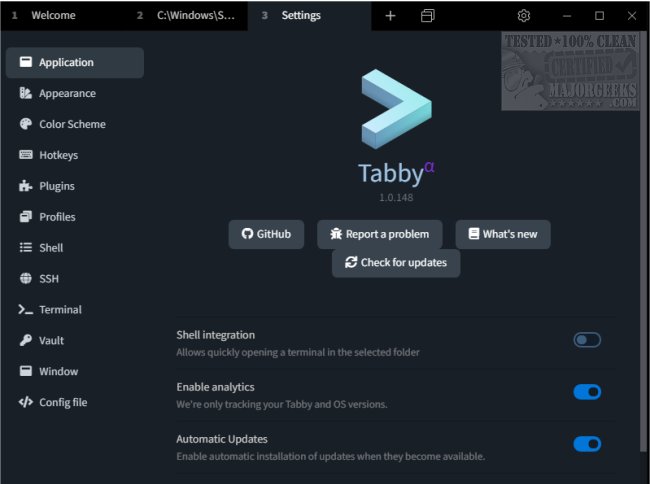
Tabby 1.0.235 has been released, marking a significant update to the terminal emulator formerly known as Terminus. This powerful tool is designed for various users, including developers, system administrators, and power users, providing a highly customizable terminal experience that functions as both an SSH client and a serial communication interface.
Key Features of Tabby:
- SSH and Serial Communication: Tabby enables secure connections to remote servers using SSH, ensuring safe data transmission and remote system management. It also supports serial connections, which is essential for interacting with hardware devices and embedded systems.
- Extensive Customization: Users can personalize their terminal environment with a multitude of configuration options, including themes, customizable keybindings, and layouts. This flexibility allows individuals to optimize their workspace for productivity and comfort.
- User-Friendly Interface: The modern, multi-tabbed graphical user interface (GUI) facilitates easy management of multiple sessions, boosting efficiency for users who juggle various tasks.
- Comprehensive Command Line Tool: Tabby supports several command-line environments, including CMD, PowerShell, WSL, Cygwin, and Git-Bash on Windows, making it a robust tool for command-line operations and remote scripting.
Additional Features Include:
- Integrated SSH client and connection manager
- Integrated serial terminal for hardware interfacing
- Theming and color schemes for aesthetic personalization
- Fully configurable shortcuts and multi-chord shortcuts for efficiency
- Split panes for simultaneous session management
- Tab memory for easy navigation
- Direct file transfer capabilities via Zmodem during SSH sessions
- Full Unicode support, accommodating diverse character sets
- Support for fast-flowing outputs without performance issues
- Enhanced shell experience on Windows with tab-completion via Clink
- Secure storage for SSH secrets and configurations within an encrypted container
Conclusion: Tabby stands out as a solid choice for users seeking a versatile and high-performance terminal emulator. With its comprehensive feature set, it not only enhances the terminal experience but also caters to the specific needs of power users who require a reliable tool for both development and system administration tasks. As Tabby evolves, it continues to solidify its place as an essential utility in the toolkit of tech enthusiasts and professionals alike
Key Features of Tabby:
- SSH and Serial Communication: Tabby enables secure connections to remote servers using SSH, ensuring safe data transmission and remote system management. It also supports serial connections, which is essential for interacting with hardware devices and embedded systems.
- Extensive Customization: Users can personalize their terminal environment with a multitude of configuration options, including themes, customizable keybindings, and layouts. This flexibility allows individuals to optimize their workspace for productivity and comfort.
- User-Friendly Interface: The modern, multi-tabbed graphical user interface (GUI) facilitates easy management of multiple sessions, boosting efficiency for users who juggle various tasks.
- Comprehensive Command Line Tool: Tabby supports several command-line environments, including CMD, PowerShell, WSL, Cygwin, and Git-Bash on Windows, making it a robust tool for command-line operations and remote scripting.
Additional Features Include:
- Integrated SSH client and connection manager
- Integrated serial terminal for hardware interfacing
- Theming and color schemes for aesthetic personalization
- Fully configurable shortcuts and multi-chord shortcuts for efficiency
- Split panes for simultaneous session management
- Tab memory for easy navigation
- Direct file transfer capabilities via Zmodem during SSH sessions
- Full Unicode support, accommodating diverse character sets
- Support for fast-flowing outputs without performance issues
- Enhanced shell experience on Windows with tab-completion via Clink
- Secure storage for SSH secrets and configurations within an encrypted container
Conclusion: Tabby stands out as a solid choice for users seeking a versatile and high-performance terminal emulator. With its comprehensive feature set, it not only enhances the terminal experience but also caters to the specific needs of power users who require a reliable tool for both development and system administration tasks. As Tabby evolves, it continues to solidify its place as an essential utility in the toolkit of tech enthusiasts and professionals alike
Tabby 1.0.235 released
Tabby (formerly Terminus) is a versatile and highly customizable terminal emulator that serves as an SSH client and a serial communication tool.