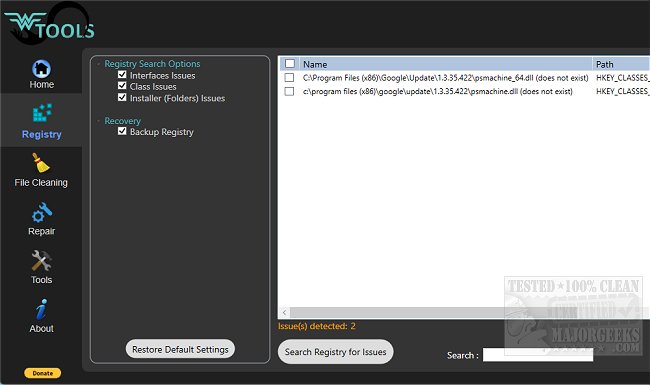
Wagnardsoft Tools has released version 1.0.9.0, designed to enhance system performance by cleaning up unnecessary data. Developed by the creators of Display Driver Uninstaller, Wagnardsoft Tools (WTools) offers a range of features aimed at optimizing your Windows environment. Key functionalities include the removal of temporary files, cleaning unused registry keys, and deleting browser data, all of which help reclaim valuable disk space.
In addition to these cleaning capabilities, WTools can repair corrupted Windows system files, perform custom-size SSD trimming, and provide elevated access to command prompt (CMD.exe) and registry editor (REGEDIT) for advanced users. The tool also includes the ability to enable or disable Message Signaled Interrupts (MSI) for Nvidia graphics cards released prior to the RTX 3000 series, with plans to extend support to all PCI devices in future updates.
Users are advised to exercise caution when using the registry cleaning features, as deleting important registry keys can lead to system instability. It is recommended to create a backup of the registry before making any changes.
For those seeking effective disk cleanup solutions, Wagnardsoft Tools stands out among alternatives like CCleaner, Wise Disk Cleaner, and PrivaZer. Additionally, users can explore Windows' built-in Storage Sense feature for automated junk file deletion and learn about secure file deletion methods using PowerShell.
As technology continues to evolve, tools like Wagnardsoft Tools will likely expand their functionality to meet the growing needs of users looking to optimize their system performance and maintain a clutter-free digital environment
In addition to these cleaning capabilities, WTools can repair corrupted Windows system files, perform custom-size SSD trimming, and provide elevated access to command prompt (CMD.exe) and registry editor (REGEDIT) for advanced users. The tool also includes the ability to enable or disable Message Signaled Interrupts (MSI) for Nvidia graphics cards released prior to the RTX 3000 series, with plans to extend support to all PCI devices in future updates.
Users are advised to exercise caution when using the registry cleaning features, as deleting important registry keys can lead to system instability. It is recommended to create a backup of the registry before making any changes.
For those seeking effective disk cleanup solutions, Wagnardsoft Tools stands out among alternatives like CCleaner, Wise Disk Cleaner, and PrivaZer. Additionally, users can explore Windows' built-in Storage Sense feature for automated junk file deletion and learn about secure file deletion methods using PowerShell.
As technology continues to evolve, tools like Wagnardsoft Tools will likely expand their functionality to meet the growing needs of users looking to optimize their system performance and maintain a clutter-free digital environment
Wagnardsoft Tools 1.0.9.0 released
Wagnardsoft Tools (WTools), from the authors of Display Driver Uninstaller, will help clean unused registry keys, remove temp files, and more.