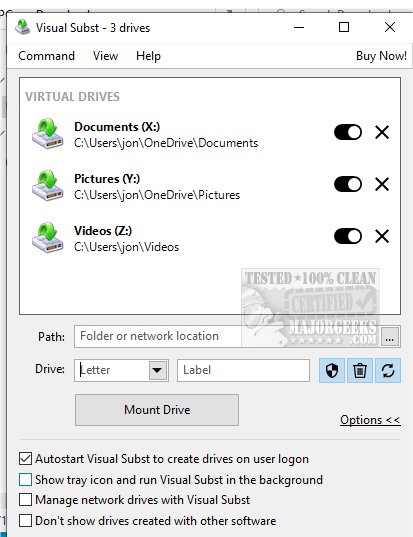
Visual Subst 6.0 has been launched, featuring an intuitive user interface that allows users to manage both virtual and network drives with ease. This tool addresses key limitations of the traditional 'SUBST' and 'NET USE' commands, offering significant enhancements for file management.
Visual Subst is a powerful application designed to simplify the management of virtual drives—created from folders on your computer—and network drives. It introduces several advantages:
1. Easy Drive Label Editing: Users can quickly modify drive labels, improving organization.
2. UAC Compliance: It creates drives that comply with User Account Control, allowing applications that require elevated permissions to function seamlessly.
3. Recycle Bin Management: Users can manage deleted items from the virtual drives more effectively.
4. Automatic Restoration: Virtual drives can be set to restore automatically after a system reboot, ensuring usability without manual intervention.
Visual Subst allows users to create virtual drives from any folder, assigning custom drive letters to streamline data transfers from removable storage. This capability significantly improves file management and accessibility, making it easier to find and work with files.
The application features a simple, efficient interface, with a well-organized list displaying all added virtual drives for easy access. A compact toolbar houses all necessary functions, enabling users to add, modify, or remove drives with just a few clicks. This design focuses on minimizing complexity, allowing users to concentrate on their work.
To add a new virtual drive, users can only add one item at a time, selecting an available drive letter to avoid conflicts. Upon closing Visual Subst, any created virtual drives are automatically dismounted. However, users can enable a feature to load all virtual drives at system startup, ensuring they are ready for use as soon as the desktop is accessed, thus streamlining workflow.
Visual Subst is an invaluable tool that transforms the file management experience. By providing seamless shortcuts to frequently accessed folders, it empowers users to efficiently transfer files between storage devices, enhancing overall productivity. With its intuitive interface and robust features, Visual Subst is a game-changer for those looking to optimize their digital organization.
As technology continues to evolve, Visual Subst may expand its functionality to incorporate cloud storage management and additional automation features. Future updates could focus on integrating more advanced security options, supporting various file formats, and improving compatibility with different operating systems. Therefore, users can look forward to enhanced productivity and ease of access in managing their digital files and drives
What is Visual Subst?
Visual Subst is a powerful application designed to simplify the management of virtual drives—created from folders on your computer—and network drives. It introduces several advantages:
1. Easy Drive Label Editing: Users can quickly modify drive labels, improving organization.
2. UAC Compliance: It creates drives that comply with User Account Control, allowing applications that require elevated permissions to function seamlessly.
3. Recycle Bin Management: Users can manage deleted items from the virtual drives more effectively.
4. Automatic Restoration: Virtual drives can be set to restore automatically after a system reboot, ensuring usability without manual intervention.
Simplified Data Transfers & File Management
Visual Subst allows users to create virtual drives from any folder, assigning custom drive letters to streamline data transfers from removable storage. This capability significantly improves file management and accessibility, making it easier to find and work with files.
User-Friendly Interface
The application features a simple, efficient interface, with a well-organized list displaying all added virtual drives for easy access. A compact toolbar houses all necessary functions, enabling users to add, modify, or remove drives with just a few clicks. This design focuses on minimizing complexity, allowing users to concentrate on their work.
How to Use Visual Subst
To add a new virtual drive, users can only add one item at a time, selecting an available drive letter to avoid conflicts. Upon closing Visual Subst, any created virtual drives are automatically dismounted. However, users can enable a feature to load all virtual drives at system startup, ensuring they are ready for use as soon as the desktop is accessed, thus streamlining workflow.
Geek Verdict
Visual Subst is an invaluable tool that transforms the file management experience. By providing seamless shortcuts to frequently accessed folders, it empowers users to efficiently transfer files between storage devices, enhancing overall productivity. With its intuitive interface and robust features, Visual Subst is a game-changer for those looking to optimize their digital organization.
Looking Ahead
As technology continues to evolve, Visual Subst may expand its functionality to incorporate cloud storage management and additional automation features. Future updates could focus on integrating more advanced security options, supporting various file formats, and improving compatibility with different operating systems. Therefore, users can look forward to enhanced productivity and ease of access in managing their digital files and drives
Visual Subst 6.0 released
Visual Subst offers an intuitive and straightforward user interface designed for effectively managing both virtual and network drives simultaneously.