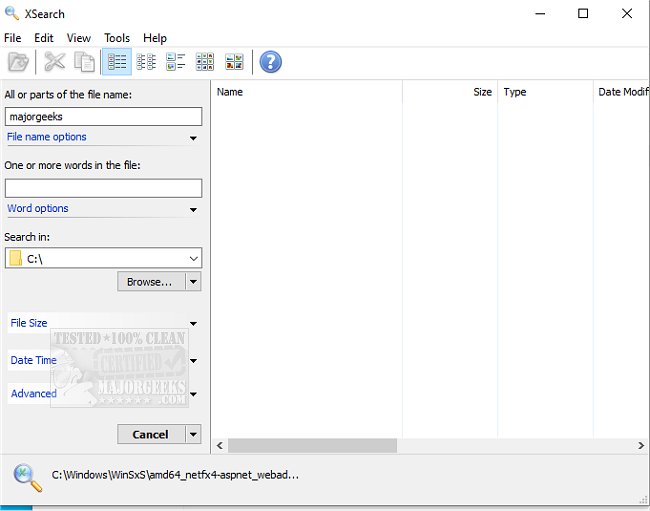
XSearch 1.1.0 has been released, offering an enhanced alternative to Windows Search without the need for indexing. While indexing improves search speed and efficiency, it often involves ongoing background scanning, which some users prefer to avoid. XSearch caters to these users by allowing searches based on file name, size, date, time, and even the content of files, offering more precise filtering options than Windows Search.
Unlike its counterpart, XSearch enables users to specify exact file sizes in various units (Byte, KB, MB, GB) and different date and time parameters (such as modified, created, or last visited). It also provides advanced search options for words or filenames, including "any," "all," "exact phrase," and "without," with additional functionality for case sensitivity and hexadecimal values.
A standout feature of XSearch is the included HexView tool, which allows users to view files in hexadecimal format, functioning as a read-only editor. The tool supports large files and offers drag-and-drop functionality, making it easy to move found files to different locations. Users can also delete, copy, cut, or rename files directly from the search results.
With many additional features not available in Windows Search, XSearch is ideal for users needing more complex search capabilities, such as specific size and date filters or advanced filename options. Its user-friendly interface and portability make it suitable for a wide range of users, from casual to advanced.
In summary, XSearch 1.1.0 is a robust tool for anyone looking for a more customizable search experience without the overhead of indexing. Its extensive options and ease of use position it as a valuable addition to any user's toolkit, especially for those who frequently work with files of varying sizes and types
Unlike its counterpart, XSearch enables users to specify exact file sizes in various units (Byte, KB, MB, GB) and different date and time parameters (such as modified, created, or last visited). It also provides advanced search options for words or filenames, including "any," "all," "exact phrase," and "without," with additional functionality for case sensitivity and hexadecimal values.
A standout feature of XSearch is the included HexView tool, which allows users to view files in hexadecimal format, functioning as a read-only editor. The tool supports large files and offers drag-and-drop functionality, making it easy to move found files to different locations. Users can also delete, copy, cut, or rename files directly from the search results.
With many additional features not available in Windows Search, XSearch is ideal for users needing more complex search capabilities, such as specific size and date filters or advanced filename options. Its user-friendly interface and portability make it suitable for a wide range of users, from casual to advanced.
In summary, XSearch 1.1.0 is a robust tool for anyone looking for a more customizable search experience without the overhead of indexing. Its extensive options and ease of use position it as a valuable addition to any user's toolkit, especially for those who frequently work with files of varying sizes and types
XSearch 1.1.0 released
XSearch provides you with an extended version of Windows Search without indexing.