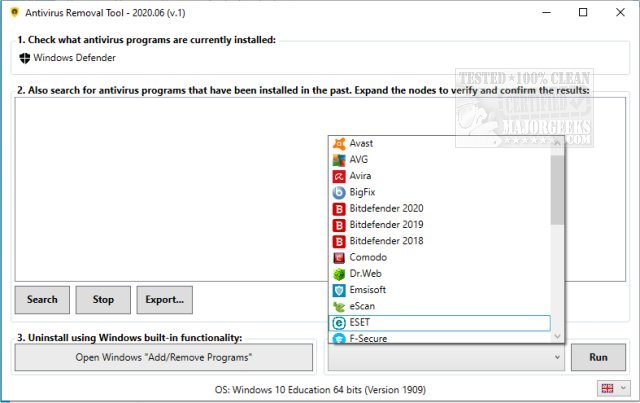
The Antivirus Removal Tool 2026.11 (v.1) has been released, offering users a portable solution for detecting and uninstalling multiple antivirus software from their systems. Developed by the same team behind the Windows Repair Toolbox, this tool can identify both current and previous antivirus installations and provides official specialized uninstallers. These uninstallers ensure that all remnants, including files, drivers, services, and registry records, are completely removed from the machine.
This tool serves as a centralized hub for various uninstallers, covering a wide range of antivirus programs from popular names like Avast to ZoneAlarm. Its user-friendly interface is designed to be intuitive, displaying all installed antivirus software at a glance, even highlighting those that may have been forgotten.
The Antivirus Removal Tool is organized into four main sections: identifying currently installed antivirus programs, searching for leftover files from past installations, utilizing Windows' built-in uninstallation functionality, and running manufacturer-specific uninstallers.
This tool is particularly useful in several scenarios:
- When installing a new antivirus, it helps to thoroughly remove the current program and any remnants from previous installations to avoid conflicts.
- If a standard uninstallation fails, resulting in a malfunctioning system.
- After a normal uninstall, if issues arise with the recently removed antivirus.
- In cases where multiple active antivirus programs are causing system problems, and complete removal is necessary.
For comprehensive antivirus protection, users are also encouraged to consider Malwarebytes, which safeguards devices, data, and privacy effectively.
In conclusion, the Antivirus Removal Tool 2026.11 is a valuable resource for users seeking to manage their antivirus software efficiently, ensuring their systems run smoothly without the complications of leftover files or multiple conflicting programs. It simplifies the process of maintaining a clean and secure computing environment. Additionally, as cybersecurity threats continue to evolve, having reliable tools like this one is essential for optimal system performance and security
This tool serves as a centralized hub for various uninstallers, covering a wide range of antivirus programs from popular names like Avast to ZoneAlarm. Its user-friendly interface is designed to be intuitive, displaying all installed antivirus software at a glance, even highlighting those that may have been forgotten.
The Antivirus Removal Tool is organized into four main sections: identifying currently installed antivirus programs, searching for leftover files from past installations, utilizing Windows' built-in uninstallation functionality, and running manufacturer-specific uninstallers.
This tool is particularly useful in several scenarios:
- When installing a new antivirus, it helps to thoroughly remove the current program and any remnants from previous installations to avoid conflicts.
- If a standard uninstallation fails, resulting in a malfunctioning system.
- After a normal uninstall, if issues arise with the recently removed antivirus.
- In cases where multiple active antivirus programs are causing system problems, and complete removal is necessary.
For comprehensive antivirus protection, users are also encouraged to consider Malwarebytes, which safeguards devices, data, and privacy effectively.
In conclusion, the Antivirus Removal Tool 2026.11 is a valuable resource for users seeking to manage their antivirus software efficiently, ensuring their systems run smoothly without the complications of leftover files or multiple conflicting programs. It simplifies the process of maintaining a clean and secure computing environment. Additionally, as cybersecurity threats continue to evolve, having reliable tools like this one is essential for optimal system performance and security
Antivirus Removal Tool 2026.11 (v.1) released
Antivirus Removal Tool provides a portable option for detecting and then uninstalling multiple pieces of antivirus software from your machine.