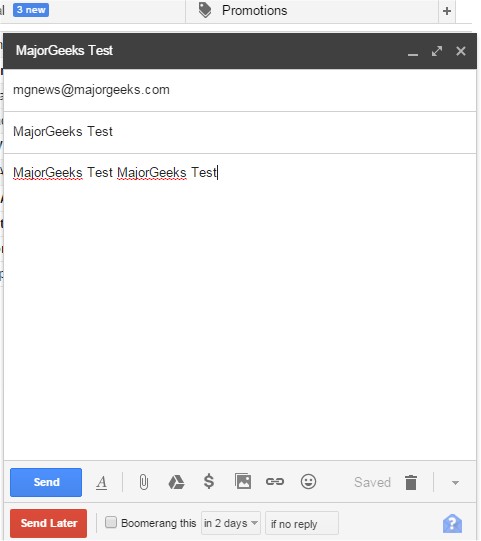
The latest release of Boomerang for Gmail (version 1.9.10) is now available for multiple browsers, including Chrome, Firefox, Edge, Safari, and Opera. This tool enhances email management by allowing users to schedule when their emails are sent, making it user-friendly with features like a calendar picker and a text box that can interpret phrases such as "next Friday" to specify the desired send time.
In addition to scheduling, Boomerang offers functionalities to help keep your inbox organized. Users can set reminders for emails by clicking the Boomerang button, allowing them to archive messages and restore them as unread when needed. This feature is particularly beneficial for various scenarios, such as:
- Sending birthday greetings on time.
- Managing projects and deadlines.
- Reminding oneself to pay bills.
- Following up with sales leads efficiently.
- Coordinating communication across different time zones.
- Handling travel confirmations, ensuring they're returned to the inbox on the day of the trip.
Furthermore, the text also hints at several tips for improving browsing experiences across various browsers, including Chrome and Firefox, as well as fun hidden games available on Google.
For an extended perspective, users can benefit from integrating Boomerang with other productivity tools and practices. For instance, combining Boomerang's scheduling capabilities with task management software could enhance project tracking. Additionally, businesses could leverage the follow-up features for customer relationship management, ensuring timely responses to inquiries. As remote work continues to rise, utilizing Boomerang can help streamline communication and improve overall efficiency in both personal and professional environments
In addition to scheduling, Boomerang offers functionalities to help keep your inbox organized. Users can set reminders for emails by clicking the Boomerang button, allowing them to archive messages and restore them as unread when needed. This feature is particularly beneficial for various scenarios, such as:
- Sending birthday greetings on time.
- Managing projects and deadlines.
- Reminding oneself to pay bills.
- Following up with sales leads efficiently.
- Coordinating communication across different time zones.
- Handling travel confirmations, ensuring they're returned to the inbox on the day of the trip.
Furthermore, the text also hints at several tips for improving browsing experiences across various browsers, including Chrome and Firefox, as well as fun hidden games available on Google.
For an extended perspective, users can benefit from integrating Boomerang with other productivity tools and practices. For instance, combining Boomerang's scheduling capabilities with task management software could enhance project tracking. Additionally, businesses could leverage the follow-up features for customer relationship management, ensuring timely responses to inquiries. As remote work continues to rise, utilizing Boomerang can help streamline communication and improve overall efficiency in both personal and professional environments
Boomerang Gmail for Chrome, Firefox, Edge, Safari, and Opera 1.9.10 released
Boomerang for Gmail allows you to schedule the time when your emails are sent and more.
Boomerang Gmail for Chrome, Firefox, Edge, Safari, and Opera 1.9.10 released @ MajorGeeks