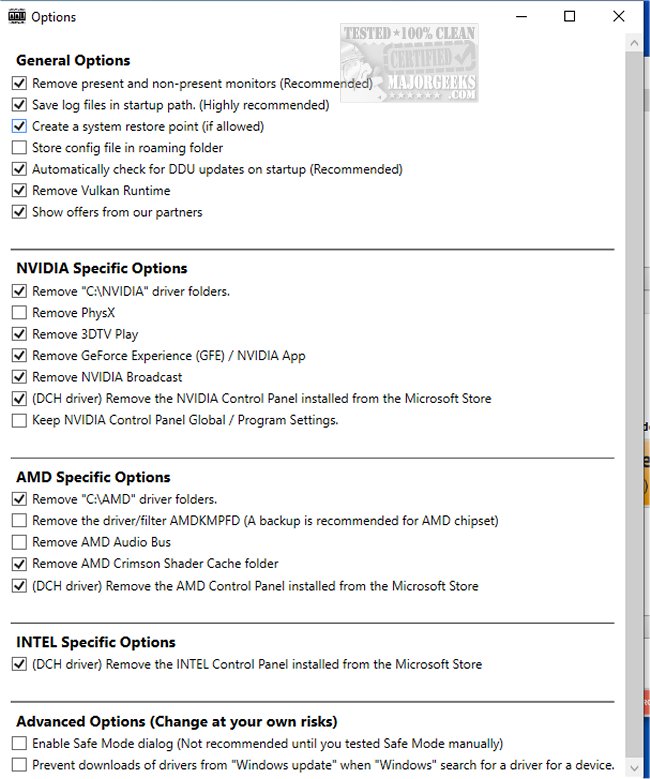
Display Driver Uninstaller (DDU) has just released version 18.1.6.3, enhancing its capabilities as a free tool designed to thoroughly remove graphics drivers from your system. This utility is particularly useful for users dealing with AMD, Nvidia, Intel, and even some Realtek audio drivers, ensuring that no remnants linger after uninstallation. This is crucial for anyone looking to switch GPU brands or clean up their system for a fresh driver installation.
DDU stands out from standard uninstallation processes by effectively cleaning up stray files, registry entries, and folders that can cause issues during driver upgrades. Its robust features include reminders to create system restore points for safety, ensuring that users can recover if anything goes wrong—a very rare occurrence when using DDU.
The program is optimized for a clean slate, making it easier to install new drivers without compatibility issues. It is compatible with Windows 7 through Windows 11, and for best results, it is recommended to run DDU in Safe Mode.
Some unique advantages of DDU include:
- Seamless switching between GPU brands without leftover driver conflicts.
- Resolution of installation issues caused by old drivers lingering on the system.
- A Force Removal option for stubborn drivers that refuse to uninstall.
- Support for audio driver clean-up to prevent sound issues.
For optimal use, it's advised to run DDU in Safe Mode, disconnect from the internet to prevent automatic driver reinstalls by Windows, and create a backup beforehand. However, it is not necessary to use DDU for every driver update—it's best reserved for significant changes or troubleshooting.
In summary, Display Driver Uninstaller (DDU) is an essential tool for anyone passionate about maintaining their PC. It not only simplifies the driver removal process but also ensures a hassle-free experience when updating or switching graphics drivers. For those who value a smooth-running system, DDU is a recommended download.
Extended Considerations:
In addition to the features highlighted, users should also keep an eye on future updates from DDU, as the developers may continue to enhance its functionality, ensuring compatibility with the latest hardware and software. For those who frequently experiment with graphics settings, DDU could prove invaluable in maintaining system integrity. Users might also benefit from community forums or user guides that provide tips and tricks for maximizing DDU's capabilities, fostering a better understanding of driver management.
Lastly, while DDU is a powerful tool, users should always stay informed about the latest driver developments for their specific hardware to ensure optimal performance. Emphasizing the importance of regular maintenance and updates can help prevent many common graphics-related issues
DDU stands out from standard uninstallation processes by effectively cleaning up stray files, registry entries, and folders that can cause issues during driver upgrades. Its robust features include reminders to create system restore points for safety, ensuring that users can recover if anything goes wrong—a very rare occurrence when using DDU.
The program is optimized for a clean slate, making it easier to install new drivers without compatibility issues. It is compatible with Windows 7 through Windows 11, and for best results, it is recommended to run DDU in Safe Mode.
Some unique advantages of DDU include:
- Seamless switching between GPU brands without leftover driver conflicts.
- Resolution of installation issues caused by old drivers lingering on the system.
- A Force Removal option for stubborn drivers that refuse to uninstall.
- Support for audio driver clean-up to prevent sound issues.
For optimal use, it's advised to run DDU in Safe Mode, disconnect from the internet to prevent automatic driver reinstalls by Windows, and create a backup beforehand. However, it is not necessary to use DDU for every driver update—it's best reserved for significant changes or troubleshooting.
In summary, Display Driver Uninstaller (DDU) is an essential tool for anyone passionate about maintaining their PC. It not only simplifies the driver removal process but also ensures a hassle-free experience when updating or switching graphics drivers. For those who value a smooth-running system, DDU is a recommended download.
Extended Considerations:
In addition to the features highlighted, users should also keep an eye on future updates from DDU, as the developers may continue to enhance its functionality, ensuring compatibility with the latest hardware and software. For those who frequently experiment with graphics settings, DDU could prove invaluable in maintaining system integrity. Users might also benefit from community forums or user guides that provide tips and tricks for maximizing DDU's capabilities, fostering a better understanding of driver management.
Lastly, while DDU is a powerful tool, users should always stay informed about the latest driver developments for their specific hardware to ensure optimal performance. Emphasizing the importance of regular maintenance and updates can help prevent many common graphics-related issues
Display Driver Uninstaller (DDU) 18.1.6.3 released
Display Driver Uninstaller (DDU) is a freeware graphics driver removal tool that helps remove all remnants of AMD, Nvidia, and Intel graphics card drivers. Video tutorial available.
Display Driver Uninstaller (DDU) 18.1.6.3 released @ MajorGeeks