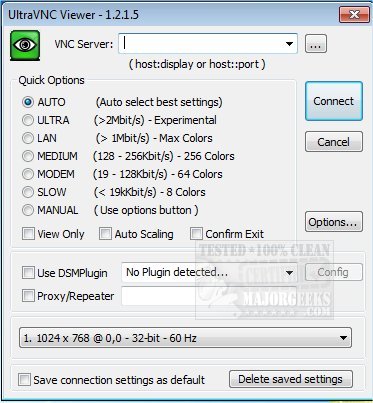
UltraVNC version 1.8.2.4 has been released, offering users the ability to remotely control computers through any TCP/IP connection. This software creates an interface that makes it appear as though the user is physically present at the remote computer, effectively displaying its screen on the user's own device. UltraVNC supports 32-bit systems, making it accessible to a wide range of users.
The program is particularly user-friendly, enabling individuals to utilize their mouse and keyboard to interact with the remote computer seamlessly. This capability is especially beneficial for IT support professionals, as it allows them to access and troubleshoot client systems from anywhere in the world without requiring customers to go through complicated installation processes.
In addition to its core functionalities, UltraVNC can enhance productivity by allowing users to work on remote systems as if they were directly in front of them. This is advantageous for businesses that rely on remote assistance, as it simplifies the support process and improves response times.
Furthermore, users are encouraged to explore related topics, such as the limitations of free VPN services, troubleshooting slow internet on Windows 10, and understanding Windows Auto-Tuning, to optimize their overall computing experience.
As technology continues to evolve, tools like UltraVNC play a crucial role in remote work and IT support, fostering efficiency and flexibility in various professional environments
The program is particularly user-friendly, enabling individuals to utilize their mouse and keyboard to interact with the remote computer seamlessly. This capability is especially beneficial for IT support professionals, as it allows them to access and troubleshoot client systems from anywhere in the world without requiring customers to go through complicated installation processes.
In addition to its core functionalities, UltraVNC can enhance productivity by allowing users to work on remote systems as if they were directly in front of them. This is advantageous for businesses that rely on remote assistance, as it simplifies the support process and improves response times.
Furthermore, users are encouraged to explore related topics, such as the limitations of free VPN services, troubleshooting slow internet on Windows 10, and understanding Windows Auto-Tuning, to optimize their overall computing experience.
As technology continues to evolve, tools like UltraVNC play a crucial role in remote work and IT support, fostering efficiency and flexibility in various professional environments
UltraVNC 1.8.2.4 released
UltraVNC software allows you to remotely control a computer over any TCP/IP connection. UltraVNC emulates the destination computer to make it look like you were in front of it. 32-Bit available.