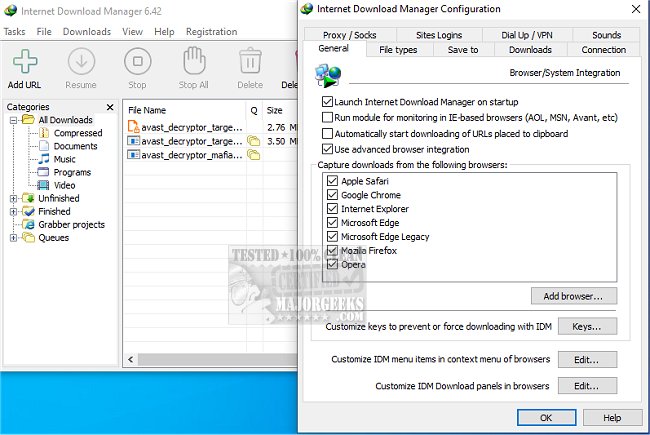
Internet Download Manager (IDM) has just released version 6.43 Build 1, enhancing its reputation as a leading tool for optimizing download speeds and managing downloads effectively. With IDM, users can experience significant speed improvements, resuming interrupted downloads and scheduling them conveniently while also having the ability to download streaming videos.
Why Choose Internet Download Manager?
1. Lightning-Fast Downloads: IDM employs advanced file-segmentation technology, allowing downloads to be accelerated by up to five times. By splitting files and utilizing parallel connections, it maximizes bandwidth and circumvents server limitations, ensuring that larger files are downloaded quickly and efficiently.
2. Resume and Recover Broken Downloads: IDM’s capability to remember where downloads left off means that users can recover from unexpected interruptions—such as internet outages or system crashes—without needing to restart the download from scratch.
3. Seamless Browser Integration: The software integrates effortlessly with major browsers like Chrome, Firefox, Edge, and Opera, automatically detecting downloadable content and providing users with a convenient "Download" button for quick access.
4. Download Streaming Videos and Audio: Users can easily download videos from popular platforms like YouTube and Dailymotion, making it simple to save tutorials, music mixes, and other media for offline access.
5. Advanced Download Organization: IDM automatically categorizes downloads into organized sections—such as documents, music, and videos—ensuring users can easily locate their files.
6. Customization for Power Users: For those seeking greater control, IDM offers customizable settings, allowing users to set download limits, schedule downloads, and manage simultaneous downloads.
7. Security Features: IDM works alongside antivirus software to scan downloads for potential malware, providing an added layer of security.
Conclusion:
Internet Download Manager transforms the downloading experience by significantly enhancing speed and reliability. It is a must-have for frequent downloaders, whether for work-related files, software updates, or media content. Although its user interface may benefit from a modernization, the software's impressive functionality and efficiency make it a valuable tool for anyone looking to improve their downloading capabilities. Users are encouraged to try IDM for a faster, more streamlined download experience.
Further Resources: For those interested in optimizing their internet experience, additional guides are available on improving wireless network performance, fixing slow internet issues on Windows 10 & 11, and checking network security settings
Why Choose Internet Download Manager?
1. Lightning-Fast Downloads: IDM employs advanced file-segmentation technology, allowing downloads to be accelerated by up to five times. By splitting files and utilizing parallel connections, it maximizes bandwidth and circumvents server limitations, ensuring that larger files are downloaded quickly and efficiently.
2. Resume and Recover Broken Downloads: IDM’s capability to remember where downloads left off means that users can recover from unexpected interruptions—such as internet outages or system crashes—without needing to restart the download from scratch.
3. Seamless Browser Integration: The software integrates effortlessly with major browsers like Chrome, Firefox, Edge, and Opera, automatically detecting downloadable content and providing users with a convenient "Download" button for quick access.
4. Download Streaming Videos and Audio: Users can easily download videos from popular platforms like YouTube and Dailymotion, making it simple to save tutorials, music mixes, and other media for offline access.
5. Advanced Download Organization: IDM automatically categorizes downloads into organized sections—such as documents, music, and videos—ensuring users can easily locate their files.
6. Customization for Power Users: For those seeking greater control, IDM offers customizable settings, allowing users to set download limits, schedule downloads, and manage simultaneous downloads.
7. Security Features: IDM works alongside antivirus software to scan downloads for potential malware, providing an added layer of security.
Conclusion:
Internet Download Manager transforms the downloading experience by significantly enhancing speed and reliability. It is a must-have for frequent downloaders, whether for work-related files, software updates, or media content. Although its user interface may benefit from a modernization, the software's impressive functionality and efficiency make it a valuable tool for anyone looking to improve their downloading capabilities. Users are encouraged to try IDM for a faster, more streamlined download experience.
Further Resources: For those interested in optimizing their internet experience, additional guides are available on improving wireless network performance, fixing slow internet issues on Windows 10 & 11, and checking network security settings
Internet Download Manager 6.43 Build 1 released
Internet Download Manager is a tool for drastically increasing your download speeds and resuming/scheduling downloads, including the capability to download any streaming video.
Internet Download Manager 6.43 Build 1 released @ MajorGeeks