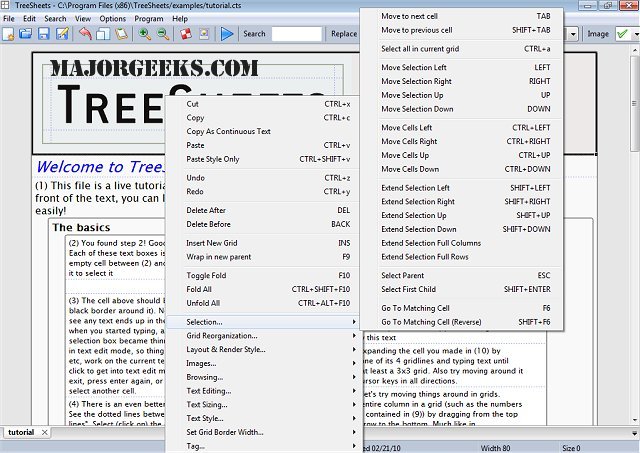
TreeSheets is an innovative application that combines the functionalities of spreadsheets, mind mappers, outliners, personal information managers, text editors, and small database utilities into a single, cohesive tool designed for efficient data organization.
The Concept Behind TreeSheets
TreeSheets addresses the common frustration of needing multiple tools for different tasks. While traditional spreadsheets offer powerful data manipulation, they often lack flexibility, feeling either flat or too rigid. In contrast, outliners provide structure but can be cumbersome for detailed data entry. Mind mappers excel at brainstorming yet fall short in precision and organization. TreeSheets aims to bridge these gaps by offering a versatile platform that feels structured yet allows for hierarchical organization—a unique blend of sticky notes on a whiteboard with the efficiency of a grid layout.
Key Features of TreeSheets
The strength of TreeSheets lies in its adaptability:
1. Streamlined Data Management: It replaces cluttered spreadsheets with a cleaner, tree-like structure, allowing users to organize data efficiently without convoluted formulas.
2. Hierarchical Outlining and Mind Mapping: Users can organize ideas and tasks in a structured manner without the complexity associated with dedicated software, making it easier to brainstorm and visualize connections.
3. PIM and Small Database Functionality: TreeSheets serves as a compact tool for managing contacts, inventories, or planning presentations, offering a structured approach to personal information management.
However, this multifaceted nature can be a double-edged sword. While it excels in creating to-do lists and managing basic data, it may not match the specificity of dedicated tools tailored for singular tasks.
Practical Applications
TreeSheets is not just aesthetically pleasing; it is practical for various organizational tasks:
- Project Planning: Break down goals into actionable steps with cross-linking features for easy navigation.
- To-Do Lists: More efficient than traditional outlines, especially for users who prefer a spreadsheet format.
- Brainstorming: Keep thoughts organized hierarchically without losing track across multiple sheets.
- Information Organization: Maintain related information compactly and accessibly.
The software also supports data entry and management, allowing users to save projects in various formats, including XML, CSV, HTML, and images, while easily importing data from previous projects.
System Requirements and Efficiency
One of the standout features of TreeSheets is its lightweight design. It operates efficiently, using only about 5MB of memory even when multiple documents are open, making it suitable for users on older operating systems, such as Windows 7. In contrast to larger, more resource-heavy applications, TreeSheets runs smoothly without bogging down system performance.
Conclusion: The Ideal Tool for Data Organization
TreeSheets is an excellent choice for those seeking a versatile data organization tool that merges the best features of spreadsheets, outlines, and mind maps into one accessible package. Its hierarchical structure offers order without excessive complexity. However, users should manage their expectations regarding artificial intelligence capabilities, as TreeSheets focuses on providing a framework for various uses rather than excelling in every niche like specialized software.
For anyone in need of an all-in-one solution for data-heavy tasks without the bloat of multiple specialized applications, TreeSheets is worth exploring. Its unique approach simplifies tasks like creating nested lists and brainstorming, making the organizational process more manageable and efficient
The Concept Behind TreeSheets
TreeSheets addresses the common frustration of needing multiple tools for different tasks. While traditional spreadsheets offer powerful data manipulation, they often lack flexibility, feeling either flat or too rigid. In contrast, outliners provide structure but can be cumbersome for detailed data entry. Mind mappers excel at brainstorming yet fall short in precision and organization. TreeSheets aims to bridge these gaps by offering a versatile platform that feels structured yet allows for hierarchical organization—a unique blend of sticky notes on a whiteboard with the efficiency of a grid layout.
Key Features of TreeSheets
The strength of TreeSheets lies in its adaptability:
1. Streamlined Data Management: It replaces cluttered spreadsheets with a cleaner, tree-like structure, allowing users to organize data efficiently without convoluted formulas.
2. Hierarchical Outlining and Mind Mapping: Users can organize ideas and tasks in a structured manner without the complexity associated with dedicated software, making it easier to brainstorm and visualize connections.
3. PIM and Small Database Functionality: TreeSheets serves as a compact tool for managing contacts, inventories, or planning presentations, offering a structured approach to personal information management.
However, this multifaceted nature can be a double-edged sword. While it excels in creating to-do lists and managing basic data, it may not match the specificity of dedicated tools tailored for singular tasks.
Practical Applications
TreeSheets is not just aesthetically pleasing; it is practical for various organizational tasks:
- Project Planning: Break down goals into actionable steps with cross-linking features for easy navigation.
- To-Do Lists: More efficient than traditional outlines, especially for users who prefer a spreadsheet format.
- Brainstorming: Keep thoughts organized hierarchically without losing track across multiple sheets.
- Information Organization: Maintain related information compactly and accessibly.
The software also supports data entry and management, allowing users to save projects in various formats, including XML, CSV, HTML, and images, while easily importing data from previous projects.
System Requirements and Efficiency
One of the standout features of TreeSheets is its lightweight design. It operates efficiently, using only about 5MB of memory even when multiple documents are open, making it suitable for users on older operating systems, such as Windows 7. In contrast to larger, more resource-heavy applications, TreeSheets runs smoothly without bogging down system performance.
Conclusion: The Ideal Tool for Data Organization
TreeSheets is an excellent choice for those seeking a versatile data organization tool that merges the best features of spreadsheets, outlines, and mind maps into one accessible package. Its hierarchical structure offers order without excessive complexity. However, users should manage their expectations regarding artificial intelligence capabilities, as TreeSheets focuses on providing a framework for various uses rather than excelling in every niche like specialized software.
For anyone in need of an all-in-one solution for data-heavy tasks without the bloat of multiple specialized applications, TreeSheets is worth exploring. Its unique approach simplifies tasks like creating nested lists and brainstorming, making the organizational process more manageable and efficient
TreeSheets 2.22.6 released
TreeSheets combines spreadsheet tools, mind mappers, outliners, personal information managers, text editors and small database utilities into an all-in-one office application.