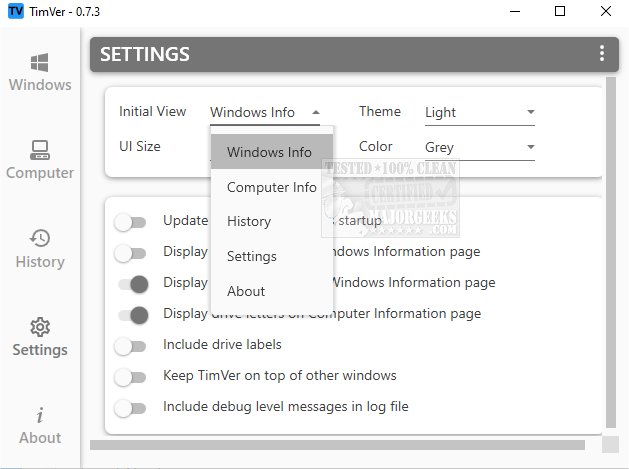
TimVer 0.11.0 has been released, providing users with an enhanced alternative to the standard Winver command for obtaining detailed information about the Windows version installed on their system. Unlike Winver, which delivers only basic details, TimVer offers a comprehensive overview that includes the version number, build number, release date, and other relevant system information. This depth of detail can be particularly beneficial for users troubleshooting issues or assessing compatibility with new software and hardware upgrades.
TimVer retrieves information using Windows Management Information (WMI), making it easy to install and deploy. It organizes the data into multiple accessible sections through a user-friendly left-hand menu, allowing users to view their computer specifications and performance metrics efficiently. Additionally, TimVer features a comprehensive history log to track system activities and changes, enhancing user awareness of their system's status.
Moreover, TimVer allows for customization of its appearance, offering options for themes, colors, and layouts, enabling users to personalize their experience. The name "TimVer," which is a nod to the developers' personal connection, adds a charming touch to this open-source tool, which stands out due to its extra features compared to Winver.
In summary, TimVer 0.11.0 is not just a version-checking tool; it is a robust application designed to empower users with in-depth system knowledge, aiding in troubleshooting and compatibility assessments while offering a customizable interface for a better user experience. As technology evolves, tools like TimVer will likely become indispensable for users navigating their computing environments
TimVer retrieves information using Windows Management Information (WMI), making it easy to install and deploy. It organizes the data into multiple accessible sections through a user-friendly left-hand menu, allowing users to view their computer specifications and performance metrics efficiently. Additionally, TimVer features a comprehensive history log to track system activities and changes, enhancing user awareness of their system's status.
Moreover, TimVer allows for customization of its appearance, offering options for themes, colors, and layouts, enabling users to personalize their experience. The name "TimVer," which is a nod to the developers' personal connection, adds a charming touch to this open-source tool, which stands out due to its extra features compared to Winver.
In summary, TimVer 0.11.0 is not just a version-checking tool; it is a robust application designed to empower users with in-depth system knowledge, aiding in troubleshooting and compatibility assessments while offering a customizable interface for a better user experience. As technology evolves, tools like TimVer will likely become indispensable for users navigating their computing environments
TimVer 0.11.0 released
TimVer offers comprehensive information about the Windows version installed on your system.