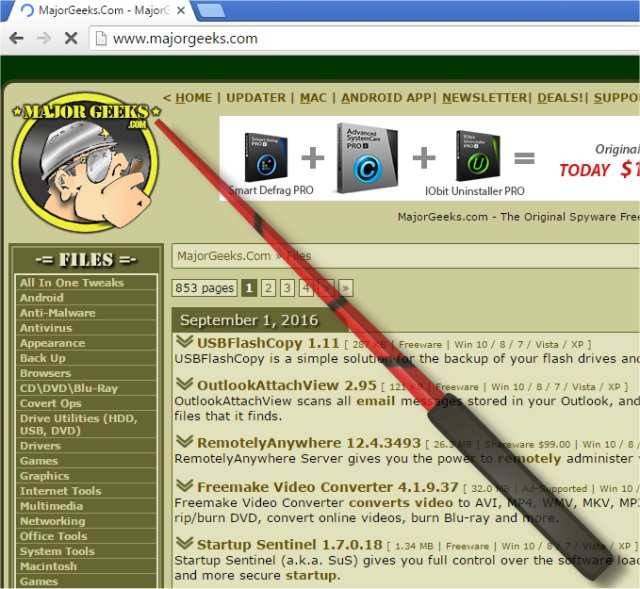
PointerStick has recently released version 7.11, enhancing its functionality as a portable tool that creates a virtual pointer stick on the Windows Desktop. This tool is particularly useful for presentations, as it allows users to highlight the current mouse position, thereby improving the audience's focus on the topic being discussed. The virtual pointer stick is especially effective when used with projectors (beamer) and large LED/LCD screens.
Key features of PointerStick include:
- A very small program size, ensuring minimal impact on system resources
- Low CPU usage, allowing it to run seamlessly in the background
- Adjustable size for the pointer stick to meet different presentation needs
- Various textures (bitmaps) for customization of the pointer stick
- An option for alpha transparency, which can enhance visibility
- The ability to deactivate the pointer stick via mouse or keyboard input for convenience
- A translation feature to support multiple languages
- Portability, making it easy to use on different systems without installation
In addition to PointerStick, users may find interest in similar tools and tips, such as enabling mouse pointer trails, resolving mouse cursor issues while typing, and managing Logitech devices with their firmware update and unifying software.
To extend the information, future updates of PointerStick could potentially introduce features such as advanced customization options, integration with presentation software for automatic activation during slideshows, and enhanced user support through tutorials or community forums. Additionally, expanding its compatibility with other operating systems or devices could widen its user base and application scenarios
Key features of PointerStick include:
- A very small program size, ensuring minimal impact on system resources
- Low CPU usage, allowing it to run seamlessly in the background
- Adjustable size for the pointer stick to meet different presentation needs
- Various textures (bitmaps) for customization of the pointer stick
- An option for alpha transparency, which can enhance visibility
- The ability to deactivate the pointer stick via mouse or keyboard input for convenience
- A translation feature to support multiple languages
- Portability, making it easy to use on different systems without installation
In addition to PointerStick, users may find interest in similar tools and tips, such as enabling mouse pointer trails, resolving mouse cursor issues while typing, and managing Logitech devices with their firmware update and unifying software.
To extend the information, future updates of PointerStick could potentially introduce features such as advanced customization options, integration with presentation software for automatic activation during slideshows, and enhanced user support through tutorials or community forums. Additionally, expanding its compatibility with other operating systems or devices could widen its user base and application scenarios
PointerStick 7.11 released
PointerStick is a portable tool that presents on the Windows Desktop a virtual pointer stick, for example, for presentations to highlight the current mouse position and the emphasis on your topic will be better.