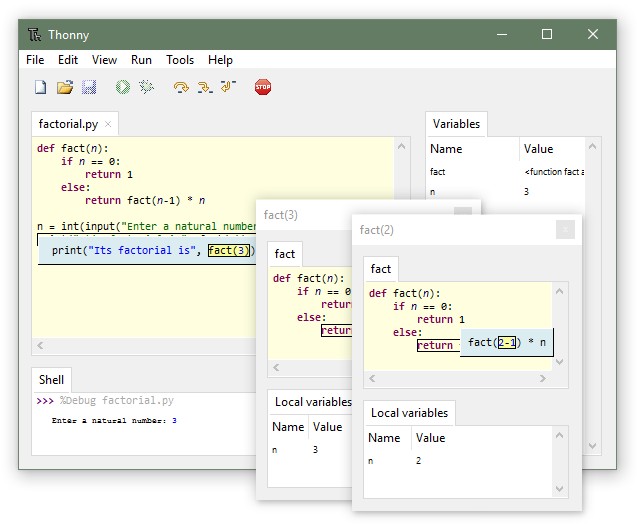
Thonny 5.0.0 has been released, marking a significant update to the Open Source Python Integrated Development Environment (IDE) designed specifically for beginners. This user-friendly platform simplifies the learning process for new programmers by coming pre-installed with Python version 3.7, enabling users to dive into coding with just a single installer. There’s no need to deal with multiple downloads or configurations; Thonny streamlines the setup to make programming accessible.
One of Thonny's notable features is its flexibility, allowing users to connect to their own Python installations if they prefer. This means that those who have a customized Python environment can still benefit from Thonny's intuitive interface and robust tools while working comfortably within their existing setup.
Thonny’s interface is tailored for beginners, offering a minimalistic design that removes potential distractions, enabling learners to focus on mastering programming fundamentals. The IDE is equipped with various features that enhance the learning experience:
1. Variable Visualization: Users can easily view how their commands affect Python variables through a dedicated variables table.
2. Step-by-Step Debugging: A simple debugger allows for running programs incrementally without the hassle of setting breakpoints, making it easier to understand code execution flow.
3. Expression Evaluation: The IDE visually breaks down expression evaluations, helping users grasp how Python processes their code.
4. Understanding Function Calls: Thonny provides a clear representation of function calls, complete with local variable tables and code pointers, which is essential for comprehending recursion.
5. Syntax Error Highlighting: Common syntax errors, such as unclosed quotes or parentheses, are easily identifiable within Thonny’s editor.
6. Scope Explanation: The IDE helps users distinguish between local and global variables, reducing confusion with similar names.
7. Code Completion: This feature aids beginners in exploring APIs, enhancing their coding efficiency.
8. System Shell Access: Thonny includes a beginner-friendly system shell for managing Python packages, handling command-line tasks with ease.
9. Pip GUI: A clean interface for package management simplifies the installation of third-party libraries.
Overall, Thonny 5.0.0 continues to embody its mission of making programming accessible and enjoyable for beginners, with an array of features that facilitate deeper understanding and engagement with Python coding.
As programming continues to evolve, future updates to Thonny can be anticipated to include enhanced functionalities, additional language support, and improved performance to cater to the growing needs of novice coders. With its commitment to education and ease of use, Thonny is poised to remain a key tool in the journey of many aspiring programmers
One of Thonny's notable features is its flexibility, allowing users to connect to their own Python installations if they prefer. This means that those who have a customized Python environment can still benefit from Thonny's intuitive interface and robust tools while working comfortably within their existing setup.
Thonny’s interface is tailored for beginners, offering a minimalistic design that removes potential distractions, enabling learners to focus on mastering programming fundamentals. The IDE is equipped with various features that enhance the learning experience:
1. Variable Visualization: Users can easily view how their commands affect Python variables through a dedicated variables table.
2. Step-by-Step Debugging: A simple debugger allows for running programs incrementally without the hassle of setting breakpoints, making it easier to understand code execution flow.
3. Expression Evaluation: The IDE visually breaks down expression evaluations, helping users grasp how Python processes their code.
4. Understanding Function Calls: Thonny provides a clear representation of function calls, complete with local variable tables and code pointers, which is essential for comprehending recursion.
5. Syntax Error Highlighting: Common syntax errors, such as unclosed quotes or parentheses, are easily identifiable within Thonny’s editor.
6. Scope Explanation: The IDE helps users distinguish between local and global variables, reducing confusion with similar names.
7. Code Completion: This feature aids beginners in exploring APIs, enhancing their coding efficiency.
8. System Shell Access: Thonny includes a beginner-friendly system shell for managing Python packages, handling command-line tasks with ease.
9. Pip GUI: A clean interface for package management simplifies the installation of third-party libraries.
Overall, Thonny 5.0.0 continues to embody its mission of making programming accessible and enjoyable for beginners, with an array of features that facilitate deeper understanding and engagement with Python coding.
As programming continues to evolve, future updates to Thonny can be anticipated to include enhanced functionalities, additional language support, and improved performance to cater to the growing needs of novice coders. With its commitment to education and ease of use, Thonny is poised to remain a key tool in the journey of many aspiring programmers
Thonny 5.0.0 released
Thonny is an Open Source Python IDE for beginners.