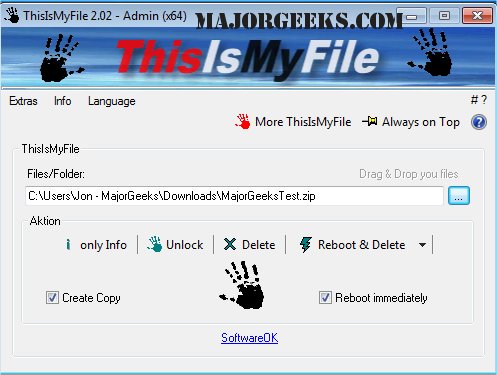
ThisIsMyFile version 4.55 has been released, offering a portable utility designed to unlock or delete files that are protected or locked. It proves to be particularly useful when encountering error messages indicating that a file cannot be deleted because it is being used by another program or user. The tool is specifically tailored for handling locked files and folders, enabling users to identify the reasons behind the locks, unlock the files, and perform deletions as needed.
The user interface is minimalist and user-friendly, allowing for easy navigation. It supports drag-and-drop functionality for files and folders, and users can also terminate processes if necessary.
Key features of ThisIsMyFile include:
- The ability to create a copy of a locked file and delete the original
- Options to unlock files only
- Reboot and delete functionality, with or without user prompts
- File selection capabilities
- Program parameter settings
- Multilanguage support
Additionally, users can explore similar utilities that help in taking full ownership of files and folders, adding secure delete options to various Windows context menus, and protecting files from deletion.
In summary, ThisIsMyFile is a powerful and efficient tool for managing locked files, making it an essential addition to anyone’s software toolkit. With continued updates and feature enhancements, it aims to provide users with even more robust solutions for file management challenges
The user interface is minimalist and user-friendly, allowing for easy navigation. It supports drag-and-drop functionality for files and folders, and users can also terminate processes if necessary.
Key features of ThisIsMyFile include:
- The ability to create a copy of a locked file and delete the original
- Options to unlock files only
- Reboot and delete functionality, with or without user prompts
- File selection capabilities
- Program parameter settings
- Multilanguage support
Additionally, users can explore similar utilities that help in taking full ownership of files and folders, adding secure delete options to various Windows context menus, and protecting files from deletion.
In summary, ThisIsMyFile is a powerful and efficient tool for managing locked files, making it an essential addition to anyone’s software toolkit. With continued updates and feature enhancements, it aims to provide users with even more robust solutions for file management challenges
ThisIsMyFile 4.55 released
ThisIsMyFile is a portable utility that allows you to unlock/delete protected or locked files.