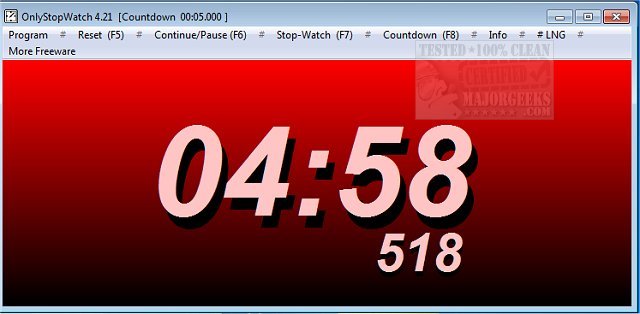
OnlyStopWatch has recently launched version 6.66, enhancing its reputation as a precise countdown timer that incorporates milliseconds. This tool allows users to start and stop timing through customizable hotkeys, making it a user-friendly option for various timing needs.
Designed for simplicity, OnlyStopWatch serves as a desktop timer ideal for optimizing processes, tasks, or any activities that require time tracking. It boasts essential features such as adjustable window sizing, customizable color attributes, and an option to keep the timer always visible on top of other applications. Users can manage various functions either through an intuitive dropdown menu or via the clearly marked hotkeys available at the top of the interface.
The application can function as both a countdown timer and a stopwatch, providing five distinct system sounds to signal the end of a countdown. However, users have noted that a visual alert would enhance usability, and this feature might be considered for future updates. Overall, OnlyStopWatch is a dependable tool that is easy to deploy and operate.
In addition to its core functionalities, users may find it beneficial to explore related features such as displaying multiple clocks on Windows, customizing the Windows taskbar clock to show only time, or removing the clock altogether. These enhancements can further improve time management and productivity on Windows systems.
As OnlyStopWatch continues to evolve, it stands out as a practical solution for anyone in need of efficient time tracking. Future updates may include more advanced features, such as visual alerts and further customization options, to broaden its appeal and functionality
Designed for simplicity, OnlyStopWatch serves as a desktop timer ideal for optimizing processes, tasks, or any activities that require time tracking. It boasts essential features such as adjustable window sizing, customizable color attributes, and an option to keep the timer always visible on top of other applications. Users can manage various functions either through an intuitive dropdown menu or via the clearly marked hotkeys available at the top of the interface.
The application can function as both a countdown timer and a stopwatch, providing five distinct system sounds to signal the end of a countdown. However, users have noted that a visual alert would enhance usability, and this feature might be considered for future updates. Overall, OnlyStopWatch is a dependable tool that is easy to deploy and operate.
In addition to its core functionalities, users may find it beneficial to explore related features such as displaying multiple clocks on Windows, customizing the Windows taskbar clock to show only time, or removing the clock altogether. These enhancements can further improve time management and productivity on Windows systems.
As OnlyStopWatch continues to evolve, it stands out as a practical solution for anyone in need of efficient time tracking. Future updates may include more advanced features, such as visual alerts and further customization options, to broaden its appeal and functionality
OnlyStopWatch 6.66 released
OnlyStopWatch is an accurate countdown timer that includes milliseconds and allows starting/stopping via predefined hotkeys.