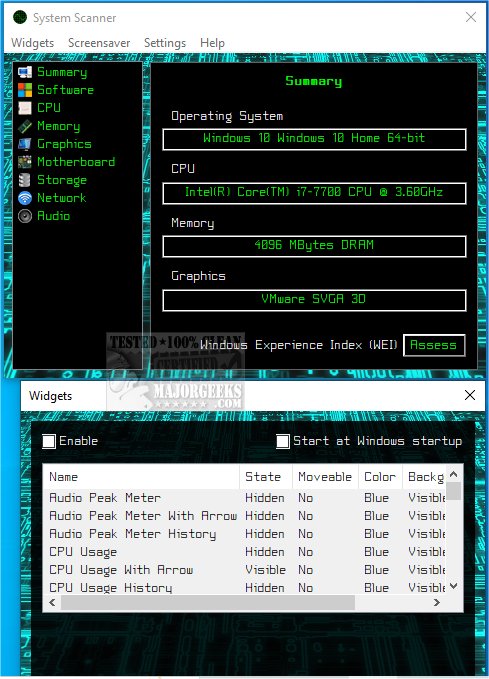
The newly released System Scanner 1.3 is an essential program designed to gather and display critical information regarding your computer's hardware, software, and overall performance. This tool empowers users to explore the specifications of various components, including the operating system, central processing unit (CPU), random access memory (RAM), video card, hard drive, and motherboard.
In-Depth Data Analysis
With System Scanner, users can easily identify their operating system's version and architecture, alongside updates. Detailed insights into the CPU, such as its model, core count, clock speed, and current temperature, are presented, allowing users to gauge performance effectively. The program also tracks RAM specifications, providing information about installed memory and speed, which is essential for assessing multitasking capabilities. Furthermore, the video card's details—maker, model, memory size, and performance—are displayed, making it a vital tool for gamers and graphic designers.
Comprehensive System Overview
System Scanner offers a thorough overview of hard drive specifications, including total capacity, used space, and read/write speeds. This information aids users in managing their storage efficiently, allowing for better decisions regarding data organization and potential upgrades. By understanding these metrics, users can optimize storage usage and enhance system efficiency.
Motherboard Insights
Additionally, the program provides vital information about the motherboard's make and model, which is crucial for understanding compatibility with future upgrades and expansions. This feature is invaluable for users seeking to enhance their computer's performance.
Utilization of WinSAT Service
System Scanner integrates with the Windows System Assessment Tool (WinSAT), enabling users to evaluate their computer's performance based on the Windows Experience Index (WEI) score. While this feature is available across all Windows versions, recent updates have removed it from the Control Panel, making System Scanner a valuable alternative.
Widgets and Screensaver Features
Beyond information gathering, System Scanner includes desktop widgets that display real-time data and a screensaver that showcases system activity during user inactivity. These features ensure that users remain informed about their system's performance at all times.
Conclusion
Overall, System Scanner 1.3 is an indispensable tool for anyone looking to gain a deeper understanding of their computer's capabilities and performance metrics. By providing essential information about hardware and software, it allows users to maintain control over their systems and make informed decisions regarding upgrades and optimizations.
Similar Tools and Guides
For users interested in further enhancing their technical knowledge, similar resources include guides on identifying hardware components, checking the serial number of a Windows PC, finding motherboard details, and assessing RAM speed and availability
In-Depth Data Analysis
With System Scanner, users can easily identify their operating system's version and architecture, alongside updates. Detailed insights into the CPU, such as its model, core count, clock speed, and current temperature, are presented, allowing users to gauge performance effectively. The program also tracks RAM specifications, providing information about installed memory and speed, which is essential for assessing multitasking capabilities. Furthermore, the video card's details—maker, model, memory size, and performance—are displayed, making it a vital tool for gamers and graphic designers.
Comprehensive System Overview
System Scanner offers a thorough overview of hard drive specifications, including total capacity, used space, and read/write speeds. This information aids users in managing their storage efficiently, allowing for better decisions regarding data organization and potential upgrades. By understanding these metrics, users can optimize storage usage and enhance system efficiency.
Motherboard Insights
Additionally, the program provides vital information about the motherboard's make and model, which is crucial for understanding compatibility with future upgrades and expansions. This feature is invaluable for users seeking to enhance their computer's performance.
Utilization of WinSAT Service
System Scanner integrates with the Windows System Assessment Tool (WinSAT), enabling users to evaluate their computer's performance based on the Windows Experience Index (WEI) score. While this feature is available across all Windows versions, recent updates have removed it from the Control Panel, making System Scanner a valuable alternative.
Widgets and Screensaver Features
Beyond information gathering, System Scanner includes desktop widgets that display real-time data and a screensaver that showcases system activity during user inactivity. These features ensure that users remain informed about their system's performance at all times.
Conclusion
Overall, System Scanner 1.3 is an indispensable tool for anyone looking to gain a deeper understanding of their computer's capabilities and performance metrics. By providing essential information about hardware and software, it allows users to maintain control over their systems and make informed decisions regarding upgrades and optimizations.
Similar Tools and Guides
For users interested in further enhancing their technical knowledge, similar resources include guides on identifying hardware components, checking the serial number of a Windows PC, finding motherboard details, and assessing RAM speed and availability
System Scanner 1.3 released
System Scanner gathers and displays vital information about your computer's hardware, software, and overall performance.