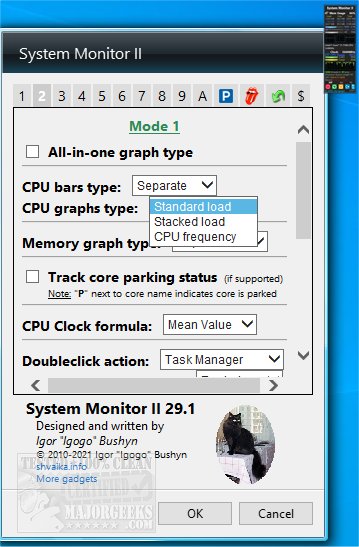
System Monitor II is a versatile desktop application that provides a comprehensive overview of your system's performance and status. This latest version, 33.1, emphasizes simplicity and efficiency, positioning itself as a lightweight alternative to other system information tools while still offering a robust set of features.
The application displays critical data such as memory usage, detailing the total, used, and free space for RAM, page files, and the combined total. It also presents information about the processor, including the model and clock frequency, and allows users to monitor the load on individual cores or streams, supporting systems with up to 40 cores and multiple CPUs. In addition, System Monitor II includes temperature readings for each core and current power consumption, provided the user installs Core Temp.
Beyond monitoring capabilities, the app facilitates various PC functions, such as shutdown, restart, and log-off options, along with the ability to change power schemes. The interface is highly customizable, allowing users to adjust colors, backgrounds, and graph details according to their preferences.
For users operating on Windows 8.1 or 10 who encounter installation issues, it may be necessary to install Desktop Gadgets Revived or a similar tool to ensure compatibility.
Key Features of System Monitor II:
- Core Temperature Display: Hover over a core's bar to reveal minimum and maximum temperatures.
- Memory Usage Insights: Hover over RAM and page file elements to view maximum usage values.
- Windows Experience Index (WEI): Accessed by clicking on the CPU vendor icon or the gadget title, with a flyout window providing additional insights.
- Multi-CPU Navigation: Utilize the mouse wheel to switch between CPUs and settings in multi-CPU systems.
- Integrated Task Manager Access: Double-click the background to launch Task Manager or Resource Monitor.
- Performance Tools Access: Run Performance Information and Tools for Windows Vista, 7, 8.1, and 10.
- Processor Queue and Hyper-Threading (HT) Details: Clickable links for in-depth information.
- PC Control Panel: Special features for enhanced control over system functions.
- Memory Usage Styles: Choose between overall usage and physical memory usage styles.
System Monitor II stands out as a comprehensive tool for users seeking to keep track of their system's performance while also providing essential controls for basic PC operations. For those interested in further enhancing their system knowledge, the app also links to resources on checking CPU cores, memory speed, hardware identification, and GPU details.
Overall, System Monitor II is an essential utility for anyone looking to optimize their computing experience through informed monitoring and control
The application displays critical data such as memory usage, detailing the total, used, and free space for RAM, page files, and the combined total. It also presents information about the processor, including the model and clock frequency, and allows users to monitor the load on individual cores or streams, supporting systems with up to 40 cores and multiple CPUs. In addition, System Monitor II includes temperature readings for each core and current power consumption, provided the user installs Core Temp.
Beyond monitoring capabilities, the app facilitates various PC functions, such as shutdown, restart, and log-off options, along with the ability to change power schemes. The interface is highly customizable, allowing users to adjust colors, backgrounds, and graph details according to their preferences.
For users operating on Windows 8.1 or 10 who encounter installation issues, it may be necessary to install Desktop Gadgets Revived or a similar tool to ensure compatibility.
Key Features of System Monitor II:
- Core Temperature Display: Hover over a core's bar to reveal minimum and maximum temperatures.
- Memory Usage Insights: Hover over RAM and page file elements to view maximum usage values.
- Windows Experience Index (WEI): Accessed by clicking on the CPU vendor icon or the gadget title, with a flyout window providing additional insights.
- Multi-CPU Navigation: Utilize the mouse wheel to switch between CPUs and settings in multi-CPU systems.
- Integrated Task Manager Access: Double-click the background to launch Task Manager or Resource Monitor.
- Performance Tools Access: Run Performance Information and Tools for Windows Vista, 7, 8.1, and 10.
- Processor Queue and Hyper-Threading (HT) Details: Clickable links for in-depth information.
- PC Control Panel: Special features for enhanced control over system functions.
- Memory Usage Styles: Choose between overall usage and physical memory usage styles.
System Monitor II stands out as a comprehensive tool for users seeking to keep track of their system's performance while also providing essential controls for basic PC operations. For those interested in further enhancing their system knowledge, the app also links to resources on checking CPU cores, memory speed, hardware identification, and GPU details.
Overall, System Monitor II is an essential utility for anyone looking to optimize their computing experience through informed monitoring and control
System Monitor II 33.1 released
System Monitor II provides you with a desktop display showing an overview of your system, and more.