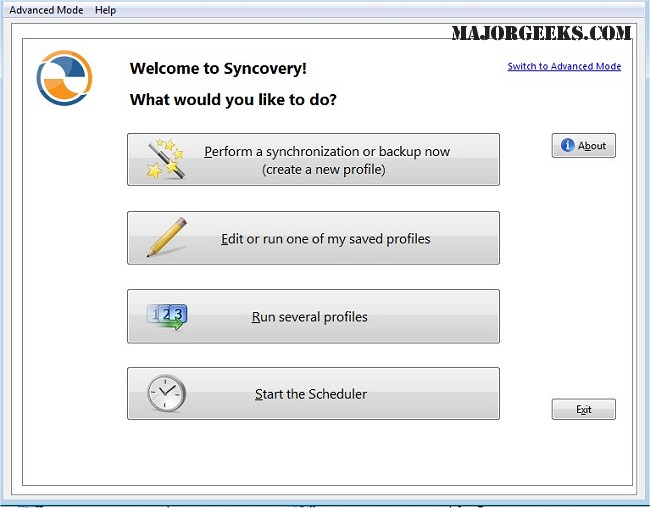
Syncovery is a powerful software tool specifically designed for efficient file copying, data backup, and synchronization across various platforms, including PCs, Macs, servers, notebooks, and online storage solutions. The latest version, 12.3.0, enhances its capabilities, allowing users to keep their data organized and up-to-date according to their unique requirements.
Key Features of Syncovery
1. Customized Manual and Automated Jobs: Syncovery allows users to configure a wide range of jobs tailored to their specific data management needs. These jobs can be executed either manually or through an automated scheduling feature, providing flexibility in data management.
2. Versatile Storage Integration: The software integrates seamlessly with various storage options, including local hard drives, network drives, and additional mounted volumes, ensuring comprehensive data accessibility.
3. Support for Multiple Protocols and Cloud Services: Syncovery supports a variety of protocols such as FTP, SSH, HTTP, and WebDAV, as well as cloud services like Amazon S3 and Google Docs. This versatility facilitates efficient data transfers across different platforms and environments.
4. ZIP Compression and Data Encryption: The application includes features like ZIP compression to reduce file sizes during transfers and data encryption options to protect sensitive information. For Windows users, the scheduler can run as a background service, allowing tasks to be executed without requiring a user to be logged in.
5. Diverse Synchronization Modes: Syncovery offers several synchronization modes to meet diverse user needs. These include:
- Standard Copying: Transfers files from the source to the destination.
- Exact Mirror: Ensures the destination is an exact replica of the source.
- SmartTracking: Intelligently tracks changes to optimize the update process.
Conclusion
Syncovery stands out as an exceptional tool for synchronizing and backing up files and folder structures across multiple locations. Its user-friendly features make data management effortless, ensuring that information remains organized, secure, and readily accessible. With the added peace of mind that comes from knowing your data is well-protected, Syncovery simplifies the complexities of file management, making it an invaluable asset for both individuals and businesses.
Future Enhancements: As Syncovery continues to evolve, potential future features could include enhanced AI-driven data management capabilities, more cloud service integrations, and improved user interfaces to further streamline the synchronization and backup processes. This ongoing development will ensure that Syncovery remains a leading solution for file management in an increasingly digital world
Key Features of Syncovery
1. Customized Manual and Automated Jobs: Syncovery allows users to configure a wide range of jobs tailored to their specific data management needs. These jobs can be executed either manually or through an automated scheduling feature, providing flexibility in data management.
2. Versatile Storage Integration: The software integrates seamlessly with various storage options, including local hard drives, network drives, and additional mounted volumes, ensuring comprehensive data accessibility.
3. Support for Multiple Protocols and Cloud Services: Syncovery supports a variety of protocols such as FTP, SSH, HTTP, and WebDAV, as well as cloud services like Amazon S3 and Google Docs. This versatility facilitates efficient data transfers across different platforms and environments.
4. ZIP Compression and Data Encryption: The application includes features like ZIP compression to reduce file sizes during transfers and data encryption options to protect sensitive information. For Windows users, the scheduler can run as a background service, allowing tasks to be executed without requiring a user to be logged in.
5. Diverse Synchronization Modes: Syncovery offers several synchronization modes to meet diverse user needs. These include:
- Standard Copying: Transfers files from the source to the destination.
- Exact Mirror: Ensures the destination is an exact replica of the source.
- SmartTracking: Intelligently tracks changes to optimize the update process.
Conclusion
Syncovery stands out as an exceptional tool for synchronizing and backing up files and folder structures across multiple locations. Its user-friendly features make data management effortless, ensuring that information remains organized, secure, and readily accessible. With the added peace of mind that comes from knowing your data is well-protected, Syncovery simplifies the complexities of file management, making it an invaluable asset for both individuals and businesses.
Future Enhancements: As Syncovery continues to evolve, potential future features could include enhanced AI-driven data management capabilities, more cloud service integrations, and improved user interfaces to further streamline the synchronization and backup processes. This ongoing development will ensure that Syncovery remains a leading solution for file management in an increasingly digital world
Syncovery 12.3.0 released
Syncovery allows you to seamlessly manage files between PCs, Macs, servers, notebooks, and online storage solutions. It ensures your data is organized and up-to-date according to your specific requirements.