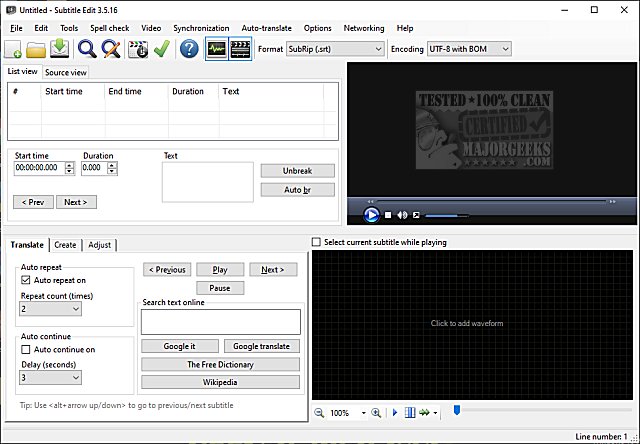
Subtitle Edit is a free and portable software designed for editing video subtitles, and the latest version, 5.2.0, showcases a variety of features that elevate it to a professional level despite being free. If you're interested in subtitle editing, you may want to explore the extensive list of features, view screenshots, or even try the software online.
Key Features of Subtitle Edit:
- Subtitle Creation and Editing: Users can create, adjust, sync, and translate subtitle lines with ease.
- Format Conversion: The software supports over 280 subtitle formats including SubRip, MicroDVD, Advanced SubStation Alpha, and more, making it versatile for various needs.
- Audio Visualization: A built-in audio visualizer allows users to view waveform and spectrogram representations for precise syncing.
- Video Playback Options: It integrates with DirectShow, VLC media player, or MPlayer for seamless video playback alongside subtitle editing.
- Advanced Syncing Tools: Users can visually sync and adjust subtitles regarding their start/end position and speed.
- Auto Translation: Subtitle Edit offers automatic translations through Google Translate for added convenience.
- Subtitles Extraction and Import: The software can rip subtitles from decrypted DVDs and import OCR VobSub and Blu-ray subtitles, making it easy to work with existing content.
- Wide Compatibility: Subtitle Edit can open subtitles embedded in various file types such as Matroska, MP4/MV4, DivX/Avi, and more, supporting a broad spectrum of video formats.
- Unicode and Language Support: It can read and write both UTF-8 and ANSI files, accommodating all languages and encodings on your PC.
- Error Correction and Spell Checking: Features like a common errors wizard and spell checking with Open Office dictionaries ensure the quality of subtitles.
- Editing Flexibility: Users can merge or split subtitles, adjust display times, and use effects like typewriter or karaoke to enhance viewer engagement.
- Export Options: The software allows exporting to various formats including PNG images, VobSub, Blu-ray sup, and plain text.
With these extensive features, Subtitle Edit 5.2.0 stands out as a powerful tool for both casual users and professionals in the field of subtitle editing. Whether you're creating new subtitles, translating existing ones, or refining your video content for better accessibility, Subtitle Edit provides a comprehensive solution that meets diverse editing needs. Its continual updates and improvements ensure it remains relevant in a fast-evolving digital media landscape
Key Features of Subtitle Edit:
- Subtitle Creation and Editing: Users can create, adjust, sync, and translate subtitle lines with ease.
- Format Conversion: The software supports over 280 subtitle formats including SubRip, MicroDVD, Advanced SubStation Alpha, and more, making it versatile for various needs.
- Audio Visualization: A built-in audio visualizer allows users to view waveform and spectrogram representations for precise syncing.
- Video Playback Options: It integrates with DirectShow, VLC media player, or MPlayer for seamless video playback alongside subtitle editing.
- Advanced Syncing Tools: Users can visually sync and adjust subtitles regarding their start/end position and speed.
- Auto Translation: Subtitle Edit offers automatic translations through Google Translate for added convenience.
- Subtitles Extraction and Import: The software can rip subtitles from decrypted DVDs and import OCR VobSub and Blu-ray subtitles, making it easy to work with existing content.
- Wide Compatibility: Subtitle Edit can open subtitles embedded in various file types such as Matroska, MP4/MV4, DivX/Avi, and more, supporting a broad spectrum of video formats.
- Unicode and Language Support: It can read and write both UTF-8 and ANSI files, accommodating all languages and encodings on your PC.
- Error Correction and Spell Checking: Features like a common errors wizard and spell checking with Open Office dictionaries ensure the quality of subtitles.
- Editing Flexibility: Users can merge or split subtitles, adjust display times, and use effects like typewriter or karaoke to enhance viewer engagement.
- Export Options: The software allows exporting to various formats including PNG images, VobSub, Blu-ray sup, and plain text.
With these extensive features, Subtitle Edit 5.2.0 stands out as a powerful tool for both casual users and professionals in the field of subtitle editing. Whether you're creating new subtitles, translating existing ones, or refining your video content for better accessibility, Subtitle Edit provides a comprehensive solution that meets diverse editing needs. Its continual updates and improvements ensure it remains relevant in a fast-evolving digital media landscape
Subtitle Edit 5.2.0 released
Subtitle Edit is a free, portable editor for video subtitles.