Stretchly version 1.22.0 has been released, enhancing its functionality as an Open Source application designed to encourage users to take regular breaks from their screens. Many individuals are aware of the necessity to step away from their computers to alleviate eye strain and prevent fatigue, yet often overlook this important practice. Stretchly addresses this common issue by residing in the system tray and providing customizable reminders to take breaks at user-defined intervals.
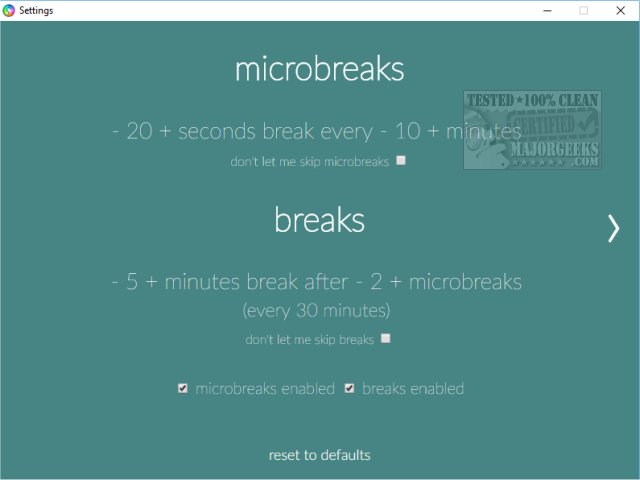
Accessing the features of Stretchly is straightforward through a right-click on its icon, which offers options such as About, Skip to the next break, Pause, Reset breaks, Settings, Start at login, and Quit. The "Your Stretchly" feature is currently inactive, but users are encouraged to begin with the Settings menu to tailor their experience. By default, the app prompts users to take a microbreak every 10 minutes for 20 seconds, followed by a longer 5-minute break after two microbreaks. Users have the flexibility to adjust these timings or disable breaks altogether.
In addition to customizing break intervals, users can also select their preferred audio alerts and color schemes. The app allows users to set breaks to full screen, display break ideas, and receive notifications before breaks commence. Notably, when a break notification appears, users have the option to skip it if necessary.
Stretchly has garnered positive feedback for its ergonomic design, offering extensive customization options and engaging break ideas that enhance user experience. This release reflects a commitment to promoting healthier computer usage habits, making it a valuable tool for anyone seeking to prioritize their well-being while working on a computer.
To extend the discussion, future updates could consider incorporating additional features such as integration with fitness apps, guided stretching exercises, or even a community platform for users to share their break experiences and tips. Additionally, compatibility with various operating systems could be explored to reach a wider audience. As remote work continues to be prevalent, tools like Stretchly will play an increasingly critical role in maintaining health and productivity
Accessing the features of Stretchly is straightforward through a right-click on its icon, which offers options such as About, Skip to the next break, Pause, Reset breaks, Settings, Start at login, and Quit. The "Your Stretchly" feature is currently inactive, but users are encouraged to begin with the Settings menu to tailor their experience. By default, the app prompts users to take a microbreak every 10 minutes for 20 seconds, followed by a longer 5-minute break after two microbreaks. Users have the flexibility to adjust these timings or disable breaks altogether.
In addition to customizing break intervals, users can also select their preferred audio alerts and color schemes. The app allows users to set breaks to full screen, display break ideas, and receive notifications before breaks commence. Notably, when a break notification appears, users have the option to skip it if necessary.
Stretchly has garnered positive feedback for its ergonomic design, offering extensive customization options and engaging break ideas that enhance user experience. This release reflects a commitment to promoting healthier computer usage habits, making it a valuable tool for anyone seeking to prioritize their well-being while working on a computer.
To extend the discussion, future updates could consider incorporating additional features such as integration with fitness apps, guided stretching exercises, or even a community platform for users to share their break experiences and tips. Additionally, compatibility with various operating systems could be explored to reach a wider audience. As remote work continues to be prevalent, tools like Stretchly will play an increasingly critical role in maintaining health and productivity
Stretchly 1.22.0 released
Stretchly is an Open Source app that reminds you to take a break from your computer.