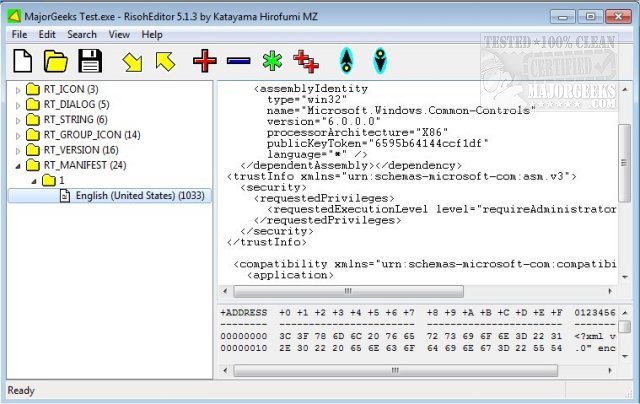
RisohEditor 6.0.5 has been released, providing a free tool for managing resource data within DLL and EXE files. This application is particularly user-friendly, allowing users to add, edit, extract, and remove various Windows resources such as dialogs, menus, icons, cursors, and string tables. The name "Risoh" translates to "ideal" in Japanese, reflecting the software's goal of simplicity and efficiency.
The interface is designed to streamline the editing process, enabling users to focus on their tasks without getting lost in a complex UI. Features like color coding enhance usability by allowing for quick identification of different resources. RisohEditor is particularly suited for individuals with basic programming skills, as it simplifies the process of EXE editing—allowing users to modify program components and update text and descriptions as needed.
Users are advised against installing the application in "C:\Program Files" or "C:\Program Files (x86)" due to potential issues with the resource compiler (windres) not accepting spaces in file paths. Key features of RisohEditor include high scalability, full Unicode support for international resources, the ability to read the "resource.h" header file, GUI editing capabilities, compatibility with Visual C++ 2017 for exported resources, and support for window class libraries.
To extend the functionality of RisohEditor, future updates could consider incorporating additional features such as version control for resource files, more advanced editing tools for experienced programmers, and enhanced collaboration options for teams working on software development projects. Additionally, providing comprehensive tutorials or an online community forum could help users troubleshoot issues and share best practices
The interface is designed to streamline the editing process, enabling users to focus on their tasks without getting lost in a complex UI. Features like color coding enhance usability by allowing for quick identification of different resources. RisohEditor is particularly suited for individuals with basic programming skills, as it simplifies the process of EXE editing—allowing users to modify program components and update text and descriptions as needed.
Users are advised against installing the application in "C:\Program Files" or "C:\Program Files (x86)" due to potential issues with the resource compiler (windres) not accepting spaces in file paths. Key features of RisohEditor include high scalability, full Unicode support for international resources, the ability to read the "resource.h" header file, GUI editing capabilities, compatibility with Visual C++ 2017 for exported resources, and support for window class libraries.
To extend the functionality of RisohEditor, future updates could consider incorporating additional features such as version control for resource files, more advanced editing tools for experienced programmers, and enhanced collaboration options for teams working on software development projects. Additionally, providing comprehensive tutorials or an online community forum could help users troubleshoot issues and share best practices
RisohEditor 6.0.5 released
RisohEditor is designed for adding, editing, extracting, and removing the resource data from DLL/EXE files for free.