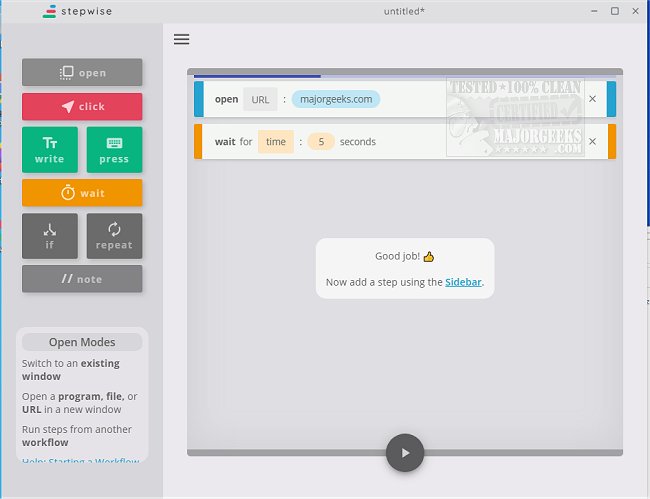
The release of Stepwise version 2.2.9 introduces an efficient tool designed to streamline daily workflows by automating repetitive tasks. This user-friendly utility allows individuals to set up, name, and save workflows without requiring extensive programming knowledge. Stepwise features an intuitive interface that guides users through the automation process, complete with helpful tips and numerous tutorials available on the author's website.
For example, if you regularly check the MajorGeeks site, Stepwise can automate this task, delivering updates daily without the need for manual intervention. Additionally, a portable version is available, ensuring users can benefit from Stepwise's capabilities even while on the move.
By simplifying the configuration process, Stepwise empowers anyone to enhance their productivity by freeing up time that would otherwise be spent on mundane tasks. This not only allows for better time management but also encourages users to focus on more important responsibilities.
In addition to Stepwise, users might also benefit from exploring related topics such as automatic and manual trigger starts, keyboard shortcuts for dismissing notifications on Windows 10/11, a comprehensive list of file explorer keyboard shortcuts, and strategies for increasing productivity through time-saving techniques. Overall, Stepwise serves as a valuable tool for anyone looking to optimize their daily routines and maximize efficiency
For example, if you regularly check the MajorGeeks site, Stepwise can automate this task, delivering updates daily without the need for manual intervention. Additionally, a portable version is available, ensuring users can benefit from Stepwise's capabilities even while on the move.
By simplifying the configuration process, Stepwise empowers anyone to enhance their productivity by freeing up time that would otherwise be spent on mundane tasks. This not only allows for better time management but also encourages users to focus on more important responsibilities.
In addition to Stepwise, users might also benefit from exploring related topics such as automatic and manual trigger starts, keyboard shortcuts for dismissing notifications on Windows 10/11, a comprehensive list of file explorer keyboard shortcuts, and strategies for increasing productivity through time-saving techniques. Overall, Stepwise serves as a valuable tool for anyone looking to optimize their daily routines and maximize efficiency
Stepwise 2.2.9 released
Stepwise is a user-friendly option for automating repetitive tasks that can potentially slow down your daily workflow.