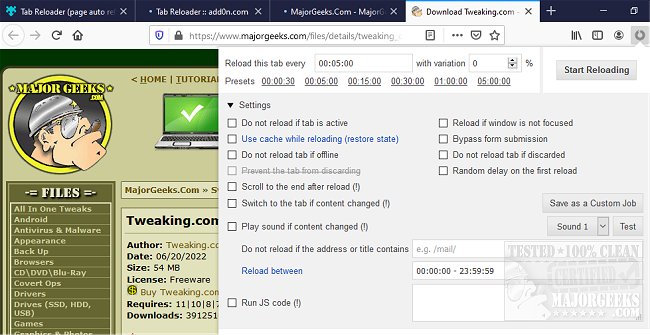
The Tab Reloader extension, now available in version 0.7.0, is designed for Chrome, Firefox, Edge, and Opera, enabling users to automatically reload browser tabs at user-defined intervals. This tool is especially beneficial for individuals who manage multiple tabs and require assistance in keeping them refreshed without manual input.
Key features of the Tab Reloader include:
- Customizable reloading times with random variations within a specified range.
- Options to reload tabs regardless of whether they are actively being viewed.
- Session management capabilities that restore reloading tasks after browser restarts.
- A user-friendly toolbar panel for managing multiple reloading tasks effortlessly.
- The ability to view the countdown for the next reload in the badge area.
- A comprehensive list of all tabs currently set for automatic reloading.
- Custom rules that trigger reloading based on URL or hostname matches.
- The option to scroll to the bottom of a tab after reloading for easy content reading.
- Features to reload all tabs in a window or across the entire browser, including local files.
- Policies to prevent reloading at specific times or under certain URLs.
- The ability to execute custom JavaScript upon each reload.
- Options to limit the number of reloads before stopping.
- The functionality to reload discarded tabs.
The Tab Reloader extension is a useful tool for users looking to streamline their browsing experience, particularly for tasks that require keeping pages up-to-date. It complements other browser management functionalities, such as muting tabs, restoring closed tabs, and managing tab warnings.
As the digital landscape continues to evolve, tools like Tab Reloader will likely see further enhancements, possibly integrating features such as AI-driven predictive reloading based on user behavior or deeper integration with task management systems. This could make it an even more indispensable tool for power users and professionals who rely heavily on web resources
Key features of the Tab Reloader include:
- Customizable reloading times with random variations within a specified range.
- Options to reload tabs regardless of whether they are actively being viewed.
- Session management capabilities that restore reloading tasks after browser restarts.
- A user-friendly toolbar panel for managing multiple reloading tasks effortlessly.
- The ability to view the countdown for the next reload in the badge area.
- A comprehensive list of all tabs currently set for automatic reloading.
- Custom rules that trigger reloading based on URL or hostname matches.
- The option to scroll to the bottom of a tab after reloading for easy content reading.
- Features to reload all tabs in a window or across the entire browser, including local files.
- Policies to prevent reloading at specific times or under certain URLs.
- The ability to execute custom JavaScript upon each reload.
- Options to limit the number of reloads before stopping.
- The functionality to reload discarded tabs.
The Tab Reloader extension is a useful tool for users looking to streamline their browsing experience, particularly for tasks that require keeping pages up-to-date. It complements other browser management functionalities, such as muting tabs, restoring closed tabs, and managing tab warnings.
As the digital landscape continues to evolve, tools like Tab Reloader will likely see further enhancements, possibly integrating features such as AI-driven predictive reloading based on user behavior or deeper integration with task management systems. This could make it an even more indispensable tool for power users and professionals who rely heavily on web resources
Tab Reloader for Chrome, Firefox, Edge, and Opera 0.7.0 released
Tab Reloader for Chrome, Firefox, Edge, and Opera allows the reloading of browser tabs within a user-defined time frame.
Tab Reloader for Chrome, Firefox, Edge, and Opera 0.7.0 released @ MajorGeeks