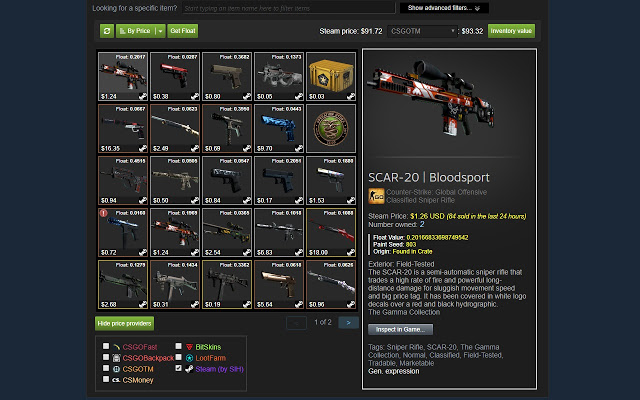
Steam Inventory Helper (SIH) version 2.10.10 has been released, enhancing the experience for Steam users managing their inventories and marketplace activities through a browser extension for Chrome and Edge. This tool serves as a personal assistant, aimed at simplifying the often cumbersome tasks involved in trading skins and managing inventory.
Key Features of Steam Inventory Helper:
1. Price Insights: Provides immediate visibility of market prices, aiding users in recognizing trends for informed trading decisions.
2. Enhanced Trading Tools: Streamlines the process of sending and managing trade offers with advanced filtering and automation capabilities.
3. Bulk Actions: Allows users to select multiple items for quick listing or selling on the Steam Market, saving valuable time.
4. Market History Tracking: Enables users to analyze their buying and selling patterns for better strategy refinement.
5. Security Features: Offers protection against phishing scams and unauthorized changes by monitoring trade offers.
To get started, users can easily download the extension from the Chrome Web Store, customize their settings based on their trading objectives, and begin enjoying the benefits of automated processes.
Important Features Include:
- Direct price displays in the Steam inventory.
- Quick bulk selling options with auto-accept and auto-adjust features.
- One-click buying for items listed in various tabs.
- Desktop notifications for new trade offers.
- Price checking via mouse-over in the trade offer window.
- Automatic ignoring/blocking of friend requests from users below a certain Steam level.
Despite its advantages, potential users should be aware of privacy concerns associated with the extension. It is crucial to understand the permissions required and to safeguard sensitive information.
Conclusion:
For avid Steam traders and those looking to streamline their inventory management, Steam Inventory Helper presents a valuable solution. Its user-friendly interface and practical tools make it a recommended choice for enhancing trading efficiency, provided users remain vigilant about their security settings.
Further Reading:
- Guides on disabling Steam notifications, hiding gameplay activity, categorizing games, creating desktop shortcuts for Steam games, and troubleshooting common issues like "Update Queued" in Steam.
Future Prospects:
As user needs evolve, future updates could include enhanced features such as more comprehensive analytics tools, integration with third-party trading platforms, or improved user interface customization options to further enrich the Steam trading experience
Key Features of Steam Inventory Helper:
1. Price Insights: Provides immediate visibility of market prices, aiding users in recognizing trends for informed trading decisions.
2. Enhanced Trading Tools: Streamlines the process of sending and managing trade offers with advanced filtering and automation capabilities.
3. Bulk Actions: Allows users to select multiple items for quick listing or selling on the Steam Market, saving valuable time.
4. Market History Tracking: Enables users to analyze their buying and selling patterns for better strategy refinement.
5. Security Features: Offers protection against phishing scams and unauthorized changes by monitoring trade offers.
To get started, users can easily download the extension from the Chrome Web Store, customize their settings based on their trading objectives, and begin enjoying the benefits of automated processes.
Important Features Include:
- Direct price displays in the Steam inventory.
- Quick bulk selling options with auto-accept and auto-adjust features.
- One-click buying for items listed in various tabs.
- Desktop notifications for new trade offers.
- Price checking via mouse-over in the trade offer window.
- Automatic ignoring/blocking of friend requests from users below a certain Steam level.
Despite its advantages, potential users should be aware of privacy concerns associated with the extension. It is crucial to understand the permissions required and to safeguard sensitive information.
Conclusion:
For avid Steam traders and those looking to streamline their inventory management, Steam Inventory Helper presents a valuable solution. Its user-friendly interface and practical tools make it a recommended choice for enhancing trading efficiency, provided users remain vigilant about their security settings.
Further Reading:
- Guides on disabling Steam notifications, hiding gameplay activity, categorizing games, creating desktop shortcuts for Steam games, and troubleshooting common issues like "Update Queued" in Steam.
Future Prospects:
As user needs evolve, future updates could include enhanced features such as more comprehensive analytics tools, integration with third-party trading platforms, or improved user interface customization options to further enrich the Steam trading experience
Steam Inventory Helper 2.10.10 released
Steam Inventory Helper is a browser addon for Chrome and Edge it is meant to help improve your Steam market and inventory experience.