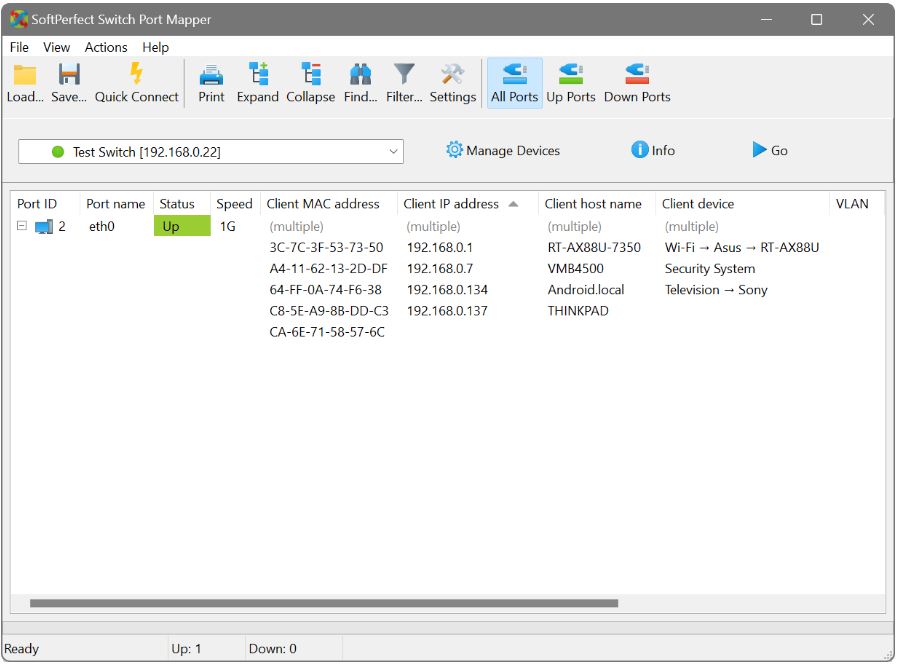
SoftPerfect Switch Port Mapper version 26.8 has been released, serving as an essential tool for network administrators. It provides detailed insight into what devices are connected to each managed switch port by mapping various data points such as MAC addresses, IP addresses, hostnames, speed, VLAN membership, and error statistics. This tool is particularly useful for identifying unused ports, managing network inventory, and preparing for troubleshooting.
By utilizing Simple Network Management Protocol (SNMP), the Port Mapper can quickly access the full list of ports on a managed switch and correlate MAC addresses with their corresponding IP addresses and hostnames, creating a straightforward and live mapping of devices connected to the network. This eliminates the need for tedious manual checks and is invaluable during network audits, migrations, or when investigating rogue devices.
Setting up the software is straightforward: users simply need to add their switch, choose the appropriate SNMP version, and initiate the scan. Within seconds, the program displays a wealth of information, including speed, duplex settings, VLAN membership, vendor details, and error/discard counts. Users can also add comments for easy identification of devices, like "Martin's printer" or "backup server," and execute various actions directly from the interface such as pinging or SSHing into a device.
The software is available in both desktop and command-line interface (CLI) formats, making it suitable for automation and scripting. It supports SNMPv1, v2c, and v3, and provides comprehensive visibility into the network, although it does require SNMP to be enabled on the managed switches and for the user to be on the same subnet.
Key Features:
- User-friendly GUI and CLI options.
- Supports SNMPv1/v2c/v3 and subnet scanning for thorough visibility.
- Displays additional information such as VLAN, vendor, speed, duplex, and error statistics.
- Quick actions available through right-click options for immediate tasks.
- Ability to save comments and export data in various formats (CSV/HTML/XML).
- Portable version available for Windows that does not require installation.
Pros and Cons:
- Pros: Easy setup, extensive data availability, flexible deployment options, scriptable, and cross-platform compatibility.
- Cons: Limited to SNMP-managed devices, requires purchase for setups with more than 10 ports, and SNMPv3 configuration may be complex.
Conclusion:
For network administrators managing even small setups, SoftPerfect Switch Port Mapper is an effective tool that enhances efficiency and clarity in network management. The trial version allows users to test its capabilities in smaller environments, and its detailed live port tables provide invaluable insights for network troubleshooting and inventory management. Highly recommended for those seeking reliable port-level visibility, especially when integrated with regular reporting and automation scripts.
Extension:
Looking ahead, future updates to SoftPerfect Switch Port Mapper could include enhanced support for emerging networking protocols, improved user interfaces, and advanced analytics features that could help predict network issues before they arise. Additionally, incorporating machine learning algorithms could assist in automatically identifying and alerting users to anomalous behavior or unauthorized devices on the network, further increasing the tool's utility in modern, complex network environments
By utilizing Simple Network Management Protocol (SNMP), the Port Mapper can quickly access the full list of ports on a managed switch and correlate MAC addresses with their corresponding IP addresses and hostnames, creating a straightforward and live mapping of devices connected to the network. This eliminates the need for tedious manual checks and is invaluable during network audits, migrations, or when investigating rogue devices.
Setting up the software is straightforward: users simply need to add their switch, choose the appropriate SNMP version, and initiate the scan. Within seconds, the program displays a wealth of information, including speed, duplex settings, VLAN membership, vendor details, and error/discard counts. Users can also add comments for easy identification of devices, like "Martin's printer" or "backup server," and execute various actions directly from the interface such as pinging or SSHing into a device.
The software is available in both desktop and command-line interface (CLI) formats, making it suitable for automation and scripting. It supports SNMPv1, v2c, and v3, and provides comprehensive visibility into the network, although it does require SNMP to be enabled on the managed switches and for the user to be on the same subnet.
Key Features:
- User-friendly GUI and CLI options.
- Supports SNMPv1/v2c/v3 and subnet scanning for thorough visibility.
- Displays additional information such as VLAN, vendor, speed, duplex, and error statistics.
- Quick actions available through right-click options for immediate tasks.
- Ability to save comments and export data in various formats (CSV/HTML/XML).
- Portable version available for Windows that does not require installation.
Pros and Cons:
- Pros: Easy setup, extensive data availability, flexible deployment options, scriptable, and cross-platform compatibility.
- Cons: Limited to SNMP-managed devices, requires purchase for setups with more than 10 ports, and SNMPv3 configuration may be complex.
Conclusion:
For network administrators managing even small setups, SoftPerfect Switch Port Mapper is an effective tool that enhances efficiency and clarity in network management. The trial version allows users to test its capabilities in smaller environments, and its detailed live port tables provide invaluable insights for network troubleshooting and inventory management. Highly recommended for those seeking reliable port-level visibility, especially when integrated with regular reporting and automation scripts.
Extension:
Looking ahead, future updates to SoftPerfect Switch Port Mapper could include enhanced support for emerging networking protocols, improved user interfaces, and advanced analytics features that could help predict network issues before they arise. Additionally, incorporating machine learning algorithms could assist in automatically identifying and alerting users to anomalous behavior or unauthorized devices on the network, further increasing the tool's utility in modern, complex network environments
SoftPerfect Switch Port Mapper 26.8 released
SoftPerfect Switch Port Mapper is a network admin tool that shows you exactly what's connected to each managed switch port, by mapping MACs, IPs, hostnames, even speed, VLAN, and error stats.