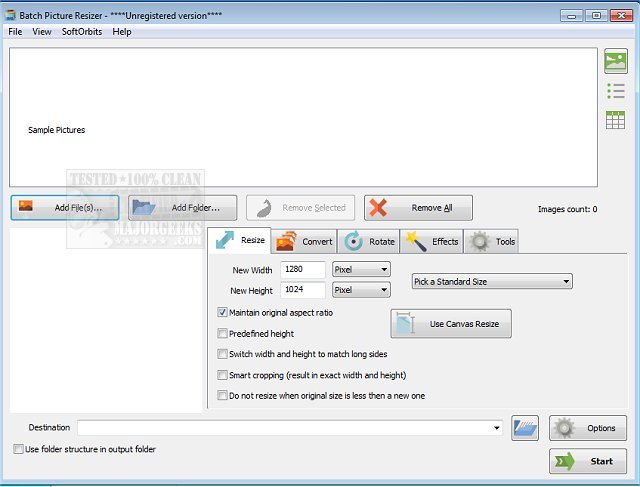
SoftOrbits has announced the release of Batch Picture Resizer version 14.2, a powerful tool geared towards simplifying the process of batch photo resizing. This software goes beyond mere resizing; it automates various image processing tasks, allowing users to convert images between numerous formats seamlessly. Moreover, it supports embedding logos or watermarks and employs advanced high-quality interpolation algorithms to ensure that images maintain their quality during enlargement or reduction.
The software is user-friendly, enabling individuals to resize multiple images simultaneously, making it ideal for sharing on social media or publishing. It supports a wide range of image formats, including but not limited to JPEG, BMP, RAW, TIFF, GIF, PNG, PCX, and TGA. Key features of SoftOrbits Batch Picture Resizer include batch processing capabilities, the ability to add text or watermarks, automatic JPEG rotation based on EXIF data, lossless transformations, and batch renaming functionalities.
Additionally, it allows for canvas size adjustments and color optimizations, while preserving important EXIF tags. The software is compatible with Windows 7 and 8, and it integrates with the Explorer menu for added convenience. Users can also adjust the output files' compression rates and DPI settings.
In summary, SoftOrbits Batch Picture Resizer 14.2 emerges as an essential tool for anyone needing efficient image processing, from photographers to social media managers. Its extensive feature set not only enhances productivity but also ensures that image quality is never compromised during editing. As digital media continues to grow, tools like this will play a crucial role in helping users manage their visual content effectively.
For those interested in exploring similar functionalities, related topics include customizing the 'Edit With Photos' context menu in Windows, restoring the classic Windows Photo Viewer, managing folders in the Windows Photos app, and controlling the automatic deletion of thumbnail caches in Windows
The software is user-friendly, enabling individuals to resize multiple images simultaneously, making it ideal for sharing on social media or publishing. It supports a wide range of image formats, including but not limited to JPEG, BMP, RAW, TIFF, GIF, PNG, PCX, and TGA. Key features of SoftOrbits Batch Picture Resizer include batch processing capabilities, the ability to add text or watermarks, automatic JPEG rotation based on EXIF data, lossless transformations, and batch renaming functionalities.
Additionally, it allows for canvas size adjustments and color optimizations, while preserving important EXIF tags. The software is compatible with Windows 7 and 8, and it integrates with the Explorer menu for added convenience. Users can also adjust the output files' compression rates and DPI settings.
In summary, SoftOrbits Batch Picture Resizer 14.2 emerges as an essential tool for anyone needing efficient image processing, from photographers to social media managers. Its extensive feature set not only enhances productivity but also ensures that image quality is never compromised during editing. As digital media continues to grow, tools like this will play a crucial role in helping users manage their visual content effectively.
For those interested in exploring similar functionalities, related topics include customizing the 'Edit With Photos' context menu in Windows, restoring the classic Windows Photo Viewer, managing folders in the Windows Photos app, and controlling the automatic deletion of thumbnail caches in Windows
SoftOrbits Batch Picture Resizer 14.2 released
SoftOrbits Batch Picture Resizer is designed for quick and easy batch photo resizing and more.