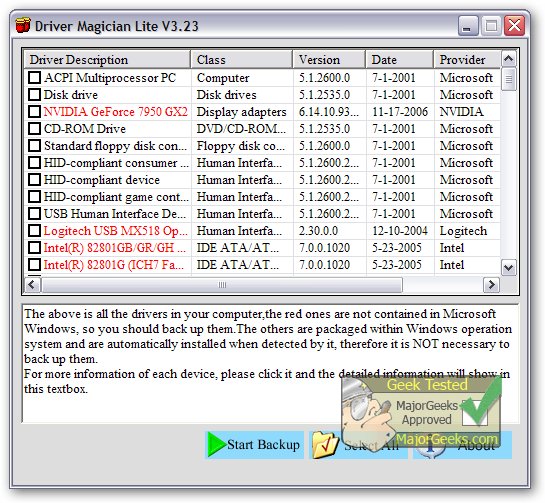
Driver Magician Lite 5.86 has been released, providing an efficient solution for managing device drivers. This software allows users to back up, restore, update, and uninstall drivers seamlessly. It scans the system to identify hardware components, extracts their corresponding drivers, and saves them to a designated location. This feature is particularly useful when users choose to format or upgrade their operating system; they can restore previously saved drivers as if they were using original installation media. Following a system reboot, the PC will be fully operational with the necessary drivers installed.
Additionally, Driver Magician Lite includes an integrated database that can connect to the internet for driver updates, saving users time in locating the correct drivers and enhancing hardware performance. It also features a hardware identifier database to help detect any unknown devices on the system.
Key features of Driver Magician Lite include:
- Backing up device drivers in four different modes.
- One-click restoration of drivers from backup.
- Updating drivers to boost system performance and stability.
- Uninstalling device drivers when necessary.
- Live updates for both the device identifier and driver update databases.
- Detection of unknown devices.
- Backing up additional items, such as My Documents and the Registry.
- Detailed hardware driver information.
- Cloning drivers into an auto-setup package (.EXE) for easy restoration without needing to install the software again.
In summary, Driver Magician Lite 5.86 is a comprehensive tool for managing drivers and improving system efficiency, making it an essential utility for users looking to maintain their computer's performance and stability.
Looking ahead, it would be beneficial for Driver Magician Lite to integrate cloud-based backup options, allowing users to securely store their driver backups online. This would provide an added layer of security and accessibility, ensuring that users can retrieve their drivers from any location. Additionally, implementing machine learning algorithms could enhance the software's ability to suggest optimal driver updates based on user preferences and system performance metrics
Additionally, Driver Magician Lite includes an integrated database that can connect to the internet for driver updates, saving users time in locating the correct drivers and enhancing hardware performance. It also features a hardware identifier database to help detect any unknown devices on the system.
Key features of Driver Magician Lite include:
- Backing up device drivers in four different modes.
- One-click restoration of drivers from backup.
- Updating drivers to boost system performance and stability.
- Uninstalling device drivers when necessary.
- Live updates for both the device identifier and driver update databases.
- Detection of unknown devices.
- Backing up additional items, such as My Documents and the Registry.
- Detailed hardware driver information.
- Cloning drivers into an auto-setup package (.EXE) for easy restoration without needing to install the software again.
In summary, Driver Magician Lite 5.86 is a comprehensive tool for managing drivers and improving system efficiency, making it an essential utility for users looking to maintain their computer's performance and stability.
Looking ahead, it would be beneficial for Driver Magician Lite to integrate cloud-based backup options, allowing users to securely store their driver backups online. This would provide an added layer of security and accessibility, ensuring that users can retrieve their drivers from any location. Additionally, implementing machine learning algorithms could enhance the software's ability to suggest optimal driver updates based on user preferences and system performance metrics
Driver Magician Lite 5.86 released
Driver Magician Lite offers a professional solution for device driver's backup, restoration, update, and removal.